
Kiri is a lightweight, open-source container runtime designed as an alternative to Docker Desktop and OrbStack. Written in Rust, it runs Docker containers through a compact Linux virtual machine on macOS and Windows, while using the host Linux kernel directly on Linux.
Its main selling points are fast container startup, low idle resource consumption, and compatibility with familiar Docker tools. It works with the Docker CLI, Docker Compose, and Buildx, so developers can continue using much of their existing container workflow.
Kiri also goes beyond basic container management with a graphical interface, local development domains, single-node Kubernetes, lightweight Linux machines, and container migration from other desktop runtimes.
Features
Lightweight Docker-Compatible Runtime
Kiri implements the Docker Engine API, allowing existing Docker tools to communicate with its runtime.
It supports common Docker operations, including:
Container creation, execution, inspection, and removal.
Container logs and interactive shell access.
Image pulling, pushing, tagging, and removal.
Volume and network management.
Resource limits for CPU, memory, and processes.
Container security options and capabilities.
Docker Compose project deployment.
The first launch automatically configures a dedicated kiri Docker context. This lets users switch between Kiri and an existing Docker Engine without replacing their current configuration.
For example:
docker --context kiri run --rm alpine echo hello

docker --context kiri compose up -d
Users can also execute Docker commands directly through the kiri CLI.
Fast Startup and Low Resource Consumption
Performance is one of Kiri's main selling points. The project reports container startup and removal in approximately 2.5 milliseconds through the Docker Engine API, compared with 213 milliseconds for Docker Desktop in its own benchmark.
It also reports approximately 15 MB of daemon memory usage while idle. The Linux VM automatically sleeps after 60 seconds without activity and can wake in approximately 0.15 seconds.
These are developer-reported benchmark results rather than independent performance measurements, but they demonstrate the project's focus on minimizing runtime overhead.
Docker Compose and Buildx Support
Kiri supports Docker Compose, making it possible to deploy multi-container applications using existing YAML configurations.
Supported operations include:
Deploying and removing Compose projects.
Starting and stopping services.
Viewing project logs.
Executing commands inside containers.
Managing multiple networks.
Building images through BuildKit and Buildx.
BuildKit runs inside a Kiri-managed container using the Buildx Docker-container driver.
There is an important limitation: host-gateway is not supported by BuildKit's Docker-container driver in this configuration. The project documents workarounds, including specifying the gateway address directly or using the legacy Docker builder where appropriate.
Graphical Container Management
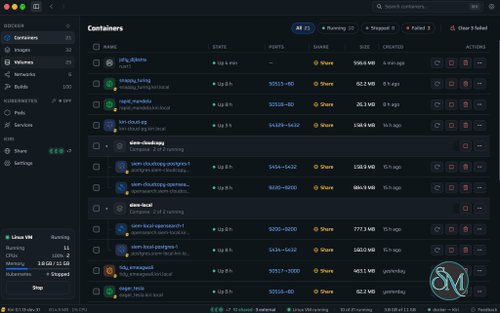
Kiri includes a native desktop interface for managing container environments without relying entirely on terminal commands.
The interface provides dedicated views for:
Containers and their status.
Images and image layers.
Volumes and networks.
Compose projects.
Container logs and processes.
Container files and configuration.
Resource usage and runtime settings.
Users can inspect container files, preview content, save files to their local Downloads directory, and open directories through the host file manager.
Kiri also provides a menu bar or system tray interface for checking runtime status and controlling the engine.
Local Development Domains and HTTPS
Kiri can assign local domains to containers, making development services easier to access.
For example, a container named web can be reached through:
http://web.kiri.local
https://web.kiri.local
Compose services can also receive project-specific names.
Kiri includes its own certificate authority for local HTTPS connections. This eliminates the need to configure a separate reverse proxy and manually generate certificates for every development service.
The application also supports .localhost domains without requiring the additional domain configuration.
Public Container Sharing
Kiri includes a sharing feature that exposes a container through a public HTTPS address.
This is useful for demonstrating local applications, sharing development environments, testing webhooks, and temporarily making a service accessible outside the local network.
It provides functionality similar to tunneling services such as ngrok, without requiring users to configure traditional router port forwarding.
Public sharing depends on Kiri's cloud infrastructure, so it is different from running a completely independent, self-hosted tunnel server.
Built-in Kubernetes
Kiri can create a single-node Kubernetes cluster using k3s.
Start the cluster with:
kiri k8s startThe cluster is configured as the kiri kubectl context, allowing users to work with Kubernetes through familiar commands.
Kubernetes LoadBalancer services can be published on localhost. This makes Kiri useful for developers who need to test Kubernetes workloads without maintaining a separate cluster.
It is particularly convenient for local development, experimentation, and learning Kubernetes.
Lightweight Linux Machines
Beyond containers, Kiri can create lightweight Linux machines.
For example:
kiri machine create dev --distro ubuntu
kiri machine shell dev
These machines provide a separate Linux environment with a user account and sudo access. Host directories can also be made available inside the machine.
This is useful for testing Linux applications, running development tools, and maintaining isolated environments without installing a full virtual machine manager.
USB Device Passthrough
Kiri supports USB device passthrough, currently marked as beta.
Users can attach compatible USB devices to containers, including:
Serial adapters.
Zigbee USB sticks.
Development boards.
Other supported USB peripherals.
The application displays the device path inside the Linux environment and provides the corresponding Docker --device configuration.
This is particularly useful for developers working with embedded systems and hardware projects.
Import from Existing Container Runtimes
Kiri provides an import command for migrating existing containers, images, and volumes from Docker Desktop or OrbStack.
This reduces the amount of manual work involved in switching container environments.
Users can bring existing development workloads into Kiri rather than recreating every container and downloading every image again.
Multi-Platform Support
Kiri supports macOS, Windows, and Linux.
It also supports running AMD64 container images on Apple Silicon through Rosetta, allowing users to work with software images that do not have native ARM64 builds.
The project supports multiple interface languages, making it accessible to developers across different regions.
Download Kiri 0.2.1 - Lightweight Replacement for Docker Desktop - Software Mirrors |
|---|
Kiri 0.2.1 for Windows |
Kiri 0.2.1 for macOS |
Kiri 0.2.1 for Linuxkiri-lite_0.2.1_amd64.deb | Debian, Ubuntu · x86-64 · engine only · 2.7 MB kiri-lite_0.2.1_arm64.deb | Debian, Ubuntu · ARM · engine only · 2.6 MB kiri_0.2.1_amd64.deb | Debian, Ubuntu · x86-64 · 52 MB kiri_0.2.1_arm64.deb | Debian, Ubuntu · ARM · 43 MB kiri-0.2.1-1.aarch64.rpm | Fedora, RHEL · ARM · 39 MB kiri-0.2.1-1.x86_64.rpm | Fedora, RHEL · x86-64 · 48 MB kiri-lite-0.2.1-1.aarch64.rpm | Fedora, RHEL · ARM · engine only · 2.3 MB kiri-lite-0.2.1-1.x86_64.rpm | Fedora, RHEL · x86-64 · engine only · 2.6 MB |
Kiri 0.2.1 Release Notes:New
Fixed and improved
|
Performance and Compatibility
Kiri is written in Rust and uses a custom lightweight Linux kernel and guest agent.
On macOS and Windows, containers run inside a dedicated Linux environment. On Linux, Kiri uses the host kernel directly instead of creating another virtual machine.
Its architecture avoids the conventional combination of Docker Engine, containerd, runc, and per-container shims. Instead, its guest agent creates containers using Linux namespaces and cgroups.
The project reports significantly faster container startup than Docker Desktop and OrbStack in its own benchmarks. Actual performance will depend on hardware, storage, workload, filesystem operations, and network configuration.
Platform support includes:
macOS: Apple Silicon and Intel processors, macOS 14 or later.
Windows: Windows 10 and 11 on x86-64 and ARM, using WSL 2.
Linux: x86-64 and ARM64, with DEB and RPM packages tested on Ubuntu and Fedora.
One important consideration is that Kiri is still a relatively young container runtime. Although it supports many Docker commands and Compose workflows, it should not automatically be considered a complete replacement for every Docker Engine feature. Users with specialized networking, storage, or BuildKit requirements should check the compatibility documentation before migrating production workflows.
System Requirements
macOS
macOS 14 or later.
Apple Silicon or Intel processor.
Compatible virtualization support.
Sufficient memory and storage for the selected containers.
Windows
Windows 10 or Windows 11.
x86-64 or ARM64 processor.
Windows Subsystem for Linux 2.
Hardware virtualization enabled.
Sufficient memory and storage for container workloads.
Linux
64-bit Linux distribution.
x86-64 or ARM64 processor.
Compatible Linux kernel and cgroup support.
DEB or RPM package installation.
Appropriate permissions for container management.
Actual resource requirements depend on the number of running containers, images, volumes, and Kubernetes workloads.
Pros and Cons
Pros
Free and open-source under Apache 2.0.
Available for macOS, Windows, and Linux.
Lightweight runtime written in Rust.
Very fast container startup according to project benchmarks.
Low idle memory consumption.
Compatible with Docker CLI and Docker Compose.
Supports Buildx and BuildKit.
Native graphical interface for container management.
Local development domains with HTTPS.
Public HTTPS sharing for containers.
Built-in single-node Kubernetes using k3s.
Supports lightweight Linux machines.
USB device passthrough.
AMD64 image support on Apple Silicon through Rosetta.
Import functionality for Docker Desktop and OrbStack environments.
Cons
Relatively young project with an evolving feature set.
Not fully compatible with every Docker Engine feature.
Windows relies on WSL 2.
BuildKit has a documented
host-gatewaylimitation.USB passthrough is still beta.
Public sharing depends on external Kiri infrastructure.
Advanced Kubernetes and container workloads may require additional resources.
How to Install
Kiri provides graphical installers and Linux packages for its supported platforms.
macOS
Download the appropriate DMG installer for Apple Silicon or Intel Macs.
After installation, open Kiri. The application configures its Docker context automatically.
Verify the installation:
docker --context kiri run --rm alpine echo helloWindows
Download the MSI installer for x86-64 or ARM64.
Kiri uses WSL 2 to provide its Linux container environment. Ensure virtualization and WSL 2 are available before installation.
After installation, open Kiri and use its configured Docker context:
docker --context kiri run --rm alpine echo helloUbuntu and Debian
Download the appropriate DEB package from the official release page.
Install it with:
sudo apt install ./kiri_*_amd64.debFor ARM64 systems, select the corresponding ARM64 package.
Fedora and Other RPM-Based Distributions
Download the RPM package and install it using:
sudo dnf install ./kiri-*.rpmAfter installation, open Kiri to complete the initial setup.
Verify Docker Compatibility
Run a test container:
docker --context kiri run --rm alpine echo helloCheck the active context:
docker context lsKiri also provides a command-line interface for managing its runtime directly:
kiri --helpFinal Verdict
Kiri is an impressive lightweight alternative to Docker Desktop and OrbStack, particularly for developers who want a faster and less resource-intensive container environment.
Its compatibility with Docker CLI and Compose makes migration relatively straightforward, while features such as local HTTPS domains, public container sharing, Kubernetes, Linux machines, and USB passthrough give it functionality beyond a basic container runtime.
The Rust-based architecture and ability to run directly on the Linux kernel are also notable technical advantages. Its low idle resource consumption makes it attractive for development workstations where Docker Desktop can otherwise consume unnecessary resources.
However, Kiri is still evolving, and some Docker compatibility limitations deserve consideration before replacing an established production development environment. Its reliance on WSL 2 on Windows and external infrastructure for public sharing are additional factors to evaluate.
Overall, Kiri is a promising choice for developers looking for a modern, lightweight, and cross-platform Docker Desktop alternative.