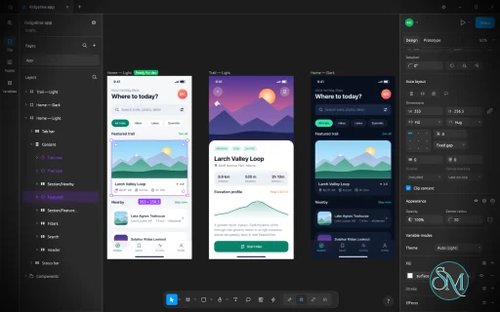

FigCraft is a free, open-source interface design and prototyping application built in Rust. It aims to reproduce core design workflows found in Figma while providing a native desktop experience, local file storage, and support for offline work.
The application includes tools for creating layouts, reusable components, vector graphics, design systems, and interactive prototypes. It also supports developer handoff, multiple export formats, command-line automation, and integration with AI agents through the Model Context Protocol (MCP).
FigCraft is an ambitious alternative for UI designers and developers who want greater control over their design files without depending entirely on a cloud-based platform. However, it is still in alpha, and its developers estimate that it has reached approximately 49% of the functionality needed to replace Figma for real-world work. It is best treated as an actively developing alternative rather than a complete replacement.
Features
Interface Design and Auto Layout
FigCraft provides a canvas-based editor with a familiar interface featuring a toolbar, layers panel, design properties, and keyboard shortcuts.
Its auto-layout system supports horizontal and vertical layouts, wrapping, grid layouts, spacing, padding, alignment, and flexible sizing. Designers can combine nested frames, constraints, and layout grids to create responsive interface structures.
These tools are useful for building application screens, dashboards, landing pages, and reusable interface layouts without manually positioning every element.
Components and Design Systems
FigCraft supports reusable components, instances, variants, and component properties. Changes to a main component can propagate to its instances while preserving supported overrides.
The application also includes an asset panel for searching and inserting reusable components, along with a variables system supporting colors, numbers, strings, and Boolean values. Variables can have multiple modes, aliases, and scopes, making them useful for maintaining design systems and light or dark themes.
These capabilities provide a foundation for consistent UI development across larger projects.
Vector Graphics and Drawing Tools
The application includes vector editing tools that go beyond basic shapes. Users can draw paths, edit points and handles, create variable-width strokes, and combine overlapping shapes using Boolean operations.
Supported operations include union, subtraction, intersection, and exclusion. The editor also provides a shape builder, masks, gradients, adjustable corners, and editable vector geometry.
This makes FigCraft useful for designing icons, interface illustrations, diagrams, and other vector-based assets without requiring a separate drawing application for every task.
Colors, Effects, and Typography
FigCraft supports solid colors, linear and radial gradients, angular and diamond gradients, image fills, multiple strokes, blend modes, shadows, and blur effects.
Additional effects include noise, texture, glass-like treatments, and masks. Color handling supports sRGB and Display P3 profiles, with exported files tagged with their color profile.
The text editor supports mixed formatting within paragraphs, variable fonts, OpenType features, text styles, spacing controls, lists, and right-to-left text. These capabilities are useful for multilingual interfaces and more sophisticated typography.
Interactive Prototyping
FigCraft allows designers to connect frames and create interactive prototypes with triggers, actions, transitions, and back navigation.
Its interaction system also supports variables and conditional expressions, enabling more dynamic prototypes. A presentation view provides device frames and interaction hints, while a live preview helps designers test their work.
These features allow teams to explore interface behavior before implementing the final design in code.
Developer Handoff and Code Inspection
The application includes a developer-oriented inspection workflow with measurements, annotations, ready-for-development status, and frame comparisons.
Developers can inspect design properties and generate code representations in formats such as CSS, HTML, React, SwiftUI, and Jetpack Compose. Components can expose their properties as parameters in the generated code.
The output is intended to help bridge design and implementation, although generated code should be reviewed and adapted to the conventions and architecture of the target project.
AI Agent and CLI Automation
One of FigCraft's most distinctive features is its command-driven architecture. The same underlying command system powers the graphical interface, CLI, JSON control channel, and MCP server.
This enables scripts and compatible AI agents to create or modify designs, inspect documents, render files, and export assets without relying exclusively on manual interaction.
The command-line tools also support headless rendering and batch export, making the application potentially useful in automated design workflows and development pipelines.
Local Files and Offline Privacy
FigCraft stores projects as local .figcraft archives and can work without requiring an account. The project states that it does not use telemetry and does not contact a server until users share or join a file.
It supports importing and exporting common formats, including SVG, PNG, JPG, WebP, and PDF. Existing Figma .fig files can also be opened on a best-effort basis, although compatibility with real-world documents has not been fully validated.
For collaborative work, FigCraft offers preview-stage live sessions and an optional self-hosted server. These features are not equivalent to a mature cloud collaboration platform, and online sharing has important privacy limitations discussed below.
Performance and Compatibility
FigCraft is built primarily in Rust and uses a native desktop interface rather than Electron or an embedded web view. Its document engine is designed to update only the parts of a design that change, which can reduce unnecessary work when editing complex documents.
The project also supports a WebAssembly build, making browser-based use possible. Desktop installers are provided for Windows, macOS, Linux, and FreeBSD, subject to the available release packages.
Its main limitation is maturity. The developers explicitly identify the application as alpha software. Although its core editor and many design features are implemented, the project has not been fully validated against real Figma documents. Importing .fig files is best-effort, and its plugin system uses WebAssembly plugins rather than Figma's native plugin ecosystem.
Live collaboration is also in preview. Users can share a document through the default collaboration server or a self-hosted server, but the project does not yet provide accounts, team management, or a complete cloud workspace.
Privacy also requires attention when sharing. Online sessions upload files to a server, and the shared documents are not end-to-end encrypted. Anyone with an edit link or code can modify the file. Sensitive projects should therefore remain local, use a trusted self-hosted server, or be shared only through a trusted local network.
System Requirements
The project does not publish a single minimum CPU, RAM, or GPU specification. Its documented technical requirements include:
Operating systems: Windows, macOS, Linux, and FreeBSD, depending on the available build.
Development toolchain: Rust and Cargo for building from source.
Web build: WebAssembly support, with Trunk used for the browser build.
Storage: Local disk space for the application, design files, and assets.
Fonts: System fonts can be used, while the project's separate
craft-fontsrepository provides additional bundled fonts.Internet connection: Not required for normal offline design work, but needed for online collaboration and other network-dependent workflows.
The easiest installation method is to download an appropriate installer from the project's GitHub releases. Developers who prefer building from source should follow the repository's current setup instructions.
Pros and Cons
Pros
Free and open-source under the MIT or Apache-2.0 license.
Native application built in Rust without Electron.
Works offline without requiring an account.
Includes auto layout, components, variants, variables, and design-system tools.
Provides advanced vector editing and Boolean operations.
Supports interactive prototyping and developer handoff.
Exposes design operations through a CLI, JSON control channel, and MCP server.
Supports common image, vector, and document export formats.
Offers cross-platform desktop builds and a WebAssembly version.
Provides a foundation for local and self-hosted collaboration.
Cons
Still in alpha and not yet a complete replacement for Figma.
Figma document import is best-effort and has not been fully validated against real documents.
Does not support Figma's native plugin ecosystem.
Multiplayer collaboration remains a preview feature.
Lacks mature account, team, and cloud-workspace management.
Online sharing is not end-to-end encrypted.
Generated code requires review before production use.
Building from source requires familiarity with Rust and Cargo.
How to Install
Option 1: Download a Prebuilt Release
Visit the FigCraft GitHub repository.
Open the Releases section.
Download the installer or package appropriate for your operating system.
Install or extract the package according to its format.
Launch FigCraft and create a new design or open an existing
.figcraftproject.
Prebuilt releases are the most convenient option for users who want to try the application without setting up a development environment.
Option 2: Build from Source
Install Rust and Cargo first, then clone the repository:
git clone https://github.com/storytold/figcraft
cd figcraft
Start the desktop application in release mode:
cargo run --release -p figcraftTo start the collaboration server separately:
cargo run --release -p figcraft-serverTo run the workspace test suite:
cargo test --workspaceThe project also provides a CI command for formatting, linting, tests, layering checks, and asset validation:
cargo xtask ciFor additional fonts, clone the shared font repository alongside FigCraft:
git clone https://github.com/storytold/craft-fonts ../craft-fontsWithout the additional font repository, FigCraft can fall back to system fonts. Consult the project's documentation for platform-specific dependencies and further configuration.
Final Verdict
FigCraft is an ambitious open-source design application that combines many of the features expected from a modern UI design tool with the benefits of native software and local-first storage.
Its strongest advantages are its component system, vector editor, prototyping tools, and command-driven architecture. Support for CLI automation and MCP is particularly interesting for developers who want AI agents to generate or modify interface designs as part of their development workflow.
However, its alpha status is a significant consideration. Figma import compatibility, collaboration, and plugin support are not yet mature enough to assume a seamless transition from established design platforms. Users working on critical production projects should evaluate these limitations before adopting it as their primary tool.
FigCraft is a promising choice for developers, designers, and open-source enthusiasts who want a native, offline-capable interface design tool. It is worth testing for new projects and automated design workflows, but teams that depend on Figma's complete collaboration ecosystem should treat it as an emerging alternative rather than a direct replacement.