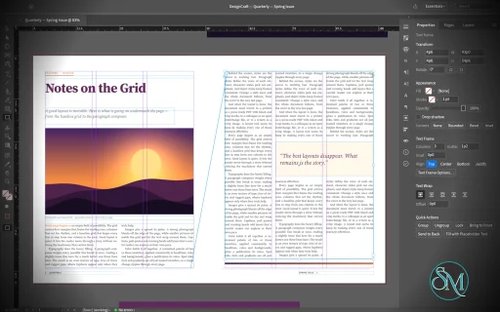


DesignCraft is a free, open-source desktop publishing application designed as an alternative to Adobe InDesign. Built in Rust by the ArtCraft team, it focuses on page layout, typography, multi-page documents, and print-oriented design. Its interface follows familiar desktop publishing conventions, making it approachable for users who already understand professional layout software.
The application supports Windows, macOS, and Linux, with a WebAssembly version for browsers. It also provides command-line tools and automation interfaces that allow compatible AI agents to interact with documents and design controls.
DesignCraft is an interesting option for creating magazines, brochures, newsletters, and other page-based publications without a commercial subscription. However, it is still an early-stage project, so users should carefully evaluate its export options and compatibility with existing publishing workflows before adopting it for production.
Features
Page Layout and Multi-Page Documents
DesignCraft provides a page-layout workspace with spreads, parent pages, layers, frames, and text stories. Its interface is inspired by familiar professional publishing applications, including conventional tools, panels, menus, and keyboard shortcuts.
Users can arrange text and graphics across multiple pages, build consistent layouts, and organize document elements into layers. Parent pages help maintain recurring elements across a publication, while spreads support designs that span facing pages.
These capabilities make DesignCraft suitable for experimenting with magazine layouts, newsletters, brochures, and other editorial projects.
Advanced Typography
Typography is one of DesignCraft's main strengths. Its text engine uses paragraph composition techniques designed to produce consistent line breaks and balanced text blocks.
Features include paragraph and character styles, multiple columns, threaded text stories, baseline grids, tabs, hyphenation, and text wrapping around objects. The engine also supports justification controls, optical margin alignment, and paragraph rules and shading.
These tools give designers greater control over text-heavy publications than a basic drawing application typically provides.
DesignCraft also supports international typography, including Japanese text handling. Its release builds bundle additional fonts to improve Japanese text rendering, while development builds can use the separate font collection or fall back to system fonts.
Frames, Layers, and Text Wrapping
DesignCraft uses frames to position text and graphics within a page. Threaded text frames allow a story to continue across multiple columns or pages, helping manage longer documents.
Layers provide a way to organize complex layouts and separate related elements. Text wrapping allows content to flow around objects such as images and decorative shapes.
These features are particularly useful when designing editorial spreads with headlines, captions, pull quotes, and multi-column body text.
Color and Design Tools
The application includes color management primitives for RGB, CMYK, and Lab color spaces, along with swatches, tints, and gradients.
These capabilities provide a foundation for creating consistent color palettes and designing layouts for different publishing needs. The project also includes tools for working with paths, geometry, measurements, and corner styles.
However, the presence of CMYK support does not automatically make DesignCraft a complete prepress solution. Designers preparing commercial print jobs should verify color output, embedded fonts, bleed settings, and print-production requirements before relying on it for final delivery.
Import, Export, and Document Formats
DesignCraft supports its own documented native document format and can import and export InDesign Markup Language (IDML). This provides a potential migration path for users who want to experiment with existing InDesign documents.
The application also supports PNG export, making it possible to render page layouts as images.
PDF export is listed on the project's roadmap rather than being a fully established production feature. This is a significant limitation for users who need print-ready PDFs as their primary deliverable.
Complex IDML documents should also be tested after import because advanced formatting and application-specific features may not transfer perfectly.
AI and Workflow Automation
DesignCraft includes a JSON control channel and a Model Context Protocol (MCP) server. These interfaces allow compatible automation tools and AI agents to interact with the application.
The control system is designed to expose interface operations, tools, panels, dialogs, and document commands, making it possible to automate layout work rather than relying entirely on manual mouse interactions.
A command-line application can also render documents in headless workflows. For example, the project provides a command for rendering every page of its sample document to PNG files.
This architecture makes DesignCraft particularly interesting for developers exploring automated publishing, template generation, and AI-assisted document creation.
EPUB Export and Digital Publishing
DesignCraft can export documents as EPUB files, extending its usefulness beyond printed publications. This provides an option for creating digital editions of magazines and other text-based layouts.
The export workflow is still evolving, so users should inspect the resulting EPUB in their intended reading applications, particularly when documents contain complex typography, columns, or custom layouts.
Download DesignCraft v0.4.0 - Software Mirrors |
|---|
DesignCraft v0.4.0 for Windowsdesigncraft-0.4.0-windows-x86.msi | 51.09 MB designcraft-0.4.0-windows-x86-portable.zip | 63.15 MB designcraft-0.4.0-windows-x64.msi | 51.99 MB designcraft-0.4.0-windows-x64-portable.zip | 65.35 MB |
DesignCraft v0.4.0 for macOS |
DesignCraft v0.4.0 for Linuxdesigncraft-0.4.0-linux-x86_64.tar.gz | 66.02 MB designcraft-0.4.0-linux-x86_64.rpm | 66.63 MB designcraft-0.4.0-linux-x86_64.flatpak | 46.62 MB designcraft-0.4.0-linux-x86_64.deb | 66.97 MB designcraft-0.4.0-linux-x86_64.AppImage.zsync | 218.79 kB designcraft-0.4.0-linux-x86_64.AppImage | 62.44 MB designcraft-0.4.0-linux-aarch64.tar.gz | 63.13 MB designcraft-0.4.0-linux-aarch64.rpm | 64.26 MB designcraft-0.4.0-linux-aarch64.flatpak | 43.7 MB designcraft-0.4.0-linux-aarch64.deb | 64.66 MB |
DesignCraft v0.4.0 for BSD |
Others Download related to DesignCraft v0.4.0 |
DesignCraft v0.4.0 Source Code |
DesignCraft v0.4.0 Release Notes:What's Changed
New Contributors
Full Changelog: v0.2.1...v0.4.0 |
Performance and Compatibility
DesignCraft is written in Rust and uses a modular architecture that separates document handling, typography, rendering, and the user interface. Its rendering engine supports multithreaded processing and cached text composition, while copy-on-write document snapshots help make undo operations efficient.
The application runs on Windows, macOS, Linux, and FreeBSD. A WebAssembly build also runs in modern browsers, using WebGPU when available and WebGL2 as a fallback.
For document interchange, DesignCraft supports IDML import and export. It also exports PNG, PDF, and EPUB files, although complex documents should be checked carefully before being used in professional production workflows. PDF export includes selectable text and embedded font subsets, with color and print-layout features such as bleed boxes and crop marks.
The main limitation is maturity. DesignCraft is an actively developed project, and compatibility with complex InDesign documents, advanced publishing features, and professional print requirements should not be assumed. Its own documentation identifies further work on publishing workflows and PDF/X-4 output.
System Requirements
Operating systems: Windows, macOS, Linux, and FreeBSD.
Browser support: WebAssembly build for modern browsers.
Windows architectures: x86, x64, and ARM64.
Linux architectures: x86-64 and ARM64.
macOS: Universal build for Intel and Apple silicon.
Build requirements: Rust 1.90 or newer, plus the documented development dependencies.
Browser rendering: WebGPU or WebGL2.
The project does not specify a comprehensive minimum RAM or processor requirement. Performance will depend on document complexity, font usage, image content, and the system's available resources.
Pros and Cons
Pros
Free and open-source under the MIT or Apache 2.0 license.
Available for major desktop operating systems and the web.
Familiar page-layout interface inspired by professional publishing software.
Advanced typography, paragraph composition, and text wrapping.
Supports spreads, parent pages, layers, and threaded text.
Imports and exports IDML documents.
Supports PNG, PDF, and EPUB export.
Includes CMYK, RGB, and Lab color tools.
Command-line tools enable headless rendering and automation.
JSON control channel and MCP support for AI-assisted design.
No mandatory subscription, license server, or telemetry.
Cons
Still under active development.
Complex InDesign documents may not transfer perfectly.
Professional print workflows require careful output validation.
PDF/X-4 output support is still a development priority.
Some advanced publishing and document-management capabilities remain incomplete.
Users may need to learn project-specific workflows and work around missing features.
How to Install
The easiest option is to download the appropriate package from the official DesignCraft website or its GitHub Releases page.
Windows users can choose an installer or portable archive. macOS users can download the universal disk image, while Linux users can choose AppImage, Flatpak, DEB, RPM, or a tarball. A browser-based build is also available.
To build and launch DesignCraft from source, install Rust 1.90 or newer and run:
git clone https://github.com/storytold/designcraft.git
cd designcraft
cargo run --release -p designcraft
To open the sample magazine:
cargo run --release -p designcraft -- --sampleTo render every page of the sample document to PNG files without opening the graphical interface:
cargo run --release -p designcraft-cli -- run --sample --all-pages out/To build the web version, install Trunk and the wasm32-unknown-unknown Rust target, then run:
cd apps/designcraft-web
trunk build --release
The resulting static files can be served using a web server. Refer to the official repository for additional build instructions and platform-specific details.
Final Verdict
DesignCraft is a promising open-source desktop publishing application that combines sophisticated typography, multi-page layout tools, color management, document interchange, and automation in a single Rust-based project.
Its typography engine and support for IDML, PDF, and EPUB make it more compelling than a simple page-layout prototype. The ability to automate document operations through a command-line interface and MCP also gives it an advantage for developers exploring template-driven publishing and AI-assisted design.
The biggest concern is production readiness. Although DesignCraft supports important publishing workflows, users who depend on complex InDesign documents, specialized print requirements, or established professional production processes should test it thoroughly before switching.
For hobbyists, independent publishers, developers, and users interested in open-source design software, DesignCraft is worth exploring. For professional publishing, it is best treated as a developing alternative rather than a drop-in replacement for Adobe InDesign.