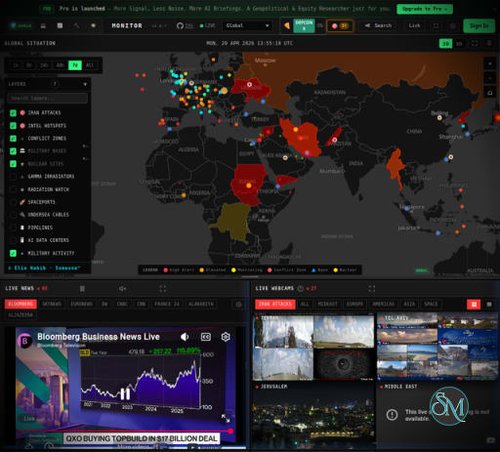
World Monitor is a real-time global intelligence dashboard that aggregates news, geopolitical data, financial markets, and infrastructure signals into one unified platform.
It is designed to provide situational awareness by combining multiple data streams such as:
News and media feeds
Military and aviation tracking
Economic and financial data
Disaster and infrastructure monitoring
All of this is processed and summarized using AI to help users quickly understand global developments.
What It Does
435+ curated news feeds across 15 categories, AI-synthesized into briefs
Dual map engine — 3D globe (globe.gl) and WebGL flat map (deck.gl) with 45 data layers
Cross-stream correlation — military, economic, disaster, and escalation signal convergence
Country Intelligence Index — composite risk scoring across 12 signal categories
Finance radar — 92 stock exchanges, commodities, crypto, and 7-signal market composite
Local AI — run everything with Ollama, no API keys required
5 site variants from a single codebase (world, tech, finance, commodity, happy)
Native desktop app (Tauri 2) for macOS, Windows, and Linux
21 languages with native-language feeds and RTL support
For the full feature list, architecture, data sources, and algorithms, see the documentation.
Download World Monitor v2.11.8 - Software Mirrors |
|---|
Download World Monitor v2.11.8 Download World Monitor v2.11.8 Download World Monitor v2.11.8 Download World Monitor v2.11.8 Download World Monitor v2.11.8 Download World Monitor v2.11.8 Download World Monitor v2.11.8 Download World Monitor v2.11.8 |
World Monitor v2.11.8 Release Notes:What's Changed
|
Quick Start
git clone https://github.com/koala73/worldmonitor.git
 cd worldmonitor
 npm install
 npm run dev
Open localhost:5173. No environment variables required for basic operation.
For variant-specific development:
npm run dev:tech       # tech.worldmonitor.app
 npm run dev:finance    # finance.worldmonitor.app
 npm run dev:commodity  # commodity.worldmonitor.app
 npm run dev:happy      # happy.worldmonitor.app
See the self-hosting guide for deployment options (Vercel, Docker, static).
Data Sources
WorldMonitor aggregates 65+ external data sources across geopolitics, finance, energy, climate, aviation, cyber, military, infrastructure, and news intelligence. See the full data sources catalog for providers, feed tiers, and collection methods.
Key Features of World Monitor
1. AI-Powered News Aggregation
World Monitor pulls data from hundreds of curated sources and uses AI to generate concise summaries and insights. This removes the need to manually track multiple news platforms.
2. Advanced Map Visualization
The platform includes a dual map system:
3D interactive globe
High-performance 2D WebGL map
With dozens of data layers such as conflicts, flights, pipelines, and disasters, users can visualize global activity in real time.
3. Cross-Stream Intelligence Correlation
One of its strongest features is the ability to correlate different data streams. For example:
Military activity
Economic signals
Natural disasters
This helps detect patterns and potential escalation scenarios across regions.
4. Country Intelligence Index
World Monitor assigns risk scores to countries based on multiple factors like unrest, security, and information flow. This provides a quick overview of global stability and emerging risks.
5. Local AI Processing
Unlike many AI tools, World Monitor can run models locally using frameworks like Ollama. This means:
No API keys required
Better privacy
Offline capabilities
6. Multi-Variant Dashboard System
The platform offers multiple specialized views:
Global intelligence dashboard
Tech-focused monitoring
Financial market tracking
Commodity analysis
All variants run from a single codebase, making it flexible for different use cases.
7. Desktop and Web Support
World Monitor is available as:
Web application
Desktop app for Windows, macOS, and Linux
This allows both browser-based monitoring and local installations.
Performance and Real-World Use
World Monitor is built for high-density data environments. It can render thousands of data points smoothly using optimized WebGL and lightweight architecture.
Common use cases include:
Geopolitical analysis
OSINT research
Market monitoring
Crisis and risk assessment
Because it aggregates and processes data in real time, it is especially useful for analysts and researchers who need up-to-date information.
User Experience
The interface is powerful but information-dense.
Beginners may feel overwhelmed at first
Advanced users will benefit from deep customization
Interactive maps and dashboards improve usability
It is closer to professional intelligence tools than typical consumer apps.
Pros and Cons
Pros
Open source and highly customizable
Combines multiple data streams in one platform
Real-time updates with AI summaries
Advanced visualization with interactive maps
Supports local AI for privacy
Cons
Steep learning curve for new users
Requires setup for full functionality
Can be resource-intensive on lower-end systems
Some features depend on external data sources
Who Should Use World Monitor
World Monitor is ideal for:
Analysts and researchers
Developers working with data and AI
Traders and market observers
OSINT enthusiasts
Anyone needing real-time global insights
It is not designed for casual users who just want simple news browsing.
Final Verdict
World Monitor is one of the most ambitious open-source intelligence dashboards available. It brings together AI, real-time data, and advanced visualization into a single powerful platform.
If you want a comprehensive, real-time view of the world with deep analytical capabilities, World Monitor stands out as a highly capable and future-oriented solution.