Airgorah is an open-source Wi-Fi security auditing application designed for Linux. Written in Rust and featuring a GTK4-based graphical interface, it offers a centralized environment for examining wireless networks and evaluating their security.
Instead of requiring users to rely solely on individual command-line utilities, Airgorah integrates wireless monitoring, access point and client discovery, and security assessment into a single desktop application.
The application is primarily intended for penetration testers, security researchers, and network administrators who need to assess wireless networks that they own or have been authorized to test.
Features
Wireless Network Discovery
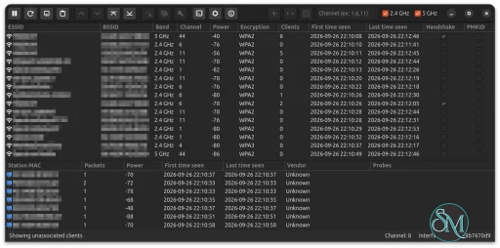
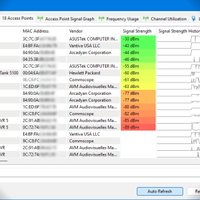
Airgorah can scan nearby wireless networks and display information about detected access points. This helps security professionals examine the wireless environment and identify devices that require further assessment.
The application also discovers clients connected to access points, providing a graphical overview of wireless network activity.
Wi-Fi Security Auditing
Airgorah integrates several wireless security assessment capabilities:
Wireless traffic capture.
Access point and connected-client discovery.
Deauthentication testing.
WPA handshake collection.
PMKID detection and collection.
Password security assessment.
These capabilities help authorized testers identify weaknesses in wireless network configurations and evaluate password security.
The application supports monitor mode and packet injection, making compatible wireless hardware essential.
Handshake and PMKID Analysis
Airgorah supports WPA handshake and PMKID collection and analysis. These are important components of wireless security assessments because they can help identify weaknesses in authentication configurations.
The application also includes password-testing functionality, allowing authorized security professionals to evaluate whether wireless network credentials are sufficiently resistant to guessing attacks.
Graphical User Interface
One of Airgorah's main advantages is its GTK4 interface. Instead of managing every operation through separate terminal commands, users can interact with wireless network information through graphical windows and controls.
The application is written in Rust, while its graphical interface uses GTK4. This combination provides a native Linux desktop experience.
Privileged Agent Architecture
Airgorah separates its graphical interface from privileged networking operations.
The main application runs as a regular user, while a separate component called airgorah-agent handles operations requiring elevated permissions. It uses Polkit to request authentication when necessary.
This architecture is particularly useful for modern Linux desktop environments, including Wayland, because the graphical application does not need to run entirely as root.
Download Airgorah v0.9.0 - WiFi Security Auditing - Software Mirrors |
|---|
Airgorah v0.9.0 - WiFi Security Auditing for Linuxairgorah_0.9.0_x86_64.rpm | 41.77 MB airgorah_0.9.0_x86_64.pkg.tar.zst | 38.74 MB airgorah_0.9.0_x86_64.deb | 41.85 MB airgorah_0.9.0_aarch64.rpm | 36.28 MB |
Airgorah v0.9.0 - WiFi Security Auditing Source CodeAirgorah v0.9.0 - WiFi Security Auditing Source code (zip) Airgorah v0.9.0 - WiFi Security Auditing Source code (tar.gz) |
Airgorah v0.9.0 - WiFi Security Auditing Release Notes:Changelog
|
Performance and Compatibility
Airgorah is designed exclusively for Linux. Its graphical interface supports both X11 and Wayland, making it compatible with a wide range of Linux desktop environments.
Because it is written in Rust, the application benefits from Rust's memory-safety features and native execution model.
However, performance and functionality depend heavily on the wireless adapter. Not every Wi-Fi chipset supports monitor mode and packet injection, and compatibility should be checked before selecting hardware for security testing.
Airgorah also requires appropriate system permissions for wireless interface management. Its Polkit-based privileged agent handles these operations separately from the graphical interface.
The project is actively developed and distributed under the MIT license. Its recent development includes PMKID support and improvements to wireless monitoring.
System Requirements
Linux operating system.
X11 or Wayland desktop environment.
Wireless network adapter supporting monitor mode.
Wireless adapter supporting packet injection.
GTK4 runtime and required application dependencies.
Polkit for privileged operations.
Additional networking utilities required by the application.
Windows and macOS are not supported.
Pros and Cons
Pros
Free and open-source under the MIT license.
Modern GTK4 graphical interface.
Written in Rust.
Supports both X11 and Wayland.
Discovers nearby access points and connected clients.
Includes wireless traffic monitoring.
Supports WPA handshake and PMKID analysis.
Separates privileged operations from the graphical interface.
Provides prebuilt Linux packages for multiple distributions.
Suitable for authorized wireless security assessments.
Cons
Linux only, with no Windows or macOS support.
Requires compatible wireless hardware.
Monitor mode and packet injection are mandatory.
Some operations require elevated permissions.
Not intended as a general-purpose Wi-Fi management application.
Users need basic knowledge of wireless networking and security.
How to Install
Airgorah provides prebuilt packages for several Linux distributions.
Supported package formats include:
DEB for Debian, Ubuntu, Kali Linux, Linux Mint, and related distributions.
RPM for Fedora and other compatible distributions.
Arch Linux packages for Arch-based distributions.
The project also provides a Docker-based build process for generating installation packages from source.
For installation instructions and the latest available packages, visit the official GitHub repository and its installation documentation.
Use Airgorah only to assess wireless networks you own or have explicit authorization to test. Wireless deauthentication and password-testing capabilities can disrupt networks or expose credentials if misused.
Final Verdict
Airgorah is an interesting open-source Wi-Fi security auditing application that makes wireless network assessment more accessible through a graphical interface. Its combination of access point discovery, client monitoring, traffic capture, handshake analysis, and PMKID support provides a useful collection of capabilities for authorized wireless security testing.
The separation between its unprivileged GTK4 interface and privileged networking agent is another strong design choice. Support for both X11 and Wayland also makes it suitable for modern Linux desktop environments.
Its biggest limitation is hardware compatibility. Users need a wireless adapter that supports monitor mode and packet injection, which excludes many standard laptop Wi-Fi adapters.
Overall, Airgorah is worth considering for Linux-based security researchers and network administrators who want a graphical tool for auditing wireless network security.