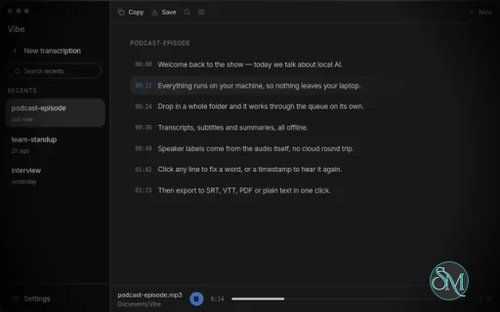


Vibe is an open source AI transcription application that lets you transcribe audio and video directly on your own computer. It is designed for people who want the convenience of modern speech-to-text software without having to upload their recordings to an online transcription service.
The biggest reason to consider Vibe is privacy. Its core transcription workflow runs locally, so your recordings do not need to leave your device. It also supports multiple transcription engines, GPU acceleration, speaker identification, subtitle generation, translation, batch processing, and even transcription from system audio and microphones.
What Is Vibe?
Vibe is a desktop AI transcription application available for Windows, macOS, and Linux.
You can give it an audio or video file and let it generate a transcript locally. It supports a wide range of languages and can produce several useful output formats.
The application is built around a native desktop architecture using Tauri and Rust, while the transcription engine can use different AI models depending on your hardware and configuration.
This makes Vibe more than just a graphical interface for Whisper. It is becoming a complete local transcription workspace.
Fully Offline Transcription
Privacy is arguably Vibe's biggest advantage.
The project describes its transcription as fully offline, with audio remaining on your device during the transcription process.
This makes it useful for recordings that you would rather not upload to a third-party service.
For example, Vibe can be used for:
Meeting recordings
Interviews
Lectures
Podcasts
Voice recordings
Private videos
Research material
Business recordings
Personal notes
You can perform the transcription without sending the original recording to a cloud transcription provider.
Multiple AI Models
Vibe is not tied exclusively to one transcription model.
The project currently supports Whisper as well as Nemotron 3.5 and Parakeet TDT v3 models.
This is important because different models can have different strengths in terms of speed, accuracy, language support, and hardware requirements.
Advanced users can also customize models and model arguments directly from the application settings.
That makes Vibe suitable for both beginners and users who want more control over their transcription setup.
GPU Acceleration
Local transcription can be computationally expensive, so hardware acceleration is important.
Vibe is optimized for GPUs on Windows, macOS, and Linux and supports Nvidia, AMD, and Intel GPUs through technologies including Vulkan and CoreML.
This can make a substantial difference when processing long recordings.
The application can also fall back to CPU processing when the required GPU environment is unavailable. A recent release specifically improved the fallback behavior when Vulkan GPU drivers are missing.
Audio and Video Transcription
Vibe accepts both audio and video files.
This makes it useful for more than traditional voice recordings. You can process interviews, lectures, webinars, movies, tutorials, meetings, and other video content.
There is also a realtime preview so you can see the transcription as processing progresses.
Batch Transcription
Vibe can process multiple files in a batch.
This is particularly useful when you have a collection of recordings that need to be transcribed rather than just one file.
Instead of manually starting each transcription, you can queue multiple files and let Vibe process them.
For researchers, content creators, journalists, and people working with large collections of recordings, this can save a significant amount of time.
Subtitle Generation
Vibe supports several subtitle and transcript formats, including:
SRT
VTT
TXT
HTML
PDF
JSON
DOCX
The SRT and VTT support is particularly useful for video creators.
You can transcribe a video locally and generate subtitle files without sending the video to an online service.
Stable Timestamps
One particularly useful feature is Stable Timestamps mode.
This mode is designed to provide more accurate subtitle timing for videos, tutorials, movies, and television content. It uses voice activity detection and is slower than the standard transcription process.
The feature was introduced in version 3.0.17.
For ordinary transcripts, the faster timestamp mode may be sufficient. For subtitles where timing matters, Stable Timestamps is a useful option.
Speaker Diarization
Vibe supports speaker diarization.
Instead of simply producing:
Hello, how are you?
it can identify different speakers in the transcript when the model and processing configuration support it.
This is especially useful for:
Interviews
Meetings
Panel discussions
Podcasts
Group conversations
The transcript data structure also supports speaker identifiers for individual segments.
Translation
Vibe can translate speech into English while processing audio in another language.
This makes it useful when you need both a transcription and an English version of the spoken content.
The translation functionality can also be combined with subtitle output, making it useful for creating English subtitles from foreign-language recordings.
YouTube and Other Websites
Vibe can also obtain audio from popular websites including YouTube, Vimeo, Facebook, and Twitter.
This means you don't necessarily have to download the media separately before transcribing it.
For example, a user could process an online lecture or publicly available video and generate a local transcript.
As always, users should make sure they have the appropriate rights to download and process the content.
System Audio Transcription
Vibe can transcribe system audio directly.
This is useful for situations where the audio isn't available as a conventional file.
For example, you could use it for a video call, presentation, online lecture, or other application producing audio on your computer.
It also supports microphone input, making it useful for live dictation and voice input.
AI Summaries
Vibe goes beyond transcription by providing transcript analysis and summaries.
It supports summaries through the Claude API and can also use Ollama for local AI analysis and batch summaries.
This distinction is important.
The transcription itself can remain local, while users who want completely local AI analysis can use Ollama instead of sending transcript content to a cloud AI service.
That gives technically inclined users considerably more control over their privacy setup.
Command Line Support
Vibe isn't limited to its graphical interface.
It also provides a command line interface.
This opens up possibilities for automation and scripting, especially for users who regularly process large collections of recordings.
There is also an HTTP API with Swagger documentation and agent skills, which makes Vibe interesting as a local transcription service rather than just a desktop application.
Dictation
Vibe can also be used for dictation.
A global shortcut can be used to trigger dictation functionality, allowing the transcription result to be inserted into other workflows.
This makes the application useful as a local speech-to-text tool rather than something limited to processing existing media files.
Custom Models
Advanced users can customize the models used by Vibe.
The project supports custom model integration through its settings and provides a mechanism for downloading models from external locations.
This is particularly attractive for users who want to experiment with newer models or choose a model based on their particular language and hardware requirements.
Cross Platform Support
Vibe supports:
Windows
macOS
Linux
The project provides builds for different architectures, including x64 and ARM64 Linux packages as well as Intel and Apple Silicon macOS builds.
This is a major advantage over many local transcription applications that only target Windows.
Download Vibe v3.2.2 - Software Mirrors |
|---|
Vibe v3.2.2 for Windows |
Vibe v3.2.2 for macOS |
Vibe v3.2.2 for Linuxvibe_3.2.2_arm64.deb | 32.06 MB vibe_3.2.2_amd64.deb | 35.39 MB |
Others Download related to Vibe v3.2.2 |
Vibe v3.2.2 Source Code |
Vibe v3.2.2 Release Notes:Release notes: https://thewh1teagle.github.io/vibe/changelog/3.2.2 Signed and notarized on macOS and Windows. |
Pros
Free and open source
MIT licensed
Fully offline transcription
Windows, macOS, and Linux
Whisper support
Nemotron 3.5 support
Parakeet TDT v3 support
GPU acceleration
Nvidia, AMD, and Intel GPU support
Apple Silicon support
Batch transcription
Speaker diarization
Stable subtitle timestamps
SRT and VTT export
PDF and DOCX export
JSON export
Translation to English
System audio transcription
Microphone transcription
YouTube and other website support
Local Ollama integration
Claude API summaries
Command line interface
HTTP API
Custom model support
Automatic updates
Cons
Local transcription requires reasonably capable hardware
Large models can consume significant RAM and GPU memory
Some advanced features are still evolving
Stable Timestamps is slower than standard transcription
Some transcription failures can still occur depending on the model and hardware
Cloud-based summaries through Claude are not fully offline
The application has a fairly large feature set, which can make the interface more complicated for simple transcription tasks
Who Should Use Vibe?
Vibe is an excellent choice for anyone who wants private AI transcription without relying on a cloud service.
It is particularly useful for content creators, developers, journalists, researchers, students, podcasters, and anyone who regularly works with recorded audio or video.
It is also a good option for people who already have a capable GPU and want to take advantage of local AI processing.
If privacy is your primary concern, Vibe is particularly attractive because the main transcription workflow can be performed entirely on your own machine.
Final Verdict
Vibe is one of the most capable open source local transcription applications available today.
What makes it stand out is not simply its Whisper support. It combines local transcription with batch processing, speaker diarization, subtitle generation, translation, system audio capture, GPU acceleration, local AI analysis, command line support, and an HTTP API.
The ability to choose between several transcription models is another major advantage for users who want to optimize the balance between speed, accuracy, and hardware requirements.
The project is also clearly active, with frequent releases and ongoing work across Windows, macOS, and Linux.
There are still some rough edges, particularly because the project is evolving quickly and local AI transcription can be sensitive to hardware and model configuration. Nevertheless, the feature set is impressive for an open source desktop application.
If you want a private, local, cross platform AI transcription tool, Vibe is very easy to recommend.