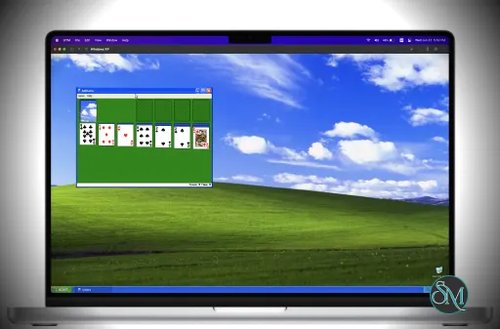
UTM is a free and open source virtualization and emulation application for macOS, iPhone, and iPad. Built on top of QEMU and Apple's Virtualization framework, it allows users to run Windows, Linux, BSD, macOS, and many legacy operating systems from a single, easy-to-use interface. Whether you need to test software, run another operating system, or emulate older hardware, UTM is one of the most capable virtualization solutions available for Apple devices.
Unlike traditional virtualization software that focuses only on modern operating systems, UTM supports both virtualization and full system emulation.
On Apple Silicon Macs, ARM-based operating systems can run using Apple's hardware virtualization for excellent performance. Meanwhile, operating systems built for x86, PowerPC, RISC-V, and many other CPU architectures can be emulated when necessary, allowing users to run software designed for entirely different hardware platforms.
The application provides a native macOS interface, making complex QEMU configurations much easier to manage.
Key Features of UTM
Hardware Virtualization
UTM uses Apple's Virtualization framework on supported Macs, allowing ARM-based guest operating systems to run with near-native performance.
This is ideal for running modern Linux distributions, Windows on ARM, and other compatible operating systems on Apple Silicon Macs.
Full System Emulation
When virtualization is not possible, UTM falls back to QEMU's emulation engine.
It supports more than 30 processor architectures, including:
x86
x86_64
ARM
ARM64
PowerPC
RISC-V
MIPS
SPARC
This flexibility makes UTM useful for running both modern and legacy operating systems.
Wide Operating System Support
UTM can run a large variety of guest operating systems, including:
Its ability to handle both current and historical systems makes it attractive to developers, hobbyists, and retro computing enthusiasts.
Native macOS Experience
Instead of exposing QEMU's complex command-line options, UTM provides a polished graphical interface for creating and managing virtual machines.
Configuration wizards simplify common tasks such as selecting the guest operating system, allocating memory, creating virtual disks, and configuring networking.
SPICE Integration
UTM uses the SPICE protocol to provide a smoother desktop experience for supported guests.
Features include:
These capabilities make virtual machines feel much closer to native desktop applications.
Shared Folders
Moving files between the host and guest is straightforward using shared folders.
This eliminates much of the friction normally associated with transferring files into virtual machines.
Snapshots
UTM supports virtual machine snapshots, allowing users to preserve a working state before testing software, applying updates, or experimenting with system changes.
Snapshots are especially useful for developers and testers.
Ready-to-Use Gallery
The official UTM Gallery provides downloadable virtual machine templates for many popular operating systems.
Instead of manually configuring every virtual machine, users can often download a prepared configuration and begin installation immediately.
Cross-Platform Availability
UTM is available for:
The macOS version offers the fullest feature set. On iOS and iPadOS, capabilities depend on Apple's platform restrictions, with UTM SE offering broader compatibility but slower emulation because it does not use JIT.
Download UTM Virtual Machines v5.0.8 - Software Mirrors |
|---|
UTM Virtual Machines v5.0.8 for macOSUTM.dmg | 290.21 MB |
UTM Virtual Machines v5.0.8 for iOSUTM.ipa | 143.58 MB UTM.deb | 142.15 MB UTM-visionOS.ipa | 139.05 MB UTM-SE.ipa | 226.12 MB UTM-SE-visionOS.ipa | 221.92 MB UTM-Remote.ipa | 35.9 MB UTM-Remote-visionOS.ipa | 31.37 MB UTM-HV.ipa | 143.58 MB |
UTM Virtual Machines v5.0.8 Source Code
UTM Virtual Machines v5.0.8 Source code (zip)
UTM Virtual Machines v5.0.8 Source code (tar.gz)
|
UTM Virtual Machines v5.0.8 Release Notes: Highlights- (macOS) DirectX graphics support for Windows: Modern accelerated graphics for Windows 11 is now available on UTM for the first time. The driver is still experimental and games compatibility is currently limited.
- Vulkan 1.3 graphics support for Linux: Vulkan 1.3 is now supported on Linux guests with VirtIO Venus drivers in Mesa. Additionally, OpenGL 4.1 is supported with the new Apple Core OpenGL backend (macOS only).
- Snapshots: Save your VM at any point and go back to it later from the new Snapshots tab. Works with QEMU VMs on macOS and iOS 26, and with Apple Virtualization VMs on macOS 27.
- (macOS) Apple Virtualization on macOS 27: Pass USB devices through to your VM, turn on Secure Boot for Linux, run a VM without saving changes, and let VMs talk to each other with new networking modes.
- (iOS) Better touch controls: Gestures respond immediately, with new middle-click and right-drag actions and a new drag-to-scroll touch mode.
- (iOS) iPhone Duo: Fold your iPhone Duo like a laptop, and the bottom half becomes a keyboard or touchpad for your VM.
Notes- Suspended VMs may not resume correctly after updating. We recommend shutting down all VMs before you update UTM.
- The minimum supported versions are now macOS 12 and iOS 15.
- We now have a development blog! Follow us for in-depth technical deep dives such as how we brought DirectX to QEMU.
- (macOS) To use the new graphics driver for Windows 11, we recommend a fresh install because the driver is still experimental and its use could lead to instability in the system. During the install of the guest tools, you will be prompted to select the experimental graphics driver. If you wish to install the new driver on a system that already is running the older display only driver, you need to run the uninstall script provided on the guest tools install ISO first.
- (macOS) Apple CoreGL backend does not support Vulkan or DirectX.
- Linux desktop rendering in Vulkan does not work due to lack of support for indirect draws for geometry shaders. Please configure your guest to use the older VirGL Gallium driver.
Changes (v5.0.8)- Fixed several changes listed for v5.0.7 being left out of that build by mistake.
- (macOS) Fixed Windows 3D acceleration on Apple Silicon Macs without Rosetta by falling back to DXMT
- (macOS) QEMU: Fixed Windows installs from the USB CD drive stalling repeatedly, which made them much slower in v5.0.7 (#7970)
Changes (v5.0.7)- Updated the virglrenderer, MoltenVK and DXMT graphics backends with fixes for Windows 3D acceleration
- QEMU: Windows guests now use the host display's refresh rate instead of always 60 Hz, which also fixes 3D acceleration failing on displays faster than 125 Hz (#7820)
- QEMU: Fixed VirtIO GPU stalls that hung Windows at shutdown, stalled 3D benchmarks on Linux, and could leave the Windows 3D driver without a display
- Snapshots: Fixed saving and restoring the state of VMs with compressed disks (#7916)
- Localization: Updated Chinese (Hong Kong, Simplified) (thanks @changanmoon)
- (iOS 27.1) Support for iPhone Duo: the VM toolbar sits in the outer display's camera strip, and a new laptop mode turns the bottom half of the folded screen into a keyboard or touchpad
- (macOS) Fixed headless VMs keeping the Mac from sleeping after they were paused or stopped
- (macOS) Closing a VM window or quitting UTM while a VM runs now confirms with "Close" or "Quit" instead of "OK"
- (macOS) Fixed shaders using instancing or integer vertex attributes drawing incorrectly with the Apple Core OpenGL backend (#7944)
- (macOS) Updated the D3DMetal graphics backend with fixes for DirectX 12
- (macOS) Display: The option to use the area beside the camera housing in full screen is now available on macOS 12 and later (#6183)
- (macOS) Wizard: Fixed the Name field's focus ring being clipped on the summary page (thanks @dnicolson)
- (macOS 15) QEMU: Better performance on Apple Silicon with the Hypervisor.framework built-in interrupt controller
- (macOS) Scripting: Force stopping a paused VM is now allowed
- (macOS 27) AVF: Explain when a USB device such as a webcam or phone can't be passed through, instead of showing "VZErrorDomain error -6" (#7914)
- (macOS) Guest Agent: Fixed an issue where clipboard sharing fails upon suspend-resume in macOS guests (you need to re-install the latest guest tools) (#7717)
Changes (v5.0.6)- Raised the minimum supported versions to macOS 12 and iOS 15 (#7758)
- Updated the DXMT and MoltenVK graphics backends
- Updated the KosmicKrisp Vulkan driver, which now requires macOS 26 or iOS 26
- Home: The welcome screen now offers to open an existing VM instead of linking to the gallery
- Snapshots: New Snapshots tab to save, overwrite, restore, rename and delete snapshots of QEMU and Apple VMs. Requires iOS 26 on iOS and macOS 27 for Apple VMs (#5484)
- Settings: Custom QEMU arguments moved to their own page, and the full command line is shown as read-only text that can be copied (#489, #7604)
- SPICE: Fixed microphone audio quality (#7751)
- SPICE: Fixed display and input freezing when audio playback hangs under memory pressure (thanks @evan314159)
- CocoaSpice: Fixed typing into the built-in serial terminal (#7814)
- Terminal: Updated SwiftTerm with a new Metal renderer, and only web links printed by the guest can be opened
- Localization: Updated Chinese (Hong Kong, Simplified) (thanks @changanmoon)
- (iOS) Fixed the VM toolbar and external display on iOS 26 and iOS 27
- (iOS 26) Reclaim Space, Compress, Resize and converting imported drives to qcow2 are now available on iOS (#4774)
- (iOS 27) Confirm before closing the window of a running VM on iPad
- (iOS) Display: Long press and pan gestures respond immediately, touches at the screen edges reach the guest, new middle click and right/middle drag actions, and a new "Touch mode (drag to scroll)" (#4738)
- (iOS) Display: Redesigned the keyboard accessory bar to match the iOS 26 keyboard
- (iOS) Input: Game controller Options and Home buttons can now be mapped
- (iOS) Settings: Fixed selecting the KosmicKrisp Vulkan driver
- (macOS) VoiceOver now announces file browse fields by their name (thanks @lprazdnik)
- (macOS) Terminal: Added a find bar (Cmd-F)
- (macOS 27) Display: New option to use the area beside the camera housing in full screen (#6183)
- (macOS 27) Display: Hot Corners are turned off while a VM is in full screen
- (macOS) Settings: Improved the notes field
- (macOS 26) Settings: The "New…" device menu now matches the sidebar
- (macOS) AVF: Sound input and output can be enabled separately, so "Output Only" no longer switches Bluetooth headphones to headset mode (#7875)
- (macOS 26) AVF: New "Shared Network (VM to VM)" and "Host Only" networking modes (#6975, #7480) (thanks @lovon-spec)
- (macOS 27) AVF: USB passthrough, also available from scripting and utmctl (#3778, #7777)
- (macOS 27) AVF: Run without saving changes (#4201, #7326)
- (macOS 27) AVF: Secure Boot option for UEFI guests (#7874)
- (macOS) Scripting: Snapshots are now scriptable objects, and utmctl gains
snapshot and discard-state commands - (macOS) Scripting: Create and install macOS VMs on the Apple backend (#6092) (thanks @meisenbarth)
- (macOS 27) Scripting: Set up the user account, automatic login and Remote Login of a new macOS VM on first boot (#7757)
- (macOS) Scripting: Fixed shared directories set with
update registry failing to open on Apple VMs (thanks @atkinsam) - (macOS) Scripting: Fixed a crash when starting a VM after removing its displays with
update configuration (#7882)
Changes (v5.0.5)- ~~Reverted minimum version requirement imposed by v5.0.4: once again we support versions down to macOS 11.3 and iOS 14.0. However, DirectX support is still limited to macOS 13.0 and iOS 16.0.~~
- Localization: Updated Chinese (Hong Kong, Simplified) (thanks @changanmoon)
- Config: For ARM64 configs, GICv3 is now selected by default. Previously this was only the case for > 8 vCPUs. This improves performance for higher vCPU counts < 8.
- Downloader: Path traversal and symlink checks added when unpacking downloaded ZIP files
- Wizard: scaling is now default to "nearest" when a "classic" computer emulation is created in the wizard and "linear" otherwise. Previously it was "nearest" for all configurations which led to poor scaling filter for anything with higher resolutions.
- (iOS) Support DirectX 11 with DXMT. Note that due to older iOS version (which supports TrollStore + Hypervisor), compatibility of DirectX titles is worse than macOS.
- (iOS) QEMU: Fixed MMIO BAR bug which prevented large hostmem window from working
- (iOS) Config: Improved RAM limit detection
- (macOS) DirectX 12 is now supported with D3DMetal backend (when available). You must (re)install the latest UTM guest tools experimental 3D graphics driver.
- (macOS) Support holding down Caps Lock key when input capture is enabled (#7840) (thanks @lprazdnik)
- (macOS) Settings: new options to gracefully power down all running VMs on exit (#7829) (thanks @vectorseven)
- (macOS) Settings: support Cmd<->Opt swapping (#7837) (thanks @lprazdnik)
- (macOS) Scripting: add snapshots commands to scripting interface (#7832) (thanks @naveenrajm7)
- (macOS) AVF: Better error message when macOS guest version is too high (#7806) (thanks @sigitkusuma)
Changes (v5.0.4)- (macOS) Added support for Neptune backend in virglrenderer for DirectX support
- Localization: Updated German (thanks @Benjamin123-tech)
- Scripting: new reload config and VLAN commands (#7710, #7711) (thanks @GregOriol)
- SPICE: Fixed various bugs in renderer that leads to performance and tearing issues
- SPICE: Fixed a memory leak that could result in large amount of memory use by UTM
- Updated USB icon (#7718) (thanks @tan9)
- Fixed crash in UTMRegistry and memory leak in AVF installer (#7701) (thanks @Casey)
Changes (v5.0.3)- Fixed regression in GRUB rendering time due to new graphics backend
- Fixed Vulkan issues on latest Wayland
- Localization: Updated Chinese (Hong Kong, Simplified) (thanks @changanmoon)
- Home: Confirm delete when using swipe left (#3086)
- Home: Prevent duplicate VMs from appearing (#7533) (thanks @DevSecTim)
- AVF: Fixed CPU spike and mic loss due to two audio devices (thanks @matapo)
- Scripting: Added ability to get IP address from AVF machines (#7643) (thanks @hellcastter)
- Scripting: Fixed "update registry" for AVM backend (#7664) (thanks @EkkoG)
- Scripting: Improve USB device matching logic (thanks @TronickDev)
Changes (v5.0.2)- Environment variables are now logged when debug log is enabled
- Fixed a regression in GL acceleration where desktop might not render correctly (#7626)
- Added geometry shaders support to MoltenVK to enable DXVK (thanks @Anducalliew433) (#7575)
- (iOS) Fixed an issue where EAGL backend boots into a black screen (#7587)
- (iOS) Fixed a crash on iOS 15 due to incompatible symbols (#7593)
- (iOS) Fixed verbose logging for graphics backend
- (iOS) Fixed a crash when GL is enabled due to missing support for glDrawElementsInstancedBaseVertex (#7596)
- (macOS) Fixed an issue when after resizing a window if the guest outputs a different resolution size, the wrong texture resolution is used leading to misaligned cursor and warped graphics (#5781)
- (macOS) Fixed an issue where the window resizes to 0x0 when native scaling is enabled
Changes (v5.0.1)- CocoaSpice: Reworked Metal renderer to be faster and have lower latency
- Fixed an issue where a BIOS file with a comma in the filename will fail to load
- Default FPS will now be the maximum refresh rate of the display on macOS and iPadOS (iPhone with ProMotion will still have 60Hz as the default rate but can be overridden to 120Hz through settings)
- (macOS) Fixed issue causing
HV_UNSUPPORTED on startup with Vulkan enabled (#7579) - (iOS) Fixed resolution issue on external displays (#6040)
- (iOS) Pinch to zoom will turn off automatically updating zoom from the guest (until reset with the resize button)
- (iOS) Fixed external display menu not updating
- (iOS) Fixed incorrect scale on external displays and connecting an external display will now automatically scale to fit
- (iOS) Fixed an issue where powering off the VM will show the home screen but not terminate UTM in the background
Changes (v5.0.0)- Add Venus support for Vulkan (#4551)
- Add Apple Core OpenGL support for OpenGL 4.1 (#4285) (thanks @startergo)
Issues
Please check the full list on Github and help report any bug you find that is not listed.
Installation
- UTM.deb: Jailbroken iOS version | Open in Cydia, dpkg, or Sileo | Yes | Yes(1) | Yes
- UTM.dmg: macOS version | Mounting and copying UTM.app to /Applications | Yes | Yes | Yes
- UTM.ipa: Non-jailbroken iOS version (sideloading) | AltStore, etc (see guide) | Yes(2) | No | No
- UTM-HV.ipa: Non-jailbroken iOS version (TrollStore) | TrollStore | Yes | Yes(1) | Yes
- UTM-SE.ipa: Non-jailbroken iOS version (sideloading) | AltStore, enterprise signing, etc | No | No | No
- UTM-Remote.ipa: Remote client | Any | No | No | No
- Hypervisor on iOS requires an M1 iPad or newer.
- Enabling JIT may require a separate JIT enabler such as [Jitterbug][2] or Jitstreamer.
[1]: https://getutm.app/install/
[2]: https://github.com/osy/Jitterbug
|
Performance and User Experience
UTM delivers one of the best virtualization experiences available on Apple hardware.
On Apple Silicon Macs, ARM virtual machines perform remarkably well thanks to hardware acceleration. Linux distributions feel responsive enough for everyday development, testing, and server workloads.
Running x86 operating systems through emulation is naturally slower, but performance is still good enough for many development tasks, legacy applications, and retro operating systems.
The interface deserves particular praise. While QEMU is incredibly powerful, its configuration can be intimidating. UTM simplifies nearly every aspect of virtual machine management without hiding advanced options from experienced users.
The project also continues to receive regular updates. Recent releases have upgraded to newer QEMU versions, improved the virtual machine creation wizard, added Shortcuts automation, introduced customizable keyboard shortcuts, and included numerous stability improvements.
Pros
Free and open source.
Excellent native macOS interface.
Supports both virtualization and full emulation.
Hardware acceleration on Apple Silicon.
More than 30 CPU architectures supported.
Runs Windows, Linux, BSD, and many legacy operating systems.
Shared folders and clipboard support.
Snapshot functionality.
Ready-made VM gallery.
Active development.
Available on macOS, iPhone, and iPad.
Cons
x86 emulation is slower than native virtualization.
Some advanced QEMU settings still require technical knowledge.
iOS and iPadOS versions are limited by Apple's platform restrictions.
Certain guest operating systems require manual configuration.
Gaming performance is generally not comparable to running operating systems natively.
Who Should Use UTM?
UTM is an excellent choice for developers, system administrators, cybersecurity professionals, students, IT professionals, and retro computing enthusiasts.
It is particularly well suited to Apple Silicon Mac owners who need to run Linux or Windows alongside macOS without purchasing commercial virtualization software.
It is also valuable for anyone experimenting with different processor architectures or preserving legacy software that no longer runs on modern hardware.
Final Verdict
UTM successfully combines the flexibility of QEMU with a polished native Apple interface, making virtualization far more approachable than using QEMU directly. Its support for hardware virtualization, full CPU emulation, snapshots, shared folders, and a broad range of operating systems makes it one of the best virtualization tools available for Apple devices.
While commercial solutions may offer additional enterprise features or optimized Windows virtualization, UTM's combination of open source licensing, excellent usability, and extensive hardware support makes it an outstanding choice for most Mac users.
For developers, testers, and enthusiasts looking for a free virtualization platform on macOS, UTM is among the very best options available.