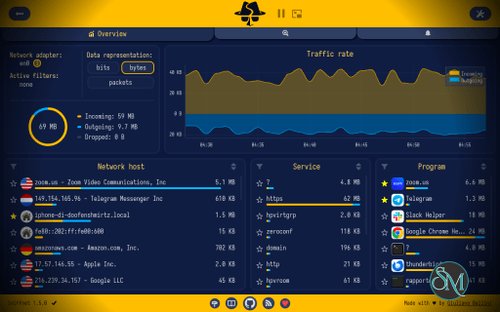



Sniffnet is an open-source network traffic monitoring tool that provides real-time insights into incoming and outgoing connections on a device.
The application allows users to:
Monitor network traffic
View active connections
Analyze data transfer activity
Inspect network protocols
Track bandwidth usage
Identify remote hosts
Generate traffic statistics
Unlike full-featured packet analyzers, Sniffnet emphasizes visualization and usability rather than deep packet inspection.
Sniffnet is an open-source network monitoring application that helps users visualize and analyze internet traffic in real time. Unlike traditional packet analyzers that often overwhelm users with technical details, Sniffnet focuses on presenting network activity through a clean, modern interface that is accessible to both beginners and experienced users.
Built with performance and simplicity in mind, Sniffnet has gained popularity among network enthusiasts, system administrators, developers, and privacy-conscious users looking for an easy way to understand what is happening on their network.
Download Sniffnet v1.5.1 - Software Mirrors |
|---|
Sniffnet v1.5.1 for WindowsSniffnet_Windows_x86.msi | 19.63 MB |
Sniffnet v1.5.1 for macOS |
Sniffnet v1.5.1 for LinuxSniffnet_LinuxRPM_x86_64.rpm | 17.28 MB Sniffnet_LinuxRPM_aarch64.rpm | 16.68 MB Sniffnet_LinuxDEB_i386.deb | 14.05 MB Sniffnet_LinuxDEB_armhf.deb | 12.99 MB Sniffnet_LinuxDEB_arm64.deb | 12.87 MB Sniffnet_LinuxDEB_amd64.deb | 13.89 MB Sniffnet_LinuxAppImage_i386.AppImage | 20.13 MB Sniffnet_LinuxAppImage_armhf.AppImage | 19.23 MB |
Sniffnet v1.5.1 Release Notes:New featureshttps://github.com/user-attachments/assets/6915371c-ab28-4d83-ac03-0c45a40fce16
Improvements
Fixes
Thanks to:
Support SniffnetStay in the loop
|






Key Features of Sniffnet
Real-Time Traffic Monitoring
Sniffnet continuously displays network activity as it occurs, providing immediate visibility into data transfers and active connections.
Users can observe network behavior without needing advanced networking knowledge.
Interactive Dashboard
One of Sniffnet's most appealing features is its graphical dashboard.
The interface presents network activity through charts, statistics, and visual summaries that are easier to understand than traditional packet capture logs.
Connection Analysis
The software provides information about:
Active connections
Remote hosts
IP addresses
Geographic locations
Protocol usage
Traffic volumes
This helps users identify which services and devices are communicating across the network.
Protocol Detection
Sniffnet recognizes common network protocols and categorizes traffic accordingly, making it easier to understand how applications are using network resources.
Bandwidth Statistics
Users can track upload and download activity, helping identify bandwidth-intensive applications and unusual network behavior.
Cross-Platform Support
The application is available across multiple operating systems, allowing users to monitor traffic on different environments using a consistent interface.
User Experience
User experience is where Sniffnet truly stands out.
Many traditional networking tools are designed primarily for network engineers and security professionals. Sniffnet takes a different approach by focusing on clarity and accessibility.
The interface is visually polished and organized, allowing users to quickly understand:
Current traffic levels
Active connections
Network trends
Host activity
Even users with limited networking experience can gain useful insights within minutes.
Performance
Sniffnet is lightweight and efficient.
The application performs real-time monitoring with relatively low resource consumption compared to many enterprise-grade network analysis platforms.
For most users, the software runs smoothly without noticeably impacting system performance.
Its implementation in Rust also contributes to strong performance, stability, and memory safety.
Privacy and Security Benefits
Sniffnet can be useful for users who want greater visibility into network activity.
By monitoring active connections, users can:
Detect unexpected traffic
Identify bandwidth-heavy applications
Monitor software network behavior
Investigate suspicious connections
Improve network awareness
While it is not a dedicated security platform, the visibility it provides can support basic troubleshooting and security investigations.
Open Source Advantage
Being open source offers several benefits:
Transparent development
Community contributions
Independent security review
No vendor lock-in
Free availability
The project has attracted an active community that continues to contribute features and improvements.
Limitations
Sniffnet is designed primarily for monitoring and visualization rather than advanced packet analysis.
Users requiring capabilities such as:
Deep packet inspection
Packet modification
Advanced protocol decoding
Forensic investigation
Enterprise network auditing
may still need specialized tools designed for professional network analysis.
The software intentionally prioritizes usability over extensive technical complexity.
Sniffnet vs Wireshark
A common comparison is between Sniffnet and Wireshark.
Wireshark remains the industry standard for deep packet analysis and advanced troubleshooting, offering far greater technical detail and protocol support.
Sniffnet focuses instead on:
Simplicity
Visualization
Ease of use
Quick monitoring
Many users may find Sniffnet more approachable for everyday network visibility while reserving Wireshark for advanced investigations.
Pros
Modern and attractive interface
Easy to use
Real-time traffic monitoring
Helpful visualizations
Lightweight performance
Cross-platform availability
Open-source development
Suitable for beginners and enthusiasts
Cons
Limited deep packet inspection capabilities
Fewer advanced analysis tools than professional alternatives
Not designed for enterprise forensic investigations
Some advanced networking users may require more detailed controls
Who Should Use Sniffnet?
Sniffnet is ideal for:
Home users
Network enthusiasts
Developers
Students
System administrators
Privacy-conscious users
IT learners
It is particularly useful for users who want to understand network activity without dealing with the complexity of traditional packet analyzers.
Sniffnet successfully makes network monitoring more accessible through a modern interface, clear visualizations, and strong performance. While it does not replace advanced packet analysis platforms, it excels at providing real-time network visibility in a way that is approachable and informative. For users seeking a lightweight and user-friendly network monitoring tool, Sniffnet is one of the best options currently available.