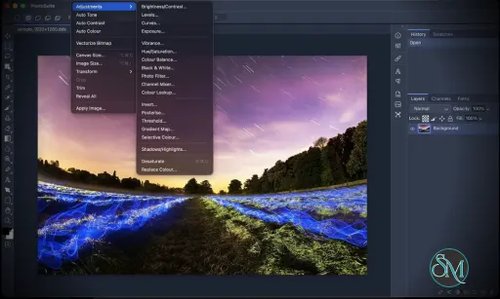




PhotoSplice is a desktop image editor designed to replicate the classic Adobe Photoshop workflow while providing native support for layered PSD and PSB files. Built on the Rust-based PhotoCraft image-editing engine, it aims to provide a familiar editing experience for graphic designers who want to work with Photoshop-compatible documents without relying on a subscription-based application.
The application supports Windows, macOS, and Linux, with downloadable installers for each platform. It also offers a browser-based version for users who want to explore the editor without immediately installing the desktop application.
PhotoSplice is particularly interesting for users who regularly work with layered graphics, digital illustrations, photo manipulation, and existing Photoshop projects. However, it is still a developing project, so its advertised compatibility should be tested with important files before it becomes part of a production workflow.
Features
Native PSD and PSB Support
One of PhotoSplice's main selling points is its support for Photoshop's native document formats. It can open and save PSD and PSB files while retaining layered document structures.
The project describes support for layers, masks, blending modes, layer effects, smart objects, text information, vector paths, and color profiles. PSB support is particularly useful for large documents that exceed the practical limits of the standard PSD format.
This capability could make PhotoSplice useful for designers who need to inspect or edit existing Photoshop projects without rebuilding their documents in another application.
However, compatibility claims should be treated as a work in progress until tested against real-world documents. Complex effects, specialized text, and advanced Photoshop features may not always behave identically across applications.
Layers and Non-Destructive Editing
PhotoSplice provides a layer-based editing workflow with pixel, text, shape, fill, and adjustment layers. It also supports groups, clipping masks, layer masks, and vector masks.
These features allow users to organize complex documents and make changes without permanently modifying the original image content.
The application also advertises smart objects and smart filters, which are useful for workflows involving reusable elements and editable effects. Layer styles such as drop shadows, glows, strokes, gradients, and bevel effects expand its design capabilities.
Photo Editing Tools
The editor includes a broad selection of tools for image manipulation, selection, painting, retouching, and composition.
Available tools include:
Marquee, lasso, and magic wand selections.
Brush, pencil, and eraser tools.
Clone stamp and healing tools.
Gradient and paint bucket tools.
Dodge, burn, blur, sharpen, and smudge tools.
Pen, shape, crop, ruler, and eyedropper tools.
This collection covers many everyday photo-editing and graphic-design tasks. Users familiar with traditional desktop image editors should find the general workflow approachable.
Image Adjustments and Filters
PhotoSplice includes adjustment tools for modifying brightness, contrast, color, and tonal range. These include Curves, Levels, Hue/Saturation, and Color Lookup.
It also advertises more advanced effects such as Liquify, Perspective Warp, Puppet Warp, Content-Aware Fill, and a Filter Gallery.
Camera Raw development and lens correction features are included for supported workflows. These capabilities give photographers and designers additional ways to refine images without switching between multiple applications.
The availability of these features does not necessarily mean every effect matches Photoshop's implementation. Users should verify important filters and adjustments with their own files.
Color Management and Professional Formats
PhotoSplice supports documents with 8-bit, 16-bit, and 32-bit color depths, along with RGB, Grayscale, CMYK, and Lab color modes.
Its advertised ICC color-management support is useful for users who need consistent color handling across images and output devices.
The application also supports a wide range of image formats, including PNG, JPEG, WebP, TIFF, GIF, BMP, OpenEXR, and several camera RAW formats.
For users working with high-dynamic-range images, its OpenEXR and Radiance HDR support adds flexibility beyond basic photo editing.
PDF Import and Export
PhotoSplice supports PDF import and export for selected workflows.
Imported PDF pages can be brought into the editor as rasterized images or, where supported, as editable elements. The project also describes exporting PDFs with text, vectors, images, and editing information.
This can be helpful when preparing graphics for documentation, presentations, and print-related work. Users should still inspect exported files to ensure that fonts, colors, vectors, and page layouts remain correct.
Automation and Plugin Support
PhotoSplice provides automation features for users who want to reduce repetitive editing work. Its advertised capabilities include actions, batch processing, script events, and a JSON control interface.
The application also supports sandboxed WebAssembly filter plugins, allowing developers to extend its image-processing capabilities.
These features could be useful for advanced users, plugin developers, and teams looking to integrate image-editing tasks into repeatable workflows.
Native Desktop Performance
Unlike desktop applications built around Electron or a browser-based interface, PhotoSplice uses a native graphical interface based on egui and wgpu.
The project advertises GPU acceleration through graphics backends such as Metal, Vulkan, and DirectX 12, with a CPU fallback.
This architecture may offer performance advantages for supported workloads, although actual performance depends on the hardware, image dimensions, filters, and complexity of the document.
Local Processing and Privacy
PhotoSplice describes itself as a local application that does not require an account and does not use telemetry or cloud processing for its core desktop workflow.
For users working with private photographs, client artwork, or confidential design files, local processing can be an important advantage.
Users who rely on the browser-based version should evaluate that deployment separately rather than assuming that its data-handling behavior is identical to the desktop application.
Download PhotoSplice v0.9.23 - Software Mirrors |
|---|
PhotoSplice v0.9.23 for Windows |
PhotoSplice v0.9.23 for macOS |
PhotoSplice v0.9.23 for Linuxphotosplice-0.9.23-linux-x86_64.tar.gz | 86.94 MB photosplice-0.9.23-linux-x86_64.rpm | 88.67 MB photosplice-0.9.23-linux-x86_64.pkg.tar.zst | 71.75 MB photosplice-0.9.23-linux-x86_64.flatpak | 54.22 MB photosplice-0.9.23-linux-x86_64.deb | 85.39 MB photosplice-0.9.23-linux-x86_64.AppImage.zsync | 272.75 kB photosplice-0.9.23-linux-x86_64.AppImage | 77.86 MB photosplice-0.9.23-linux-aarch64.tar.gz | 83.98 MB photosplice-0.9.23-linux-aarch64.rpm | 85.96 MB photosplice-0.9.23-linux-aarch64.pkg.tar.zst | 69.35 MB photosplice-0.9.23-linux-aarch64.deb | 83.01 MB |
PhotoSplice v0.9.23 Source Code |
PhotoSplice v0.9.23 Release Notes: |
Performance and Compatibility
PhotoSplice targets users who prefer a traditional desktop image editor with a familiar Photoshop-style layout. Its native application architecture and GPU-oriented rendering design are promising for workflows involving large images and multiple layers.
The project supports Windows, macOS, and Linux. Windows users can choose an installer or portable package, while macOS users can download a disk image. Linux users have several package formats, including AppImage, DEB, RPM, and Flatpak.
Its advertised support for layered PSD and PSB files is a major advantage, but format compatibility is more complicated than simply opening and saving a document. Advanced effects, smart objects, text rendering, and color-management behavior can vary between applications.
Because PhotoSplice is a developing project, users should test representative documents before migrating important projects. Keep backups of original files and verify that saved documents reopen correctly in the software used by collaborators or clients.
The project also provides a browser-based editor, which can be convenient for initial evaluation. The desktop version is the more relevant option for users who want a dedicated application and local file workflow.
One additional consideration is the project's recent history. PhotoSplice appeared under the same GitHub account after the earlier PhotoSuite repository became unavailable following a reported DMCA takedown. The current repository presents itself as a distinct project, but this history makes it especially important to verify its development status, licensing, and download sources rather than assuming that the project's continuity is guaranteed.
System Requirements
PhotoSplice supports the following desktop platforms:
Windows: Windows 10 or later, with x64 packages.
macOS: macOS 11 or later, with a universal package for Intel and Apple silicon.
Linux: x86-64 and ARM64 packages for supported distributions, with Flatpak availability for x86-64.
Building the application from source requires a recent stable Rust toolchain. Linux developers also need the documented graphics, windowing, and GTK development libraries.
The project does not provide a single universal hardware recommendation for every editing workload. Large layered documents, high-bit-depth images, and complex filters may require substantial memory and graphics resources.
For everyday editing, use a supported operating system and ensure sufficient storage space for the application, source images, and working documents.
Pros and Cons
Pros
Open-source desktop image editor.
Available for Windows, macOS, and Linux.
Supports layered PSD and PSB documents.
Provides familiar layer-based editing and masking tools.
Includes photo retouching, image adjustments, and creative filters.
Supports numerous raster and camera RAW formats.
Offers automation through actions, batch processing, and a JSON control interface.
Includes WebAssembly-based plugin support.
Designed for local desktop use without requiring an account for its core workflow.
Provides a browser-based version for convenient evaluation.
Cons
The project is still developing, so advertised features may not be equally mature.
Full compatibility with complex Photoshop documents should not be assumed.
Some advanced effects may behave differently from their Photoshop counterparts.
Performance depends on hardware, document complexity, and graphics support.
Users should verify current releases and project continuity because of the earlier PhotoSuite repository's reported takedown.
The project's licensing and bundled third-party assets should be reviewed before redistribution or commercial integration.
How to Install
Visit the official PhotoSplice repository on GitHub.
Open the Releases section and select the appropriate package for your operating system.
Download the installer or portable package that matches your platform and processor architecture.
Install the application or extract the portable package, following the instructions for your operating system.
Launch PhotoSplice and open an image or an existing PSD document.
Test the editing tools and confirm that important layers, effects, and text render correctly.
Save a copy of the edited document and reopen it to verify that the document structure is preserved.
For Linux, choose the appropriate package for your distribution. Users who prefer not to install a desktop application can also explore the browser-based editor.
Download only from the project's official repository or another source that can be independently verified. Back up important documents before testing any new editor with production files.
Final Verdict
PhotoSplice is an ambitious open-source image editor that aims to bring a familiar Photoshop-style workflow to Windows, macOS, and Linux. Its advertised PSD and PSB support, layer-based editing, extensive image tools, RAW format compatibility, and automation features make it an interesting option for designers and photographers.
Its biggest potential advantage is the combination of native desktop performance, local processing, and a broad collection of editing features without requiring a conventional subscription. For users who primarily need common photo-editing tools and want to experiment with an open-source alternative, PhotoSplice is worth evaluating.
However, its development status and recent project history deserve careful consideration. Users should independently verify the repository, inspect the licensing information, and test important documents before relying on it for professional work.
PhotoSplice has promising potential, but its long-term value will depend on continued development, dependable releases, and demonstrated compatibility with real-world Photoshop documents.