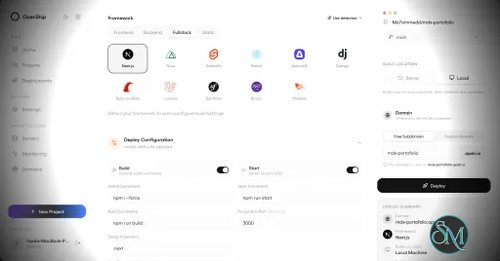
Openship is an open source application deployment platform that simplifies building, deploying, operating, and scaling applications on your own infrastructure. It combines Git-based deployments, container management, SSL automation, application monitoring, managed services, and a modern web interface into a single platform. Designed as an alternative to managed platforms such as Vercel, Netlify, and Render, Openship gives developers full ownership of their infrastructure while maintaining a streamlined deployment experience.
Deploying applications to self-managed servers often requires configuring Docker, reverse proxies, SSL certificates, deployment pipelines, and monitoring separately. Openship brings these capabilities together into a unified platform that works with cloud VPS providers, dedicated servers, and homelabs.
Unlike many self-hosted deployment tools that install build agents directly on production servers, Openship builds application images externally and deploys immutable containers over SSH. This keeps production systems focused on serving applications while simplifying rollbacks and updates.
The platform is fully open source under the AGPL-3.0 license and supports both self-hosting and managed cloud hosting.
Key Features of Openship
Git-Based Deployments
Applications are deployed automatically from Git repositories. Every commit can trigger a build, resulting in versioned container images that are easy to deploy or roll back.
Deploy Anywhere
Openship supports deployment to:
Virtual private servers
Dedicated servers
Home labs
Cloud virtual machines
Openship Cloud
The deployment workflow remains consistent regardless of the hosting environment.
Zero Downtime Deployments
The platform automatically routes traffic to newly deployed containers after they are ready, reducing downtime during updates. Previous versions remain available for quick rollback if necessary.
Automatic SSL
SSL certificates are automatically provisioned through Let's Encrypt, eliminating manual certificate management for hosted applications.
Integrated Monitoring
Developers can monitor deployments, view application logs, inspect metrics, and manage previous releases directly from the web dashboard, desktop application, or CLI.
Managed Infrastructure Services
Beyond application deployment, Openship includes managed services such as PostgreSQL, MySQL, Redis, MongoDB, and a built-in transactional email service with support for multiple domains.
Multiple Interfaces
Users can manage infrastructure through:
This flexibility makes Openship suitable for both manual administration and automation workflows.
Open Source
Every component of the platform is publicly available, allowing organizations to audit the source code, customize functionality, and avoid vendor lock-in.
Download OpenShip v0.9.3 - Software Mirrors |
|---|
OpenShip v0.9.3 for WindowsOpenship-win32-x64.zip | 219.81 MB |
OpenShip v0.9.3 for macOSOpenship-x64.dmg | 239.66 MB Openship-arm64.dmg | 230.88 MB |
OpenShip v0.9.3 for LinuxOpenship.AppImage | 186.19 MB openship-v0.9.3-linux-amd64.tar.gz | 68.67 MB openship-email-v0.9.3-linux-amd64.tar.gz | 75.32 MB Openship-arm64.AppImage | 186.8 MB |
Others Download related to OpenShip v0.9.3openship-dashboard-v0.9.3.tar.gz | 38.36 MB openship-cli-v0.9.3.tar.gz | 39.18 MB |
OpenShip v0.9.3 Source Code
OpenShip v0.9.3 Source code (zip)
OpenShip v0.9.3 Source code (tar.gz)
|
OpenShip v0.9.3 Release Notes: This release improves Cloud monitoring and build-cache reliability, adds deployment
automation and isolated pull-request previews, and makes workers and schedulers
easier to configure, observe and recover. These notes cover all merged changes
since 0.9.2.
Deployment automation and previews
- Move command variables into Environment — review literal environment
assignments in install, build and start commands, then migrate them into
encrypted project or service settings. Conflicts and concurrent edits stop the
migration before partial changes are saved. Import and saved settings share the
same parser and guidance.
- Prepare framework output automatically — Next.js standalone monorepos and
Nuxt builds retain their required workspace dependencies, public/static assets
and selected Node or Bun runtime. Managed direct-server defaults start from the
configured app directory; explicit custom commands retain their working directory.
- Review older manual cache mounts — detect duplicate package/framework cache
mounts and offer configuration migration only after a successful build proves
managed cache support for those paths. Existing volume data is retained. Build
logs report observed cache reuse and build-time comparisons.
- Catch setup problems earlier — pre-install checks identify missing app roots
and environment examples; command-variable, standalone startup and duplicate-mount
guidance explains what needs attention without exposing variable values.
- Opt into GitHub pull-request previews — same-repository, non-draft pull
requests can deploy their exact commit into a separate preview environment with
preview-only variables, isolated volumes and per-service URLs. Production
variables are not copied. Forks and unsafe shared-storage configurations are
excluded.
- Recover preview lifecycle operations — durable coordination handles repeated
webhooks, controller restarts and retryable close/merge cleanup. Optional GitHub
comments update one existing comment, alongside the existing deployment Checks.
Whole-instance transfers preserve preview ownership; individual project imports
clear preview automation that cannot safely transfer.
- Use automation from the SDK — configure and list previews, inspect or migrate
manual cache mounts, and move command variables through the shared validated
project operations.
Workers, schedulers and rollback
- Configure roles without rebuilding the web app — Apps & Services → Configure
roles can add or change workers and singleton schedulers on active single-app
self-hosted Docker deployments. The normal deployment engine reuses the verified
image and frozen environment while preserving the web container and unchanged
replicas. The API, SDK and CLI expose the same operation. Cloud, bare, static,
cluster and multi-service targets are outside this editor's scope.
- See and inspect background processes — runtime roles appear in project
service views and topology, with role/replica log selection and retry states.
Health monitoring includes worker and scheduler failures instead of observing
only the foreground container.
- Keep independent role suggestions — framework scans expose matching presets
at the selected app root. Only presets competing for the same declared slot
exclude one another; explicit roles, including an empty list, retain precedence.
Suggestions do not automatically enable background processes.
- Recover interrupted role handovers — persist exact container identities and
ownership before replacement, predecessor shutdown and publication. Startup and
deployment reconciliation either finish a published handover or safely restore
its predecessor; uncertain cleanup remains pending before conflicting work.
- Protect active and rollback images — retained role replicas keep their
required image artifacts protected during configuration changes and release cleanup.
- Restore frozen Compose environment accurately — rollback preserves encrypted
deployment snapshots without confusing literal redaction-like values with missing
secrets. Incomplete legacy snapshots fail clearly rather than borrowing mutable
current service settings.
Cloud monitoring, caches and storage
- Avoid expensive monitoring scans — Cloud hosts using fuse-overlayfs skip
Docker's full storage inventory, which can exhaust daemon memory. Host totals
remain measured; unavailable detailed project storage stays unknown.
- Show guest RAM usage — use verified guest counters instead of hypervisor
process memory and overhead. Older guests receive a bounded, read-only memory
sample; stream teardown releases the executor.
- Keep partial metrics useful — missing disk or memory fields in a live frame
retain the latest measured value for that metric, with its measurement time.
Purchased capacity is never substituted for measured consumption.
- Keep Cloud cache cleanup scoped — collect only owned, idle project-worker
caches and stop before Docker Engine's global builder prune. Cache reuse, worker
GC, existing build concurrency and user-configured resource limits are unchanged.
Cloud builds require their isolated BuildKit executor instead of silently falling
back to the embedded builder. Existing legacy daemon state and autonomous Docker
GC remain separate host-maintenance concerns.
- Accept filesystems without fixed inode totals — unsupported or zero inode
totals mean unknown availability rather than confirmed exhaustion. Real free-space
and supported inode-exhaustion checks still protect deployment admission.
Domains and ingress
- Route verified custom domains on first deployment — single-app domains
without a saved destination use the verified serving port through the shared
route planner. Explicit endpoints and service-group destinations retain their
ownership instead of selecting a sibling service.
- Avoid ephemeral secondary host ports — secondary loopback publications use
the existing allocator and the target host's ephemeral-range checks.
- Handle varied Cloudflare Access applications — accounts containing launcher
or other domain-less applications no longer crash managed ingress setup.
Inventory and write receipts are validated while overlap and foreign-resource
ownership protection remain enforced.
- Clarify edge availability — documentation explains edge failure behavior and
recovery responsibilities for deployed applications.
Webmail
- Resolve exact Message-IDs for actions — thread reads, deletion, labels and
flags validate exact IMAP envelope identities instead of trusting substring
search matches. Literal percent sequences remain unchanged, stale UID hints are
rejected, and missing or refused operations no longer report success.
- Cache application assets correctly — fingerprinted assets receive immutable
caching while application HTML is revalidated.
- Serve precompressed assets — negotiate available Brotli or gzip files with
appropriate content types, encoding and cache headers. |
Performance and User Experience
Openship provides a polished user experience that lowers the barrier to self-hosting modern applications. The interface is clean, deployments are straightforward, and infrastructure management is considerably simpler than manually configuring Docker, reverse proxies, certificates, and monitoring tools.
One of its strongest advantages is keeping production servers free from build workloads. Images are built separately and transferred to the deployment target, improving reliability and reducing resource usage on live servers.
The project is under active development, with new features such as clustering and horizontal scaling planned for future releases. Community feedback has been largely positive, particularly regarding its ease of use and modern approach to self-hosted deployments.
Pros
Free and open source.
Supports deployment to your own infrastructure.
Zero downtime deployments.
Automatic SSL certificate management.
Git-based deployment workflow.
Built-in monitoring and rollback.
CLI, web, desktop, REST API, and MCP support.
No vendor lock-in.
Active development.
Cons
Still a relatively new platform.
Advanced clustering features are still under development.
Best suited for containerized applications.
Smaller community than established deployment platforms.
Who Should Use Openship?
Openship is an excellent choice for developers, DevOps engineers, startups, agencies, and organizations that want a modern deployment experience without relying entirely on managed cloud platforms.
It is especially appealing to users who want the simplicity of services like Vercel while maintaining complete ownership of their servers, applications, and deployment pipeline.
Final Verdict
Openship successfully bridges the gap between traditional self-hosting and modern cloud deployment platforms. Its Git-driven workflow, automated infrastructure management, integrated monitoring, and open source philosophy provide an impressive developer experience without sacrificing control.
Although the platform is still evolving, it already delivers a compelling alternative to commercial deployment services and has strong potential to become a leading open source application platform.