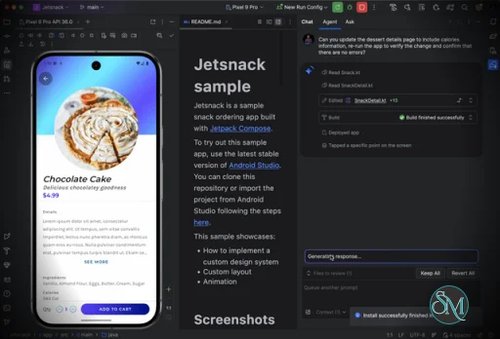


Android Studio is the official integrated development environment for building Android applications. Developed by Google and based on the IntelliJ IDEA platform, it provides developers with the tools needed to design, build, test, debug, profile, and publish Android apps from a single development environment.
The biggest strength of Android Studio is how much of the Android development workflow it brings together. Developers can create projects, manage Gradle builds, write Kotlin or Java code, design interfaces, run applications on physical devices or emulators, inspect performance, and prepare releases without constantly switching between different applications.
Kotlin is now a major part of modern Android development, and Android Studio provides strong support for Kotlin alongside Java. Code completion, inspections, refactoring, debugging, and automated suggestions make it much easier to work with larger Android projects.
The Android Studio editor is another highlight. It provides intelligent code completion, navigation, refactoring tools, error detection, and support for the Android SDK and common development frameworks. Developers can quickly navigate between classes, resources, layouts, and project files, which becomes increasingly valuable as applications grow.
Android Studio also includes the Android Emulator. Developers can create virtual Android devices with different screen sizes, Android versions, hardware configurations, and device profiles. This makes it possible to test applications across different environments without owning every physical device.
The Layout Inspector and Compose tooling are particularly useful for UI development. Developers working with Jetpack Compose can preview interfaces directly inside the IDE, while traditional Android Views can be inspected and debugged using the built-in layout tools.
Performance analysis is another important feature. Android Studio includes profiling tools for examining CPU activity, memory usage, network activity, and other runtime characteristics. These tools can help developers identify performance bottlenecks that may not be obvious from the source code alone.
Gradle integration is also central to the Android Studio experience. Dependencies, build variants, product flavors, signing configurations, and release builds can all be managed through the Android build system. While Gradle can become complicated in larger projects, having it integrated directly into the IDE makes Android project management considerably more convenient.
Android Studio is not without drawbacks. It is a relatively demanding development environment, particularly when running the IDE, emulator, Gradle builds, and other development tools simultaneously. Large projects can also take noticeable amounts of time to index or compile, especially on machines with limited memory or slower storage.
The number of available features can also make Android Studio feel overwhelming for beginners. Developers need to become familiar with Gradle, SDK versions, emulators, build variants, dependencies, and Android-specific project structures before they can fully take advantage of the IDE.
Despite these issues, Android Studio remains difficult to avoid for serious Android development. Its close integration with the Android SDK and development ecosystem means developers get access to tools that are specifically designed around the platform rather than relying on a generic code editor.
Pros
Official IDE for Android development
Excellent Kotlin and Java support
Integrated Android Emulator
Powerful debugging and profiling tools
Jetpack Compose and UI development support
Strong Gradle integration
Intelligent code completion and refactoring
Supports multiple Android device configurations
Extensive Android SDK integration
Free and open source components
Cons
Relatively high system resource usage
Emulator can require significant CPU and RAM
Gradle configuration can become complicated
Large projects may take time to index and build
Can be overwhelming for beginners
Final Verdict
Android Studio is a comprehensive development environment that covers almost every stage of Android application development. From writing Kotlin code and designing interfaces to running emulators, debugging applications, analyzing performance, and creating production builds, it provides an extensive collection of tools in one package.
Its resource requirements and complexity can be frustrating on lower-end hardware, but those tradeoffs are reasonable considering how much functionality the IDE provides.
For anyone serious about developing Android applications, Android Studio remains one of the most complete and capable development environments available.