
MobiKin Eraser for Android is a desktop utility designed to erase personal information from Android phones and tablets before they are sold, donated, recycled, or handed to someone else. It can remove contacts, text messages, call logs, photos, videos, music, applications, and other private information.
Unlike a standard file manager, the software is designed to erase existing data and overwrite storage to make recovery more difficult. It offers three erasure levels, allowing users to select the process according to their security requirements.
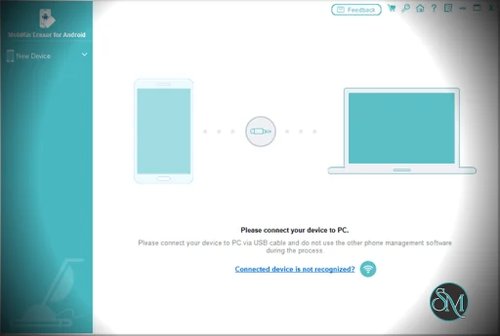
The application runs on Windows and macOS and connects to Android devices through USB or Wi-Fi. Its straightforward interface makes it accessible to less technical users, although connecting a phone may require enabling USB debugging and installing device drivers.
Features
Erase All Android Data
MobiKin Eraser for Android can erase multiple categories of information from a connected device, including:
Contacts and text messages.
Call logs and other communication records.
Photos, videos, and music.
Applications and supported documents.
Notes, books, and other personal files.
Account information, browsing history, and other private data.
The software is designed for users who want to prepare an Android device for a new owner without manually deleting individual files.
However, the exact data removed depends on the device, Android version, and the software's access to the relevant storage. Users should not assume that every application account, cloud-synchronized record, or protected system partition is automatically erased.
Erase Deleted Files
Deleting a file does not always mean that its underlying data has been securely erased. MobiKin provides an erasure process intended to overwrite deleted data and make recovery more difficult.
This feature is particularly relevant when preparing a used phone for resale or disposal.
Its effectiveness depends on the device's storage technology and implementation. Modern Android devices commonly use flash storage with wear leveling and encryption, so conventional overwriting cannot guarantee that every physical storage location has been sanitized. Users handling highly sensitive information should verify the device manufacturer's recommended secure-erasure procedure.
Three Security Levels
MobiKin provides three erasure levels:
Low Level: A faster erasure process intended for less demanding requirements.
Medium Level: An additional overwriting process intended to make data recovery more difficult.
High Level: Performs three overwriting passes according to the developer's documentation.
The higher level is designed for users who want additional overwriting, although more passes do not automatically guarantee better sanitization on modern flash storage.
For everyday device handovers, the appropriate choice depends on the device's encryption and storage implementation as well as the sensitivity of the information being removed.
Erase Private Information
The software targets personal information that may remain on a phone, including account details, passwords, transaction records, financial information, search history, and browsing history.
This makes it relevant to users concerned about exposing personal information when transferring ownership of a device.
The extent of removal depends on where the information is stored and whether the application can access it. Data stored in cloud services or remote accounts must be managed separately.
USB and Wi-Fi Connections
MobiKin supports connecting Android devices to a computer through USB or Wi-Fi.
For USB connections, users may need to enable USB debugging, authorize the computer, and install the required drivers. The software can also install its companion Android application as part of the connection process.
For Wi-Fi connections, the phone and computer must be on the same network, and the companion application is used to establish the connection.
USB is a practical choice when a stable connection is important. Wi-Fi offers an alternative when a suitable cable is unavailable, although network configuration can introduce additional troubleshooting steps.
Erasure Reports
MobiKin can save an erasure report after completing the process. According to the developer, the report includes device details, the selected security level, the number of overwriting passes, the erasure method, and the result.
This is useful for keeping a record of a device-cleaning operation, particularly when preparing multiple phones for resale or disposal.
An erasure report documents the software's reported process. It should not be treated as independent proof that every physical storage location has been irrecoverably sanitized.
Windows and macOS Support
MobiKin Eraser for Android is available for Windows and macOS. Both versions provide a desktop interface for connecting an Android device, selecting an erasure level, and initiating the operation.
The software supports a broad range of Android manufacturers, although compatibility can vary by model and operating system. Testing the free trial with the intended device before purchasing is a sensible precaution.
Performance and Compatibility
MobiKin Eraser for Android uses a guided workflow that reduces the number of steps required to initiate an erasure. Once the device is recognized, users can select a security level and start the process from the desktop interface.
Actual processing time depends on the phone, the amount of data, the connection method, and the selected erasure level. The developer does not establish a universal completion time for every device.
Compatibility is an important consideration. Android USB connections may require debugging permissions and driver installation, while wireless connections depend on the local network and companion application.
The software's claims about making data unrecoverable should also be evaluated carefully. Modern Android devices frequently use encryption, and flash storage controllers manage physical writes in ways that make conventional overwriting an imperfect guarantee of secure sanitization.
For many modern phones, a correctly implemented factory reset that securely discards encryption keys can be an effective way to protect previously stored data. Follow the device manufacturer's guidance, remove associated accounts when appropriate, and verify the reset procedure before handing the device to someone else.
MobiKin may be useful for additional data-erasure workflows, but its overwrite-pass count alone should not be interpreted as proof of stronger security than a properly implemented device reset.
System Requirements
MobiKin Eraser for Android supports the following environments according to its published specifications:
Windows: Windows 7, 8, 10, and 11.
macOS: macOS 10.10 or later.
Android: Compatible Android phones and tablets. The current product page lists Android 6 and later, including Android 17.
Processor: Intel or AMD processor at 750 MHz or faster on Windows.
Memory: At least 512 MB of RAM according to the published Windows requirements.
Storage: At least 1 GB of available disk space.
Actual compatibility depends on the phone model, Android release, USB drivers, and connection method. These published minimum requirements are modest, but users should verify compatibility with their specific device before purchasing.
Pros and Cons
Pros
Erases multiple categories of Android personal information.
Includes a workflow for erasing deleted data.
Offers three erasure levels.
Supports USB and Wi-Fi connections.
Available for Windows and macOS.
Provides an erasure report after processing.
Uses a guided interface that is accessible to less technical users.
Useful when preparing Android phones for resale, donation, or disposal.
Cons
Full erasure functionality requires a paid license.
The free trial does not provide the full data-wiping functionality.
USB connections may require debugging permissions and driver installation.
Device compatibility can vary between Android models.
Overwriting cannot guarantee that every physical flash-storage location has been sanitized.
Erasure reports do not independently verify the security of the underlying storage.
Does not erase information stored remotely in cloud accounts or online services.
How to Install
Step 1: Download MobiKin Eraser for Android
Visit the official MobiKin website and download the Windows or macOS installer.
Install the application and launch it on your computer.
Step 2: Connect Your Android Device
Connect the phone to the computer using a USB cable.
If prompted, enable USB debugging in Android's developer settings and authorize the computer. Allow the application to install the required drivers or companion application if necessary.
Alternatively, use the supported Wi-Fi connection method. Ensure that the phone and computer are connected to the same network.
Step 3: Select the Security Level
Once the application recognizes the phone, review the connected device and choose an erasure level.
Select the level appropriate for your needs, keeping in mind that additional overwriting passes do not guarantee complete sanitization of every physical flash-storage location.
Step 4: Confirm the Erasure
Back up any information you want to keep before proceeding.
Follow the application's confirmation prompts to initiate the erasure. Carefully review the selected device because the process is intended to destroy personal data and may be irreversible.
Step 5: Complete the Process
Keep the phone connected until the software reports completion.
Save the erasure report if you need a record of the operation. If you are preparing the phone for a new owner, follow the manufacturer's recommended factory-reset procedure and confirm that the device is ready for initial setup.
Final Verdict
MobiKin Eraser for Android offers a straightforward way to manage data removal from Android phones through a Windows or macOS computer. Its guided interface, three erasure levels, USB and Wi-Fi connections, and report-generation feature make it accessible to users preparing devices for resale or disposal.
Its main limitation is the distinction between overwriting data and guaranteeing secure sanitization. Modern flash storage and Android encryption complicate traditional overwrite-based erasure, so the number of passes alone is not a reliable measure of security.
For ordinary users who want a guided desktop utility, MobiKin Eraser for Android is worth considering. However, users should test device compatibility before purchasing and consult the manufacturer's secure-reset guidance when protecting sensitive information.