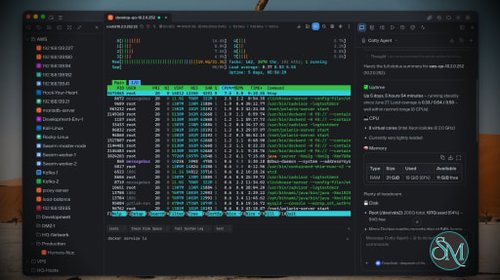
Netcatty is an open source SSH client and remote server management application designed for developers, DevOps engineers, and system administrators. Rather than being a simple terminal emulator, it combines SSH, SFTP, port forwarding, terminal management, and workspace organization into a single desktop application. Available for Windows, macOS, and Linux, Netcatty aims to streamline remote server administration with a modern interface and powerful productivity features.
Managing multiple remote servers often means juggling several terminal windows, file transfer tools, and SSH configurations. Netcatty brings these tasks together into one application with organized workspaces, split terminals, and integrated file management.
Unlike traditional SSH clients that focus solely on terminal access, Netcatty provides a complete remote administration environment with support for SSH, Telnet, Mosh, serial connections, SFTP, jump hosts, proxy servers, and port forwarding.
Key Features of Netcatty
Modern SSH Workspace
Netcatty organizes servers into a built-in Vault, allowing users to manage large numbers of hosts using grid, list, or tree views with fast search capabilities. This makes navigating complex infrastructures much easier than maintaining separate configuration files.
Split Terminal Support
Multiple terminal sessions can be displayed simultaneously using horizontal and vertical split layouts. This is especially useful when monitoring several servers or comparing outputs side by side.
Built-In SFTP Client
The integrated SFTP browser supports drag-and-drop file transfers, remote file editing, and directory management without requiring a separate application.
Multiple Connection Protocols
In addition to SSH, Netcatty supports Telnet, Mosh, and serial connections. It also includes support for jump hosts, proxy servers, and legacy SSH algorithms for compatibility with older systems.
Port Forwarding
The application supports local, remote, and dynamic port forwarding with reusable configurations and automatic startup, making it suitable for development, database access, and secure tunneling.
Secure Authentication
Netcatty supports password authentication, SSH keys, certificates, and SSH agent forwarding, providing flexibility for both personal and enterprise environments.
Cloud Configuration Sync
Users can synchronize their configuration across multiple devices using supported cloud storage providers such as GitHub, Google Drive, OneDrive, or Amazon S3.
AI Assistant
Recent versions include an integrated AI assistant that helps automate terminal workflows and assists with remote administration tasks directly within the application.
Download Netcatty v1.1.83 - Software Mirrors |
|---|
Netcatty v1.1.83 for WindowsNetcatty-1.1.83-portable-win-x64.exe | 129.85 MB Netcatty-1.1.83-win-x64.exe | 130.08 MB Netcatty-1.1.83-win-x64.zip | 178.42 MB |
Netcatty v1.1.83 for macOSNetcatty-1.1.83-mac-arm64.dmg | 147.9 MB Netcatty-1.1.83-mac-arm64.zip | 148.01 MB Netcatty-1.1.83-mac-x64.dmg | 153.06 MB Netcatty-1.1.83-mac-x64.zip | 153.21 MB |
Netcatty v1.1.83 for LinuxNetcatty-1.1.83-linux-aarch64.pacman | 104.14 MB Netcatty-1.1.83-linux-aarch64.rpm | 151.51 MB Netcatty-1.1.83-linux-amd64.deb | 154.5 MB Netcatty-1.1.83-linux-arm64.AppImage | 154.88 MB Netcatty-1.1.83-linux-arm64.deb | 151.56 MB Netcatty-1.1.83-linux-x64.pacman | 110.99 MB Netcatty-1.1.83-linux-x86_64.AppImage | 156.94 MB Netcatty-1.1.83-linux-x86_64.rpm | 154.47 MB |
Netcatty v1.1.83 Release Notes: ✨ Release Highlights
Netcatty v1.1.83 adds cross-tab broadcast input and note references for AI, makes SFTP browsing and transfers more dependable, and improves terminal responsiveness, SSH reconnects, and system identification.
📂 SFTP browsing and transfer reliability
- Choose a compact file list, rename and reorder bookmarks, and open a host directly in the dual-pane SFTP browser. Folder scans and uploads with many small files also receive performance improvements (#3245).
- Pause and resume behavior is more consistent across large-file transfers, folder downloads, and transfer views. Delayed controls no longer override a newer pause, and ambiguous or changed endpoints are rejected when resuming (#3226, #3284, #3285, #3291, #3305).
- Transfers better protect files created concurrently and preserve existing permissions when replacing remote files. Aborted SFTP channel opens no longer tear down a shared SSH connection (#3202, #3286, #3288).
- SFTP side panels retain each terminal's directory and filter independently, with fixes for drag-and-drop routing and privileged-shell workflows (#3232, #3239, #3241, #3296).
🖥️ Terminal input, history, and responsiveness
- Broadcast input across multiple tabs, with a follow-up fix to prevent duplicated keypress text (#3275, #3292).
- Inactive terminal panes skip unnecessary painting, while scrolling and resizing better preserve your reading position (#3283, #3300).
- Alternate-screen history previews preserve full-width rows and row boundaries; autocomplete positioning and IME punctuation handling receive focused fixes (#3165, #3204, #3297, #3304, #3164).
- Windows modified-Enter handling and shell discovery are improved, and ZMODEM uploads and downloads use faster transfer paths (#3247, #3281, #3147).
🤖 AI context and system identification
- Use Context → Mention Note to search and reference Vault Notes in AI conversations. References keep the exact note identity, and supported agents can read current content in bounded sections (#3290).
- AI command execution detects the active terminal shell, including nested fish sessions, while keeping helper commands out of Bash history. Request compression better preserves the user's original text (#3262, #3267, #3298, #3303).
- Host systems default to automatic identification, with manual correction tucked into Device Type settings. AI uses the selected or detected system; cosmetic icons do not change it, and unknown systems remain unknown. Temporary connections and Mosh are included (#3312).
📝 Notes and desktop improvements
- Notes containing numeric comparisons render normally. Unsupported rich Markdown falls back to editable source instead of appearing blank, and autocomplete popups stay within view (#3175, #3215, #3277).
- A new Launch at login option starts Netcatty in the tray on supported systems. HTML session logs adapt to light and dark themes, and the tray panel keeps its intended height (#3238, #3264, #3209).
- Import supported saved MobaXterm credentials from
.mobaconf exports, and resume automatic sync after the first master-key setup (#3045, #3302).
🔌 Connections and port forwarding
- SSH reconnects and new sessions refresh login information, with fixes for stored-key credential loading and concurrent session joins (#3203, #3234, #3294).
- Duplicate a terminal into a fresh connection when needed. Port forwarding gains Start all / Stop all, and auto-start rules recover after becoming inactive (#3222, #3180, #3279).
Download based on your OS:
- Windows:

- macOS:
 
Code signing policy
Netcatty is applying to the SignPath Foundation open-source program. Once
approved, covered Windows release artifacts will use Free code signing provided by SignPath.io, certificate by SignPath Foundation.
See the
Code signing policy
and Privacy policy.
What's Changed- Update Nix release metadata for v1.1.82 by @netcatty-bot in #3136
- fix(i18n): correct the zh-TW SFTP file name label by @LaiYueJi in #3161
- fix(terminal): recover the stuck IME punctuation deferral that swallows subsequent input by @binaricat in #3164
- fix(terminal): scrollable history preview inside the alternate screen by @binaricat in #3165
- fix(terminal): send IME commits and short pastes per character by @binaricat in #3168
- fix: strip zero-width characters from terminal input (#3138) by @keroroyuki in #3156
- ci: replace Cursor GitHub automation with Claude Code by @binaricat in #3177
- [Bug] Restore AI automation YAML so issue triage registers by @binaricat in #3182
- [Bug] Copy AI helper into RUNNER_TEMP so triage can route by @binaricat in #3183
- fix(ai): do not report Cursor installed from bundled SDK by @binaricat in #3178
- fix(app-lock): allow whitespace-only passwords by @lswzw in #3150
- fix(snippets): add package context menu for rename and delete by @binaricat in #3179
- feat(port-forwarding): add start all and stop all actions by @binaricat in #3180
- feat(zmodem): accelerate upload and download transfers by @lswzw in #3147
- fix(cloud-sync): confirm provider disconnect before stopping sync by @saltand in #3189
- [Bug] Let Claude Code classify issues by dropping unsupported JSON Schema draft by @binaricat in #3190
- fix(ai-settings): add MCP onboarding prompt and skill file guidance to Tool Access by @netcatty-bot in #3192
- fix(terminal): clear Windows command hints correctly when the host OS flag is mislabeled by @netcatty-bot in #3191
- fix(ssh): self-terminate abandoned remote probes to cut CPU on slow hosts by @netcatty-bot in #3193
- fix(settings): render large font dropdowns incrementally to stop UI freeze by @netcatty-bot in #3196
- fix(notes): keep unrenderable markdown visible in the notes editor by @binaricat in #3175
- fix(sftp): recover when temp directory inode is replaced by @binaricat in #3176
- fix(terminal): skip autocomplete live preview on network devices by @binaricat in #3201
- fix(sync): stop SSH connects from dirtying WebDAV auto-sync by @binaricat in #3200
- fix(sftp): restore remote mode after replace upload by @binaricat in #3202
- fix(terminal): keep autocomplete popup on the wrapped command start by @binaricat in #3204
- fix(vault): wait for stored-key decrypt before reconnect auth by @binaricat in #3203
- feat(vault): import saved MobaXterm passwords from .mobaconf by @binaricat in #3045
- fix(terminal-worker): keep one stray async error from killing every session by @netcatty-bot in #3208
- chore: update star history charts by @github-actions[bot] in #3216
- fix(notes): render numeric comparisons without changing source by @binaricat in #3215
- fix(sftp): add breadcrumb go-to-root button beside home icon by @netcatty-bot in #3212
- fix(tray): restore full panel height through the app lock wrapper by @netcatty-bot in #3209
- fix(ssh): connect PuTTY-style CLI launches into the running instance by @netcatty-bot in #3220
- fix(cli): release password-bearing second-instance argument copies by @binaricat in #3223
- fix(terminal): add duplicate-session option that opens a fresh connection by @netcatty-bot in #3222
- fix(ai): keep resumed terminal chats visible after merge by @binaricat in #3225
- fix(sftp): keep bulk queues and large-file resume responsive by @binaricat in #3226
- fix(sftp): preserve cwd tracking for concurrent terminals by @binaricat in #3234
- fix(sftp): keep side panel directory and filter across terminal tab switches by @netcatty-bot in #3232
- fix: make terminal drag uploads route-safe by @binaricat in #3239
- fix: elevate /root drops after sudo -i by @binaricat in #3241
- feat(settings): launch at login and start minimized to the system tray by @ice616 in #3238
- [Bug] Preserve modified Enter keys in local Windows TUIs by @binaricat in #3247
- fix(vault): make host OS metadata settable end to end by @JasonWenTheFox in #3257
- fix(workspace): auto-name merged tab workspaces from both tab labels by @netcatty-bot in #3250
- fix(vault): sync managed ssh_config with latest host edits by @netcatty-bot in #3260
- fix(ai): run Responses API turns stateless to stop rs_ item replay errors by @netcatty-bot in #3251
- fix(ai): avoid idle PowerShell clear corruption by @JasonWenTheFox in #3253
- feat(sftp): bookmarks, compact list, dual-pane entry, and faster folder scans by @binaricat in #3245
- fix(ai): make the command blocklist shell-aware by @JasonWenTheFox in #3258
- fix(window): restore main window position when a secondary display returns after lock by @netcatty-bot in #3246
- fix(terminal): keep line timestamps on preserved scrollback after reconnect by @netcatty-bot in #3268
- Feature/broadcast mode for multiple tabs by @Meow-Emperor in #3275
- fix(terminal): color the viewport in-frame on bulk keyword-highlight bypass by @netcatty-bot in #3272
- fix: prevent Notes autocomplete popup clipping by @binaricat in #3277
- fix(ai): detect the active terminal shell before command execution by @netcatty-bot in #3262
- fix(terminal): accept WindowsApps execution aliases in shell discovery by @CNHLAIA in #3281
- fix(ai): keep agent wrapper out of bash history to stop arrow-key residue by @netcatty-bot in #3267
- fix(port-forwarding): reconnect auto-start rules after inactive status by @atirna in #3279
- perf(terminal): skip painting inactive terminal panes by @binaricat in #3283
- fix(sftp): refuse ambiguous or replaced resume endpoints by @binaricat in #3285
- fix(sftp): settle folder children before history compaction removes their rows by @binaricat in #3287
- fix(sftp): preserve shared SSH connections on transfer cancellation by @binaricat in #3288
- fix(sftp): preserve latest pause across delayed transfer controls by @binaricat in #3284
- fix(sftp): preserve concurrent files during local publication by @binaricat in #3286
- fix(logs): adaptive light/dark theme for HTML session logs by @netcatty-bot in #3264
- chore: update star history charts by @github-actions[bot] in #3307
- fix(sftp): settle direct folder downloads after pause and resume by @binaricat in #3291
- fix(terminal): avoid duplicate broadcast keypress text by @binaricat in #3292
- fix(settings): restore AI detection after effect replay by @binaricat in #3295
- fix(sftp): preserve browsed paths across tab snapshot transitions by @binaricat in #3296
- fix(ai): keep live shell probes out of Bash history by @binaricat in #3298
- fix(ssh): keep remote watchdog alive until blocked children are stopped by @binaricat in #3301
- fix(sync): resume auto-sync after first master-key setup by @binaricat in #3302
- fix(ai): preserve exact user text during request compression by @binaricat in #3303
- fix(terminal): keep full-width history preview rows visible by @binaricat in #3304
- fix(sftp): share pending resume feedback across transfer views by @binaricat in #3305
- fix(ci): permit exact research helper paths in Claude automation by @binaricat in #3306
- fix(terminal): preserve row boundaries in alternate history preview by @binaricat in #3297
- fix(ssh): refresh login on new sessions and reconnects by @netcatty-bot in #3294
- fix(terminal): keep reading position across fit resize and settled output by @netcatty-bot in #3300
- feat(ai): add Mention Note context picker for Vault Notes by @netcatty-bot in #3290
- fix: unify host system detection and simplify host details by @binaricat in #3312
- fix(build): correct macOS signing keychain password by @binaricat in #3315
New Contributors- @keroroyuki made their first contribution in #3156
- @lswzw made their first contribution in #3150
- @saltand made their first contribution in #3189
- @JasonWenTheFox made their first contribution in #3257
- @Meow-Emperor made their first contribution in #3275
- @CNHLAIA made their first contribution in #3281
- @atirna made their first contribution in #3279
Full Changelog: v1.1.82...v1.1.83
|
Performance and User Experience
Netcatty delivers a polished desktop experience with a clean interface and responsive terminal performance. Workspace restoration allows users to resume previous sessions after restarting the application, reducing setup time for daily work.
Although the application is built with Electron, performance is generally smooth on modern hardware. Memory usage is higher than lightweight native SSH clients, but the added functionality justifies the additional resource consumption for most professional users.
The project is actively maintained, with frequent updates introducing new features, performance improvements, and bug fixes.
Pros
Free and open source.
Modern interface with workspace management.
SSH, SFTP, Telnet, Mosh, and serial support.
Split terminal layouts.
Built-in SFTP browser.
Flexible port forwarding.
Secure authentication options.
Cross-platform support.
Active development.
Cons
Electron-based application uses more memory than native SSH clients.
Advanced features may be unnecessary for users who only need basic SSH access.
Some enterprise users may prefer highly specialized commercial SSH management tools.
Who Should Use Netcatty?
Netcatty is an excellent choice for developers, DevOps engineers, cloud engineers, system administrators, security professionals, and IT consultants who regularly manage multiple remote servers.
It is particularly valuable for users looking to replace separate SSH clients, SFTP applications, and terminal windows with a unified workspace.
Final Verdict
Netcatty is far more than a traditional SSH client. By combining terminal management, secure file transfers, workspace organization, port forwarding, and modern productivity features into one application, it offers an impressive environment for remote server administration.
Its clean interface, broad protocol support, and active development make it one of the most compelling open source SSH workspaces currently available. For professionals managing remote infrastructure on a daily basis, Netcatty is well worth considering.