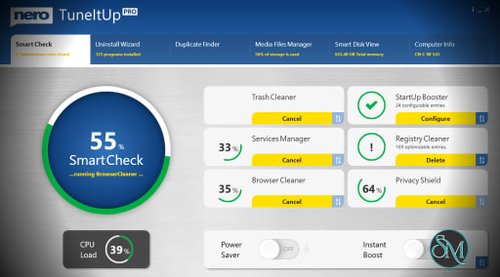



Nero TuneItUp FREE is a free Windows maintenance application that helps users remove junk files, optimize startup behavior, and perform routine cleanup tasks.
The software focuses on:
Temporary file cleanup
Browser cleanup
Startup management
Storage optimization
Basic privacy cleanup
System health monitoring
Unlike the paid version, the FREE edition is designed primarily for manual maintenance rather than continuous optimization.
Nero TuneItUp FREE is the free edition of Nero's PC optimization software, designed to help Windows users clean unnecessary files, manage startup programs, and perform basic system maintenance. While it lacks some of the automation and advanced features found in the PRO version, it provides a straightforward way to improve system organization and reclaim storage space.
For users looking for an easy-to-use maintenance utility without spending money, Nero TuneItUp FREE offers a practical entry point into PC optimization.
More Products From Nero AG | |
|---|---|
Search Nero Products with Discount Coupon from Software Mirrors... | |
Key Features of Nero TuneItUp FREE
Junk File Cleanup
The software scans for temporary files, cached data, logs, and other unnecessary files that accumulate during normal Windows usage.
Removing these files can help recover storage space and reduce clutter.
Startup Program Management
Users can view applications that automatically launch when Windows starts and disable unnecessary entries to potentially improve boot times.
Browser Cleaning
Nero TuneItUp FREE can remove browser cache files, cookies, and temporary internet data from supported web browsers.
Basic Privacy Cleanup
The software includes tools for clearing certain usage traces and temporary records that accumulate during daily computer activity.
Simple System Overview
Users can quickly view system status information and receive recommendations regarding potential maintenance tasks.
User Experience
Nero TuneItUp FREE is designed for simplicity.
The interface is clean, easy to navigate, and suitable for users with little technical experience. Most maintenance operations can be completed with just a few clicks, and the software provides clear explanations for common optimization tasks.
The learning curve is minimal, making it accessible to casual users who simply want to keep their PCs organized.
Performance and Effectiveness
The software performs well for basic maintenance activities such as:
Cleaning temporary files
Freeing storage space
Managing startup applications
Removing browser clutter
Users with older computers may notice modest improvements in startup speed and overall responsiveness after cleaning accumulated junk files and reducing unnecessary startup programs.
However, expectations should remain realistic. Modern versions of Windows already include many built-in maintenance features, so dramatic performance gains are uncommon.
The greatest benefit comes from simplifying routine system housekeeping.
Free vs PRO Version
The biggest difference between the FREE and PRO editions is automation.
The PRO version adds features such as:
Automatic optimization
Real-time monitoring
Advanced cleanup capabilities
Enhanced maintenance scheduling
The FREE edition focuses primarily on manual cleanup and optimization tasks.
For many casual users, the free version provides enough functionality for occasional maintenance.
Resource Usage
Nero TuneItUp FREE is relatively lightweight.
When not actively scanning or cleaning, the software has minimal impact on system resources and runs comfortably on most modern Windows systems.
Safety and Reliability
The software generally follows a conservative approach to cleanup and optimization.
Rather than making aggressive system modifications, it focuses on removing unnecessary files and managing startup entries.
This reduces the risk of system instability and makes it suitable for less experienced users.
Limitations
As a free utility, some advanced capabilities are reserved for the paid edition.
Additionally, many features overlap with tools already included in Windows, such as:
Storage Sense
Disk Cleanup
Startup Apps management
Browser privacy controls
Users comfortable with built-in Windows utilities may find less need for a dedicated optimization application.
Pros
Free to use
Easy-to-understand interface
Effective junk file cleanup
Useful startup management tools
Lightweight resource usage
Suitable for beginners
Safe and conservative optimization approach
Cons
Limited compared to the PRO version
Many features overlap with built-in Windows tools
Performance improvements are typically modest
Lacks advanced automation features
Some optimization recommendations may require upgrading
Who Should Use Nero TuneItUp FREE?
Nero TuneItUp FREE is best suited for:
Casual Windows users
Beginners
Users with older PCs
Individuals seeking simple cleanup tools
Users who prefer graphical maintenance utilities
It is particularly useful for people who want a convenient way to perform periodic system cleanup without relying solely on Windows settings menus.
Nero TuneItUp FREE provides a straightforward and user-friendly solution for basic Windows maintenance. While it does not offer revolutionary optimization capabilities, it delivers useful cleanup and startup management tools within a simple interface. For users seeking a free maintenance utility that simplifies routine housekeeping tasks, it remains a solid option.