

Icecream Ebook Reader is a Windows desktop application for reading and organizing digital books. It supports popular formats such as EPUB, MOBI, PDF, FB2, CBR, CBZ, TXT, and ZIP, making it a convenient choice for readers who keep books in different file formats.
The application focuses on reading comfort and library organization rather than ebook creation. Users can customize text appearance, switch to a dark reading mode, highlight passages, add notes, bookmark pages, and track reading progress. Its straightforward interface makes it accessible to casual readers, students, and anyone who wants a dedicated ebook reader on a Windows computer.
Icecream Ebook Reader offers a free edition with essential reading features and a paid PRO edition for additional functionality. However, it does not support DRM-protected ebooks, which is an important limitation for users who purchase books from digital bookstores or borrow titles from online libraries.
Buy Icecream Ebook Reader from Software Mirros - Discount 15% OFF
Icecream Ebook Reader PRO - Lifetime - Discount 15% Off
Icecream Ebook Reader PRO - Yearly - Discount 15% Off
Features
Support for Multiple eBook Formats
Icecream Ebook Reader supports several widely used ebook and document formats, including:
EPUB
MOBI
PDF
FB2
CBR and CBZ
TXT
ZIP
This broad compatibility allows users to manage different types of digital reading material in one application. Comic book formats such as CBR and CBZ are also supported.
However, DRM-protected content is not supported. Users should confirm that their ebooks are compatible before switching from another reading application.
Digital Library Management
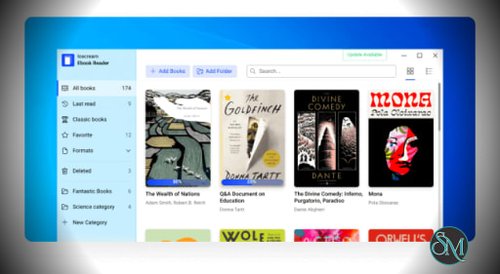
The built-in library helps users organize their ebook collections in one place. Books can be added individually, in bulk, or by selecting folders.
Users can create categories, mark favorites, search their library, and sort books using available filters. The application also provides a bookshelf-style view for browsing a collection visually.
These features are useful for readers who maintain a large collection of ebooks and want a more organized experience than opening files individually through File Explorer.
Bookmarks and Reading Progress
Icecream Ebook Reader tracks reading progress and provides bookmarks to help users return to specific sections of a book.
These features make it easier to continue reading across multiple sessions without manually remembering the last page. Progress tracking is particularly helpful when managing several books at once.
The software also provides navigation and in-book search tools, allowing users to find specific text or move to a particular page more quickly.
Notes and Text Highlighting
The application lets users highlight text and add notes to supported ebook formats. Notes can be searched and organized by text or color.
This is useful for students, researchers, and readers who want to collect important passages, record observations, or revisit key information later.
The annotation features make Icecream Ebook Reader more than a basic document viewer, although users should check format-specific support if they rely heavily on annotations.
Customizable Reading Experience
Icecream Ebook Reader provides several options for adjusting how books appear on screen.
Users can change font families, font sizes, line spacing, and other text settings. The application also supports single-page and double-page layouts, allowing readers to choose a presentation that suits their screen size and preferences.
A full-screen mode reduces distractions by giving the book more space on the display. Dark reading mode provides an alternative interface for reading in dim environments.
These options make the software adaptable to different reading habits and display configurations.
Text-to-Speech
Icecream Ebook Reader includes text-to-speech functionality that can read ebook content aloud using voices available through the operating system.
This feature can help users who prefer listening to text, want to rest their eyes, or need an alternative way to consume written material.
Voice quality and language availability depend on the speech voices installed on Windows. Text-to-speech should not be assumed to work equally well with every ebook layout or file format.
Search, Copy, and Translation
The built-in search feature helps users locate words, phrases, and specific sections within supported ebooks.
Users can also select text to copy it, translate it, or search for related information through Google or Wikipedia.
These tools are useful when reading technical material, studying unfamiliar topics, or researching references without repeatedly switching between applications.
Offline Reading
Icecream Ebook Reader is designed for local ebook reading. According to the developer, books remain stored on the user's computer, and the reader can work offline.
This is useful for people who prefer keeping their reading collections locally rather than relying on a cloud-based library.
However, users should distinguish offline reading from features that might require an internet connection, such as searching the web for selected text.
Performance and Compatibility
Icecream Ebook Reader is a lightweight desktop application designed for Windows. Its focus on reading and library management keeps the interface relatively straightforward, without the complexity of a full ebook publishing or editing suite.
The software supports Windows 11, Windows 10, and older Windows releases listed on its official product page. Its modest published hardware requirements make it accessible on many older computers.
Performance will depend on the size of the ebook collection, the complexity of individual documents, and the computer's available resources. Standard EPUB and text-based books should be straightforward to handle, while large PDFs and image-heavy comic books can require more resources.
The main compatibility limitation is the lack of DRM support. Even if a protected book uses a supported file extension, Icecream Ebook Reader may not be able to open it. Readers who depend on purchased or borrowed DRM-protected titles should verify compatibility with the publisher or library before choosing this application.
Another limitation is platform availability. The product is designed for Windows rather than providing a complete native reading experience across Windows, macOS, Linux, and mobile devices.
System Requirements
The official product page lists the following minimum requirements:
Operating system: Windows 11, Windows 10, Windows 8.1, Windows 8, or Windows 7.
Processor: Intel, AMD, or compatible processor running at 2.66 GHz.
Memory: 1 GB RAM minimum, with 2 GB recommended for better performance.
Display: Minimum resolution of 1280 × 720.
Disk space: Approximately 70 MB to 300 MB.
Check the official product page for the latest compatibility information before installing the software, particularly if you use an older Windows system.
Pros and Cons
Pros
Supports EPUB, MOBI, PDF, FB2, CBR, CBZ, TXT, and ZIP.
Provides a digital library with categories and favorites.
Tracks reading progress and supports bookmarks.
Includes text highlighting and note-taking.
Offers customizable fonts, spacing, and page layouts.
Provides dark mode and full-screen reading.
Includes text-to-speech using available Windows voices.
Supports in-book search and selected-text actions.
Offers a free edition for basic reading.
Can read locally stored ebooks offline.
Cons
Does not support DRM-protected ebooks.
Designed for Windows rather than offering broad native cross-platform support.
Some advanced features require the PRO edition.
Does not replace dedicated ebook authoring software.
Text-to-speech quality depends on installed system voices.
Library migration from other ebook readers has limitations.
How to Install
Visit the official Icecream Ebook Reader website.
Download the installer for Windows.
Run the installer and follow the setup instructions.
Launch the application after installation.
Add individual ebook files, import multiple books, or select folders containing your collection.
Choose a book and customize the font, layout, or reading theme as needed.
Use bookmarks, notes, highlights, and reading-progress tracking to organize your reading sessions.
Download the application from the official website to ensure you obtain the intended installer.
Final Verdict
Icecream Ebook Reader is a practical option for Windows users who want a simple application for reading and organizing digital books. Its broad format support, library management, bookmarks, annotations, text-to-speech, and customizable reading interface cover the needs of most casual readers.
Its main strength is convenience. Users can keep their ebooks in one library, adjust the reading experience, and return to books without relying on a complicated document-management workflow.
The most significant limitation is the lack of DRM support, which rules it out for some commercially purchased ebooks and library loans. Its Windows-focused design may also be unsuitable for readers who need to synchronize their libraries across multiple platforms.
For DRM-free ebooks and everyday reading on a Windows PC, Icecream Ebook Reader is worth trying. The free edition is a sensible starting point, while users who need additional library and annotation features can evaluate whether the PRO edition offers enough value.