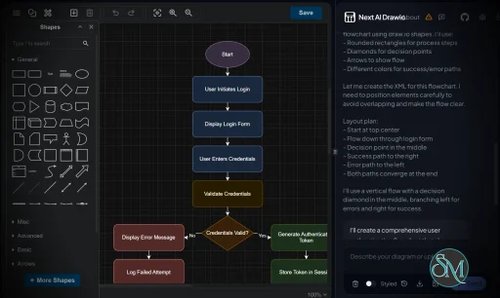
Next AI Draw.io is an open source application that brings AI-powered diagram generation to Draw.io (diagrams.net). It allows users to create flowcharts, architecture diagrams, UML diagrams, mind maps, sequence diagrams, and other visualizations using natural language prompts. Instead of manually placing shapes and connectors, users simply describe what they want, and the AI generates an editable Draw.io diagram.
Creating diagrams from scratch can be time-consuming, especially for software architecture, business processes, and technical documentation. Next AI Draw.io simplifies this process by combining large language models with the Draw.io file format, enabling users to generate professional diagrams in seconds.
Since the output is compatible with Draw.io, every generated diagram remains fully editable after creation.
Key Features of Next AI Draw.io
AI Diagram Generation
Users can describe a diagram in plain English, and Next AI Draw.io automatically generates a structured Draw.io diagram with connected shapes and proper layouts.
Multiple Diagram Types
The application supports generating various diagram styles, including:
Editable Draw.io Output
Unlike image-based AI diagram generators, the output is a native Draw.io diagram. Every object, label, and connector can be modified after generation.
AI Model Support
Next AI Draw.io supports multiple AI providers and can often be configured to work with cloud-based models or locally hosted large language models, giving users flexibility over privacy and operating costs.
Modern Web Interface
The interface is clean and easy to use. Users simply enter a prompt, choose the AI model if necessary, and generate diagrams without learning complicated syntax.
Open Source
Being open source allows developers to inspect the code, self-host the application, customize workflows, and contribute improvements to the project.
Download Next AI Draw.io v0.5.0 - Software Mirrors |
|---|
Next AI Draw.io v0.5.0 for WindowsNext.AI.Draw.io.0.5.0.exe | 464.44 MB Next.AI.Draw.io.Setup.0.5.0.exe | 464.66 MB |
Next AI Draw.io v0.5.0 for macOSNext-AI-Draw.io-0.5.0-arm64-mac.zip | 307.15 MB Next-AI-Draw.io-0.5.0-arm64.dmg | 304.18 MB Next-AI-Draw.io-0.5.0-mac.zip | 314.23 MB Next-AI-Draw.io-0.5.0.dmg | 311.24 MB |
Next AI Draw.io v0.5.0 for Linuxnext-ai-draw-io-0.5.0.aarch64.rpm | 177.65 MB next-ai-draw-io-0.5.0.x86_64.rpm | 183.14 MB next-ai-draw-io_0.5.0_amd64.deb | 238.9 MB next-ai-draw-io_0.5.0_arm64.deb | 234.03 MB Next-AI-Draw.io-0.5.0-arm64.AppImage | 318.86 MB Next-AI-Draw.io-0.5.0.AppImage | 318.32 MB |
Next AI Draw.io v0.5.0 Release Notes: What's New in v0.5.0
The first release since May. The web UI is rebuilt around the canvas, draw.io is bundled with the app, the settings dialog is redone, and the MCP server reaches feature parity with the web app. Desktop users get every fix that landed on main over the last five months.
New Features
- Canvas-first UI with a bundled draw.io: the canvas fills the window and the chat floats on its right. draw.io v32.0.2 is served from the app's own origin (no separate draw.io container, works offline), so the app drives the editor directly: every AI change is a version card with a thumbnail that can be compared, restored or undone; an AI change is one Ctrl+Z step; changed shapes are highlighted; selected shapes are sent to the model; draw.io's own toolbar, menus (auto layout, Mermaid, CSV import) and page tabs are available. New start screen, session rename and switcher, and opening
.drawio files (#957, #962)
- Settings dialog rebuilt: tabs for Models, General, Drawing and About. Adding a provider is three numbered steps (connection, models, test), with a searchable provider picker, one status line per provider, Bedrock sign-in by API key or access keys with a session token, and a model picker that lists every model as working, untested or failed (#958)
- MCP server 0.3.0, feature parity with the web app: the drawing guide and 30 icon libraries over MCP,
screenshot_diagram for visual checks, all-or-nothing edit_diagram, sessions auto-saved to .drawio files (DRAWIO_DATA_DIR), preview themes and dark mode, editable SVG export. The web app now reuses the MCP server's diagram code (#951)
- Multi-page documents in the MCP server:
add_page, edit a page by id, name or index, export specific pages (#862)
load_diagram MCP tool: load a .drawio file from disk into the session, including draw.io's compressed format (#893)
- Admin panel at
/admin: manage server settings in a web UI instead of environment variables, enabled by setting ADMIN_PASSWORD; secrets are masked, serverless hosts get a read-only view (#866). Its copy is rewritten in plain words in all four languages (#963)
- Model lists and catalog: 18 providers can fetch their model list into a searchable picker; a models.dev snapshot flags models without tool calls, which cannot draw; the Test button checks all models at once and shows response times (#951)
- New providers: AIHubMix (#865), Atlas Cloud (#896) and MiMo by Xiaomi (#887); MiniMax default model upgraded to M3 (#857)
- Comma-separated
AI_MODEL: AI_MODEL=a,b,c is enough for a quick multi-model server setup (#870)
- Quota by the CDN's client IP:
CLIENT_IP_HEADER and ORIGIN_SECRET stop quota bypass through a faked X-Forwarded-For header (#956)
Improvements
- Claude 4.7 and later, GPT 6: requests retry without sampling settings and with adaptive thinking on models that reject
temperature; GPT 6 models show their reasoning; suggested models updated to Claude 5 and GPT 6; Bedrock model ids fixed to use inference profiles (#951)
- Provider error hints: provider errors are classified into 12 kinds, each with a hint the user can act on and an "Open model settings" button (#951). When the server's own key is refused, the chat shows a quota hint instead of two unhelpful lines (#953)
- Output token budget:
maxOutputTokens is always sent (#915) and the default is raised to 64000 with a retry at the provider's limit, so reasoning models reach the tool call instead of ending without a diagram (#927)
- Self-hosted deployments: the MCP server card is hidden when
NEXT_PUBLIC_SELFHOSTED is true (#711); ANTHROPIC_AUTH_TOKEN is accepted as an alternative to ANTHROPIC_API_KEY (#853); suggested models refreshed for all providers (#863); env.example lists every provider (#881)
- Accessibility: the viewport no longer blocks pinch zoom on phones (#881)
Security
- SSRF in
/api/parse-url: private and internal URLs are blocked (#845), including private IPv6 (#858), DNS rebinding and redirects (#878). Advisory GHSA-wqcv-5qvx-vx75
- MCP preview page XSS: the session id is validated and the history panel no longer uses
innerHTML (#951). Advisories GHSA-jx8r-j32j-q3mq and GHSA-rv7m-56x2-7q2c
- Chat route hardening: file parts only accept
data: URLs, server credentials only run server models, a client base URL for Vertex only works with the client's own key; helper routes share the access code check and have body size limits (#951)
- Admin settings: the settings file target is validated before it is reported writable (#894)
- Dependencies: vulnerable packages updated (#804), esbuild security update (#867)
Bug Fixes
- Image input: the name-based "model does not support images" check is removed, so vision-capable models such as Qwen and Kimi are no longer blocked (#326, #877); DeepSeek V4 Vision receives images after the SDK update (#934, #951)
- MCP exports: export replies are tagged by request, so an autosave SVG is never saved as the PNG export and parallel page exports no longer write the wrong image (#795, #951)
- Model test: validation uses the same client as chat, including Azure OpenAI's
createAzure, and its output budget is raised from 20 to 1024 tokens so models that think before answering pass the test (#820, #884, #951)
- Ollama: chat requests go to Ollama's
/api path again (#954); the desktop server bypasses the system proxy for localhost (#951)
- Multi-page diagrams: autosave, history and
.drawio download keep every page after an export (#895)
- Stop button: a stop or a closed tab reaches the provider even after a garbage collection pause (#965)
- Streaming edits: cut-off cell XML is refused in
edit_diagram operations, so the canvas no longer jumps out of view while an edit streams (#960)
- MCP
edit_diagram freshness: the 30 second time gate is replaced by a content comparison (#890)
- Sessions and canvas: restoring a session no longer replays the last drawing over the saved diagram, a failed or stopped edit restores the canvas, XML repair no longer corrupts valid diagrams, storage errors are reported and chats are never deleted silently (#951)
- Chat input: template dialogs no longer send the message, sending waits for file extraction, an IME Enter no longer sends (#951)
- Desktop app: API keys are decrypted after
ready so Windows and Linux get them, config writes are atomic with a backup of a corrupt file, navigation away from the app is blocked (#951)
- Bedrock: tool streaming works under Zod v4 (#860)
- Model selector: long labels no longer overflow (#910)
- Validation retry: the retry counter is cleaned up when the visual check throws (#881)
Developer Experience
- E2E tests run in six shards (#959); the MCP server is published to npm through OIDC trusted publishing (#891); the Docker image carries provenance and SBOM attestations (#902)
- Biome pinned and
public/ excluded from formatting (#869, #912); the MCP package check reads npm 12's pack output (#952)
- Dependency updates (#856, #903, #904, #932, #948); the unused
base-64 dependency is removed (#881)
Documentation
- README restructured around the new promo video (#961); LM Studio with the OpenAI provider (#897); Atlas Cloud sponsorship (#919); a new example drawing (#966)
Contributors
Downloads
⚠️ Note: The app is not code-signed on macOS. You may see security warnings:
- macOS: "App is damaged": right-click the app, choose Open, then Open again, or run: sudo xattr -rd com.apple.quarantine "/Applications/Next AI Draw.io.app"</blockquote>
- Windows: Code-signed with SignPath
Full Changelog: v0.4.16...v0.5.0
|
Performance and User Experience
Next AI Draw.io provides a smooth experience, especially for users already familiar with Draw.io. Diagram generation is typically fast, depending on the selected AI model.
Generated diagrams generally require only minor adjustments, significantly reducing the time needed to create technical documentation. More complex architecture diagrams may still benefit from manual refinement, but the AI provides an excellent starting point.
Because diagrams remain fully editable, users are not locked into AI-generated results.
Pros
Free and open source.
Generates editable Draw.io diagrams.
Supports multiple diagram types.
Natural language prompt interface.
Compatible with various AI models.
Self-hosting support.
Saves significant time when creating documentation.
Cons
Diagram quality depends on prompt clarity.
Complex diagrams may require manual adjustments.
AI model configuration may require technical knowledge.
Performance depends on the selected AI provider or local hardware.
Who Should Use Next AI Draw.io?
Next AI Draw.io is ideal for software developers, solution architects, DevOps engineers, system administrators, technical writers, students, educators, and business analysts who frequently create diagrams.
It is especially valuable for teams already using Draw.io for software architecture, infrastructure documentation, or workflow visualization.
Final Verdict
Next AI Draw.io successfully combines the flexibility of Draw.io with the productivity of AI-generated diagrams. Its ability to transform natural language into fully editable diagrams can dramatically reduce the time spent creating technical documentation and planning system architectures.
Although complex projects may still require manual refinement, the generated diagrams provide an excellent foundation for further editing. For anyone who regularly works with Draw.io, Next AI Draw.io is a powerful productivity tool worth exploring.