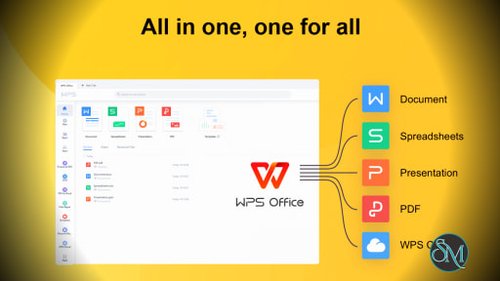



WPS Office is a popular all-in-one productivity suite that combines word processing, spreadsheets, presentations, and PDF tools in a single application. It aims to provide a familiar alternative to Microsoft Office while adding cloud synchronization, collaboration features, templates, and AI-powered tools.
One of its biggest advantages is its broad platform support. WPS Office is available for Windows, macOS, Linux, Android, and iOS, making it easy to move between computers, phones, and tablets.
WPS Office is built around four main components: Writer, Spreadsheet, Presentation, and PDF. The suite supports common Microsoft Office formats including DOCX, XLSX, and PPTX, allowing users to work with existing Office documents without needing Microsoft's software.
The interface will feel familiar to anyone who has used Microsoft Office. This makes the transition relatively easy, especially for students, home users, and businesses looking for an alternative office suite.
WPS Office has also expanded beyond traditional office software. Its current offering includes AI assistance, cloud documents, real-time collaboration, PDF editing, templates, and image tools.
Buy KINGSOFT Office Software with Discount Coupon
WPS Office Premium (File Recovery, Photo Scanning, Convert PDF) - Yearly
WPS Office Premium (File Recovery, Photo Scanning, Convert PDF) - Quarterly
WPS Office Premium (File Recovery, Photo Scanning, Convert PDF)
WPS Office PDF Convert Tool - Quarterly
WPS Office PDF Convert Tool - Yearly
WPS Office Cloud Storage - Cloud Collaboration - Cloud Backup - Quarterly
WPS Office Cloud Storage - Cloud Collaboration - Cloud Backup
WPS Office Cloud Storage - Cloud Collaboration - Cloud Backup - Yearly
WPS Office Template(Office Template, Resume Builder) - Monthly
WPS Office Template(Office Template, Resume Builder) - Yearly
WPS Office for Mac (PDF Converter & PDF Editor) - Monthly
WPS Office for Mac (PDF Converter & PDF Editor) - Yearly
WPS Office for Mac (PDF Converter & PDF Editor ) - Quarterly
WPS Office for Mac (20G Cloud Storage & Cloud Collaboration & Backup ) - Quarterly
WPS Office for Mac (20G Cloud Storage & Cloud Collaboration & Backup ) - Yearly
WPS Office for Mac (20G Cloud Storage & Cloud Collaboration & Backup) - Monthly
WPS Office for Mac Premium (File Recovery, Photo Scanning, Covert PDF) - Monthly
WPS Office for Mac Premium (File Recovery, Photo Scanning, Covert PDF) - Yearly
WPS Office for Mac Premium (File Recovery, Photo Scanning, Covert PDF) - Quarterly
WPS Office for Mac Template Premium (Office Template, Resume Bulider) - Monthly
WPS Office for Mac Template Premium (Office Template, Resume Bulider) - Yearly
Key Features of WPS Office
WPS Writer
WPS Writer is the word processing component and provides the tools needed for creating reports, letters, contracts, articles, and other documents.
It supports common Word formats and includes formatting tools for tables, images, headers, footers, and other document elements. WPS also provides AI-powered writing assistance for drafting, rewriting, proofreading, summarizing, and translation.
WPS Spreadsheet
WPS Spreadsheet provides a familiar spreadsheet environment for managing data, formulas, charts, budgets, and other calculations.
Its compatibility with common Excel formats makes it particularly useful when working with files created in Microsoft Excel. WPS currently advertises support for 47 file formats across its office suite.
WPS Presentation
WPS Presentation provides tools for creating slide decks, presentations, and visual reports.
The interface is relatively easy to understand for existing PowerPoint users, while templates can help users create professional-looking presentations without designing everything manually.
PDF Tools
PDF support is one of the areas where WPS Office has expanded considerably.
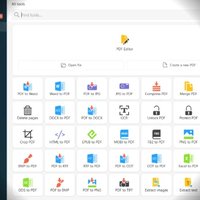
Depending on the plan, users can read, edit, convert, compress, sign, merge, and split PDF documents. OCR and PDF conversion tools are also available for more advanced document workflows.
Having PDF functionality inside the same application is convenient because users do not have to switch between an office suite and a separate PDF application for common tasks.
WPS AI
AI is now integrated throughout WPS Office rather than being limited to a standalone feature.
WPS AI can help draft and rewrite documents, summarize content, analyze information, create presentations, translate documents, and assist with spreadsheet tasks.
For example, Writer can summarize a long document or rewrite selected text without requiring users to copy the content into a separate AI chatbot.
Cloud Synchronization
WPS Office includes cloud storage and synchronization, allowing documents to be accessed across supported devices.
The free plan currently includes 1 GB of cloud storage, while Pro+ increases this to 20 GB.
This is useful for users who frequently switch between a desktop computer, laptop, phone, and tablet.
Collaboration
WPS Office supports document sharing, real-time co-editing, comments, permissions, and synchronized changes.
These features make it more suitable for teams than a traditional offline-only office suite.
Templates
The suite includes a large template library covering documents, spreadsheets, presentations, resumes, business materials, and other common use cases.
This can save considerable time when users need a polished document but do not want to design the layout themselves.
Download WPS Office V12.2.0.18911 - Software Mirrors |
|---|
Download WPS Office V12.2.0.18911 for Windows |
Performance and User Experience
WPS Office generally provides a familiar and approachable experience. Users who already know Microsoft Office should have little difficulty finding common tools and features.
Another advantage is that the entire suite is consolidated into one application. Instead of installing separate software for documents, spreadsheets, presentations, and basic PDF work, WPS brings those functions together.
The suite is also positioned as lightweight, with official versions available for both desktop and mobile platforms. Linux users can install packages in DEB and RPM formats.
The main drawback is the distinction between the free and premium versions. The free edition provides the core office applications and basic PDF capabilities, but advanced PDF tools, additional cloud storage, unlimited templates, and some AI capabilities are reserved for paid plans.
Users should therefore check which features they actually need before deciding whether the free version is sufficient.
Pros
Familiar Microsoft Office-style interface.
Writer, Spreadsheet, Presentation, and PDF in one suite.
Strong DOCX, XLSX, and PPTX compatibility.
Available on Windows, macOS, Linux, Android, and iOS.
AI writing and document assistance.
PDF editing and conversion tools.
Cloud synchronization.
Real-time collaboration.
Large template library.
Free version available.
Good choice for users who want one application for everyday office work.
Cons
Some advanced features require a paid subscription.
Free users receive limited cloud storage.
AI features have usage limitations depending on the plan.
PDF functionality is more restricted in the free version.
The interface can feel busy because so many tools are integrated into one application.
Users heavily invested in Microsoft's ecosystem may still prefer Microsoft 365 for maximum compatibility.
Who Should Use WPS Office?
WPS Office is a strong choice for students, home users, freelancers, small businesses, and anyone who needs a capable Microsoft Office alternative without immediately paying for a subscription.
It is particularly useful for people who work across several devices. The combination of desktop applications, mobile apps, cloud synchronization, and web access makes it easy to continue working when moving between platforms.
Users who frequently work with PDFs may also appreciate having document conversion and editing tools alongside their regular office applications.
Final Verdict
WPS Office has grown into a remarkably complete productivity suite. It is no longer simply a cheaper alternative to Microsoft Office. The combination of Writer, Spreadsheet, Presentation, PDF tools, cloud synchronization, collaboration, templates, and AI makes it a serious all-in-one productivity platform.
Its strongest advantage is convenience. Most everyday document tasks can be handled without leaving the same application, while broad file compatibility makes it practical for users who regularly exchange documents with Microsoft Office users.
The free version is capable enough for many people, although the increasingly important AI, cloud, and advanced PDF features are where the paid plans become more attractive.
For users looking for a familiar, cross-platform office suite with a generous feature set, WPS Office remains one of the better Microsoft Office alternatives available.