

dbForge Data Compare for SQL Server is a database comparison and synchronization tool from Devart designed for developers and database administrators who need to find differences between SQL Server databases and safely move data between environments. It can compare live databases, backups, script folders, custom query results, and several SQL Server cloud services.
The tool is particularly useful when moving data between development, testing, staging, and production environments, or when you need to investigate differences between two databases without manually checking individual tables.
Features
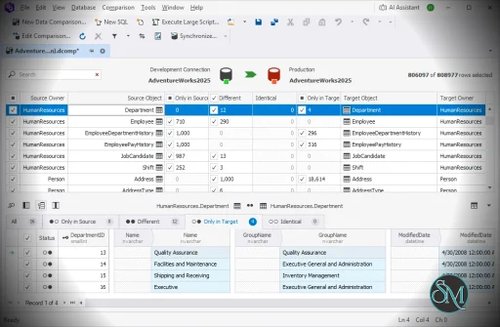
dbForge Data Compare for SQL Server provides a visual comparison workflow that makes it easier to identify and manage differences between databases.
Key features include:
Compare data between SQL Server databases
Compare data from native SQL Server backups
Compare static data stored in scripts folders
Compare results from custom SQL queries
Map schemas, tables, and columns with different names
Compare databases with different structures
Use custom comparison keys for tables without primary keys or unique constraints
Filter which data should be compared and synchronized
Generate T-SQL synchronization scripts
Synchronize selected differences instead of the entire database
Generate comparison reports in HTML, Excel, and CSV formats
Restore specific data from native SQL Server backups
Integrate with SQL Server Management Studio
Automate comparison and synchronization through the command line in the Professional edition
The mapping options are particularly useful for databases that have evolved differently. Tables and columns do not necessarily need identical names because the tool allows users to define custom mappings.
Review
The main strength of dbForge Data Compare for SQL Server is that it turns what can be a tedious SQL task into a visual workflow.
Instead of manually writing queries to find missing or modified rows, you can select the source and target databases, configure the comparison, and let the application identify the differences. The results can then be filtered and reviewed before anything is synchronized.
The synchronization workflow is also well thought out. You can select individual changes, groups of changes, or all detected differences, then either apply them directly or generate a T-SQL script for later execution. The ability to review the generated script before deployment is useful when working with production databases.
Another useful feature is support for native SQL Server backups. This allows the tool to use backup data for comparison and row-level recovery without requiring a complete database restore. This can be valuable when investigating corrupted, missing, or accidentally modified data.
The main limitation is that this is a specialized commercial tool. If you only occasionally need to compare a few tables, standard SQL queries or existing SQL Server utilities may be enough. For regular database synchronization work, however, the time saved can justify using a dedicated comparison tool.
Performance and Compatibility
dbForge Data Compare is designed to handle comparisons involving large amounts of SQL Server data. Its comparison interface provides filtering, sorting, full-text data search, and options to hide unchanged columns, which makes large comparison results easier to work with.
The current compatibility list includes SQL Server 2025 and 2022, older SQL Server versions down to SQL Server 2000 with limited support, SQL Server on Linux, Amazon RDS, Azure SQL Database, Azure Synapse Analytics, Azure SQL Managed Instance, and Microsoft Fabric.
SSMS integration is also available, with current support including SSMS 17 through 22 and SSMS 2016.
Actual comparison performance will depend heavily on the size of the databases, network connection, SQL Server configuration, indexes, and the amount of data being compared. A comparison involving millions of rows should naturally require more resources than a small development database.
System Requirements
According to Devart's current documentation, dbForge Data Compare for SQL Server supports:
Windows 7, 8, 8.1, 10, and 11
Windows Server 2008, 2012, 2016, 2019, 2022, and 2025
.NET Framework 4.7.2 or later
It supports SQL Server installations and several cloud SQL Server environments, including Azure SQL Database and Amazon RDS.
Database permissions are also important. Comparing data requires appropriate access to the database schema and data, while synchronization generally requires higher privileges such as db_owner depending on the operation being performed.
Pros and Cons
Pros
Excellent visual database comparison workflow
Supports large and complex SQL Server environments
Can compare live databases, backups, scripts, and custom query results
Flexible table and column mapping
Allows selective synchronization
Generates T-SQL synchronization scripts
Supports SQL Server backups for data recovery
Useful reporting options
SSMS integration
Command-line automation available in the Professional edition
Cons
Designed specifically around SQL Server
Commercial licensing may be expensive for occasional users
Some advanced capabilities are restricted to the Professional edition
Requires Windows and .NET Framework
Database synchronization requires careful permission and deployment planning
How to Install
Download the dbForge Data Compare for SQL Server installer from Devart and run it on a supported Windows system.
Follow the installation wizard and allow it to install the required components. After installation, launch dbForge Data Compare and create a new data comparison project.
Select the source and target databases, configure the comparison options, map tables and columns where necessary, and start the comparison. After reviewing the differences, you can select the changes to synchronize and either apply them or generate a T-SQL synchronization script.
Frequently Asked Questions
What is dbForge Data Compare for SQL Server?
It is a database comparison and synchronization tool for finding differences between SQL Server databases and moving selected data changes between them.
Can dbForge Data Compare compare SQL Server backups?
Yes. The Professional edition supports native SQL Server backups as data sources and can be used for row-level recovery.
Can I synchronize only selected rows?
Yes. Data Compare allows you to select specific differences for deployment instead of synchronizing everything detected during the comparison.
Does dbForge Data Compare support Azure SQL?
Yes. It supports Azure SQL Database and Azure SQL Managed Instance, along with other SQL Server-related cloud platforms.
Does it integrate with SQL Server Management Studio?
Yes. dbForge Data Compare can be integrated with SQL Server Management Studio, allowing comparison and synchronization workflows from within SSMS.
Is dbForge Data Compare available for free?
Devart provides a trial version, while the full product is commercial. The current product line offers Standard and Professional editions, with advanced features such as native backup comparison and command-line functionality available in Professional.