
DataGrip is a professional database IDE developed by JetBrains for database administrators, SQL developers, data engineers, and software developers. Designed to work with both relational and NoSQL databases, it combines intelligent SQL editing, database management, schema comparison, version control integration, and AI-assisted development into a single cross-platform application. Available for Windows, macOS, and Linux, DataGrip is widely regarded as one of the most powerful database IDEs available.
Managing multiple databases often requires switching between different administration tools, query editors, and database clients. DataGrip eliminates this problem by providing a unified environment that supports dozens of database engines through JDBC drivers.
Whether you work with PostgreSQL, MySQL, Microsoft SQL Server, Oracle Database, SQLite, MongoDB, Redis, Snowflake, or cloud databases, DataGrip offers a consistent development experience with intelligent code assistance and advanced database management tools.
Key Features of DataGrip
Intelligent SQL Editor
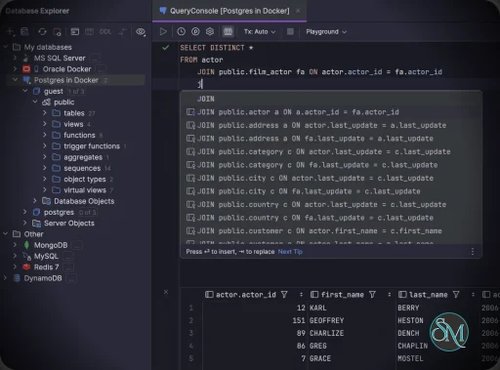
DataGrip offers context-aware SQL completion, syntax highlighting, code inspections, refactoring, quick fixes, and automatic formatting. The editor understands your database schema, foreign keys, and object relationships, making SQL development significantly faster.
Broad Database Support
The IDE supports a wide range of database systems, including:
PostgreSQL
MySQL and MariaDB
Microsoft SQL Server
Oracle Database
SQLite
MongoDB
Redis
ClickHouse
Snowflake
Amazon Redshift
Google BigQuery
Cassandra
CockroachDB
Many other JDBC-compatible databases
This flexibility makes DataGrip suitable for developers working across multiple environments.
Powerful Query Console
DataGrip provides multiple query execution modes, parameterized queries, local history, transaction management, and query history. Developers can safely experiment with SQL while keeping a complete record of executed statements.
Data Editor
The built-in data editor allows users to browse, edit, insert, delete, filter, and search records directly from the IDE. Navigation through foreign key relationships makes exploring complex databases much easier.
Schema Comparison and Migration
DataGrip can compare database schemas, highlight differences, and generate migration scripts, simplifying database upgrades and synchronization between development, staging, and production environments.
Database Diagrams
The IDE automatically generates relationship diagrams for tables and database objects, helping developers understand complex schemas without relying on third-party visualization tools.
Import and Export
DataGrip supports importing and exporting data in numerous formats, including CSV, JSON, HTML, Markdown, Excel, and customizable export templates, making data exchange straightforward.
Version Control Integration
Git and other version control systems are integrated directly into the IDE, allowing SQL scripts and database projects to be managed alongside application source code.
JetBrains AI Integration
Recent releases include JetBrains AI features that can explain SQL queries, generate SQL from natural language, optimize statements, and provide context-aware assistance based on the connected database schema.
Download DataGrip 2026.2.6 - Software Mirrors |
|---|
DataGrip 2026.2.6 for Windowsdatagrip-2026.2.6.exe | 818.26 MB |
DataGrip 2026.2.6 for Mac |
DataGrip 2026.2.6 for Linux |
Others Download related to DataGrip 2026.2.6 |
DataGrip 2026.2.6 Release Notes:DataGrip 2026.2.6 is Out!Please see the release notes for the complete list of fixes and improvements. |
Performance and User Experience
DataGrip delivers the polished experience expected from JetBrains products. The interface is clean, customizable, and responsive, while navigation shortcuts and intelligent search make working with large database projects efficient.
Database introspection may take a little time when connecting to extremely large enterprise databases, but subsequent interactions are generally fast. The IDE also benefits from regular updates that introduce support for new database versions, performance improvements, and AI enhancements.
Although beginners may find the extensive feature set slightly overwhelming, the intuitive interface and excellent documentation help reduce the learning curve.
Pros
Excellent SQL editor with intelligent code completion.
Supports dozens of relational and NoSQL databases.
Powerful schema comparison and migration tools.
Integrated data editor and query console.
Built-in database diagrams.
Git and version control integration.
AI-assisted SQL development.
Available for Windows, macOS, and Linux.
Regular updates and strong JetBrains ecosystem.
Cons
Commercial software, although free for non-commercial use.
Large enterprise databases may require longer initial indexing.
Advanced features can take time to master.
Some database-specific administrative tools are still better handled by vendor-native utilities.
Who Should Use DataGrip?
DataGrip is an excellent choice for SQL developers, database administrators, backend developers, data engineers, DevOps engineers, analysts, and anyone who regularly works with multiple database platforms.
It is especially valuable for professionals who want a single, intelligent IDE instead of maintaining separate clients for different database systems.
Final Verdict
DataGrip remains one of the best database IDEs available today. Its intelligent SQL editor, broad database compatibility, advanced schema management, integrated data tools, and JetBrains AI capabilities make it an outstanding solution for professional database development.
While casual users may be satisfied with simpler database clients, developers and database professionals will appreciate the productivity gains that DataGrip delivers. For anyone seeking a powerful, modern SQL IDE, DataGrip is among the top choices on the market.