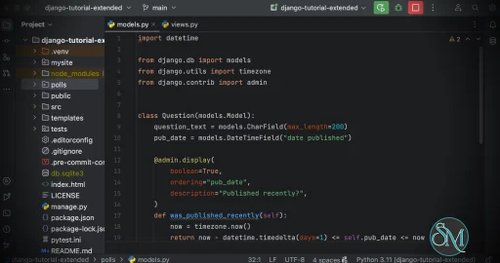

PyCharm is JetBrains' dedicated integrated development environment (IDE) for Python development. It combines intelligent code completion, advanced debugging, integrated testing, database tools, and support for popular Python frameworks into a single application. Whether you're building web applications, automating tasks, analyzing data, or developing machine learning models, PyCharm provides a comprehensive environment that helps developers write cleaner and more maintainable code.
PyCharm is now available as a single, unified product, simplifying installation while offering additional professional capabilities through licensing.
Python has become one of the world's most popular programming languages, powering everything from web applications and automation scripts to artificial intelligence and scientific computing. PyCharm is designed to support these diverse workflows with intelligent coding assistance, project management, and powerful developer tools.
Beyond Python, the IDE also supports HTML, CSS, JavaScript, TypeScript, SQL, Markdown, YAML, and many other technologies commonly used in modern software development.
Key Features of PyCharm
Intelligent Code Completion
PyCharm analyzes your codebase to provide context-aware code completion, automatic imports, type inference, quick documentation, and real-time error detection. These features help reduce mistakes and improve development speed.
Advanced Refactoring
The IDE includes powerful refactoring tools for renaming variables, extracting methods, reorganizing classes, and restructuring projects while safely updating references throughout the codebase.
Integrated Debugger
PyCharm features a robust debugger with breakpoints, variable inspection, expression evaluation, call stack analysis, and support for remote debugging, making it easier to identify and resolve issues.
Framework Support
PyCharm offers built-in support for popular Python frameworks such as Django, Flask, FastAPI, Pyramid, and Tornado. Framework-aware navigation and code generation simplify development and reduce configuration work.
Scientific and Data Science Tools
The IDE supports Jupyter notebooks, scientific libraries, interactive Python consoles, and data visualization workflows, making it a strong choice for data scientists, researchers, and machine learning engineers.
Testing and Quality Tools
PyCharm integrates with pytest, unittest, doctest, and other testing frameworks. It also includes tools for code inspections, linting, coverage analysis, and profiling to help maintain code quality.
Database Integration
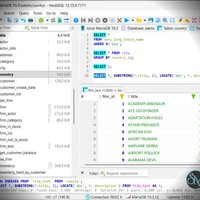
Developers can connect to supported databases, browse tables, execute SQL queries, and inspect data without leaving the IDE.
Git and Version Control
Built-in Git integration makes it easy to manage repositories, review changes, resolve merge conflicts, and collaborate with GitHub, GitLab, Bitbucket, and other Git hosting platforms.
AI-Assisted Development
PyCharm integrates with JetBrains AI to assist with code generation, documentation, explanations, refactoring suggestions, and other development tasks.
Download PyCharm 2026.2.3 - Software Mirrors |
|---|
PyCharm 2026.2.3 for Windowspycharm-2026.2.3.exe | 917.78 MB pycharm-2026.2.3.win.zip | 1.23 GB |
PyCharm 2026.2.3 for Mac |
PyCharm 2026.2.3 for Linux |
Others Download related to PyCharm 2026.2.3 |
PyCharm 2026.2.3 Release Notes:This update fixes several type-checking false positives along with issues in Ruff, Jupyter, Databricks, and interpreter setup: Code Insight
IDE and Tooling
Full release notes. |
Performance and User Experience
PyCharm delivers a polished and productive development experience. Intelligent indexing enables fast navigation, accurate code analysis, and efficient project-wide searches.
Large Python projects can require noticeable memory during indexing, but the IDE remains responsive once analysis is complete. The interface is clean, customizable, and consistent with other JetBrains products, making it easy for existing JetBrains users to adapt.
Pros
Excellent Python code completion and analysis.
Powerful debugging and refactoring tools.
Built-in support for major Python frameworks.
Strong data science and Jupyter notebook integration.
Comprehensive testing and code quality tools.
Integrated database management.
Deep Git integration.
AI-assisted development features.
Available for Windows, macOS, and Linux.
Cons
Higher resource usage than lightweight editors.
Initial indexing can take time for large projects.
Some advanced capabilities require a paid subscription.
Extensive feature set may feel overwhelming to beginners.
Who Should Use PyCharm?
PyCharm is ideal for Python developers, web developers, data scientists, machine learning engineers, automation engineers, researchers, educators, and students. It is particularly well suited for developers working on medium to large Python projects that benefit from intelligent code analysis and integrated development tools.
Users who only edit simple scripts occasionally may prefer a lightweight editor, while professional developers will appreciate PyCharm's comprehensive feature set.
Final Verdict
PyCharm remains one of the best IDEs for Python development. Its intelligent coding assistance, framework integration, powerful debugging tools, and support for scientific computing make it suitable for nearly every type of Python project.
The unified product model further streamlines the user experience, allowing developers to focus on building applications rather than choosing between separate editions. For anyone serious about Python development, PyCharm continues to be one of the strongest IDEs available.