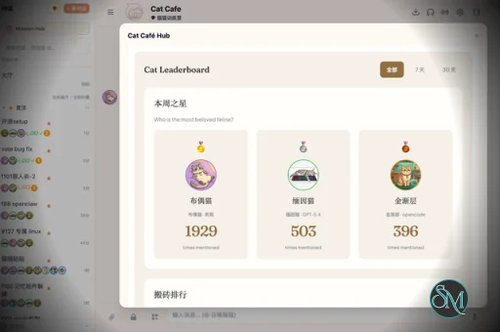

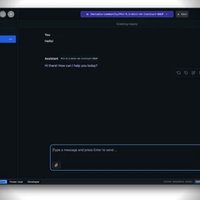
Clowder AI is an open-source platform designed to turn separate AI agents into a coordinated team. Instead of using Claude, GPT, Gemini, or other AI tools independently, Clowder provides a shared layer for communication, memory, task handoffs, review, and persistent agent identities.
The project is built around the idea that different AI models can take different roles. One agent can handle implementation, another can review the work, while others can focus on research or design. Clowder acts as the coordination layer rather than replacing the underlying AI agent tools.
Features
Clowder AI provides several components for coordinating multiple AI agents.
Multi-agent orchestration
Persistent agent identities
Shared memory
Cross-model review
Agent-to-agent communication
Structured task handoffs
Evidence and decision logs
MCP support
Plugin framework
Feishu and Telegram integrations
On-demand skills
Claude Code integration
Codex CLI integration
Gemini CLI integration
OpenCode integration
Desktop applications for Windows and macOS
Web interface
Self-hosted deployment
Optional Redis support
MIT license
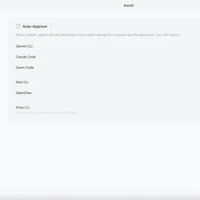
The supported agent model is particularly interesting because Clowder does not attempt to replace the individual agent CLIs. Instead, it sits above them and provides the coordination layer.
Download Clowder AI v0.14.1 - Software Mirrors |
|---|
Clowder AI v0.14.1 for Windows |
Clowder AI v0.14.1 for macOS |
Clowder AI v0.14.1 Source Code |
Clowder AI v0.14.1 Release Notes:v0.14.1This patch brings the accepted integration changes since v0.14.0 to the stable release channel. Regular contributions and daily synchronization now land onnext; maintainers promote a fixed, checked candidate to main for release. The repository's default branch remains main.
Changes
Contributing and upgradingStart ordinary contribution branches from upstreamnext and open PRs with --base next; see CONTRIBUTING.md. Stable release candidates enter main after acceptance. A fix made directly for stable main must return to next. The shared branch reader, preservation checks, intake lineage and sync-tag provenance use these same roles. #1756, #1757
Use the supported installer or rebuild the matching API, Web, shared and MCP packages together. Updating source alone does not change an already-running Host or launcher. Existing plugin installations still update separately through Plugin Manager; this release does not itself publish a new plugin package or enable a Collective connection. No manual state deletion, new environment variable or dependency migration is required by this patch.
At startup, the persistent configuration owner automatically attempts the existing legacy-probe migration under its configuration lock before admitting turns. Removing matched entries serializes the affected JSON/TOML file again; TOML comments and formatting may be lost in the rewritten file. Original bytes are retained in a sibling .before-f333-probes-* backup with mode 0600. Disabled, plugin-owned, customized and unknown entries are not removed.
ValidationThe fixed promotion candidate passed Linux CI, Windows Smoke, macOS Preview Lifecycle and 55 supplemental public regressions. The complete 2,959-file API plan executed successfully; this is a file-level coverage result, not a claim of zero skipped subtests or a new installed-package acceptance matrix. Candidate and checksDesktop distributions and limits
v0.14.1这个补丁版把 v0.14.0 之后已验收的集成改动带入稳定发布通道。常规贡献和日常同步现在进入next,维护者验收固定候选后再提升到 main 发版。仓库默认分支仍为 main。
更新内容
贡献与升级常规贡献从上游next 创建分支,PR 显式使用 --base next,详见贡献指南。稳定候选验收后进入 main;在稳定 main 做的修复须回流 next。共享分支读取、保留检查、回流水位和同步标签溯源沿用同一分工。#1756、#1757
使用受支持的安装器,或一起构建配套的 API、Web、shared 与 MCP。只更新源码不会改变正在运行的 Host 或旧启动脚本。已有插件仍须通过插件管理单独更新;本版本本身不发布新插件包,也不自动连接 Collective。本补丁不要求手动删状态、新增环境变量或依赖迁移。
持久配置的所属安装在启动、接纳执行回合之前,会在配置锁内自动尝试既有的旧探针迁移。移除匹配项时,受影响的 JSON/TOML 文件会重新序列化,改写后的 TOML 可能丢失注释和原格式;原始字节保留在旁边的 .before-f333-probes-* 备份中,权限为 0600。禁用、插件所有、自定义及未知条目不会被移除。
验证范围固定晋升候选通过了 Linux CI、Windows Smoke、macOS Preview Lifecycle 及 55 项公开侧补充回归。完整的 2,959 个 API 测试文件均已执行通过;这是文件级覆盖结果,不表示所有子测试零跳过,也不代替新一轮安装包实装矩阵。候选与检查桌面分发与限制
|
Performance and Compatibility
Clowder AI is available as a desktop application for Windows and macOS. The project also supports running from source, making it possible to use the platform without relying on the packaged desktop applications.
The current source setup requires Node.js 20 or newer and pnpm 9 or newer. Redis 7 or newer is optional, with a memory mode available when Redis is not used.
The project is under active development. The v0.13.0 release focused on stability improvements around agent messaging, provider and session recovery, the Hub interface, and desktop functionality. The release also provides Windows installers and portable packages plus Intel and Apple Silicon macOS builds.
Clowder is more demanding conceptually than a normal AI chat application. Its main value depends on actually using multiple agents and allowing them to communicate and share work. Users who primarily work with one AI model may not need the additional orchestration layer.
System Requirements
For running Clowder AI from source, the project lists:
Node.js 20 or newer
pnpm 9 or newer
Git
Redis 7 or newer, optional
Internet access for connecting external AI providers and services
Prebuilt desktop releases are available for Windows and macOS. The current release provides Windows x64 installers and portable packages, along with Intel and Apple Silicon macOS builds.
Pros and Cons
Pros
Open source under the MIT license
Supports multiple AI model families
Persistent agent identities
Shared memory between agents
Built-in cross-model review
Agent-to-agent communication
MCP support
Supports Claude Code, Codex CLI, Gemini CLI, and OpenCode
Self-hostable
Windows and macOS desktop applications
Portable Windows version available
Apple Silicon and Intel Mac support
Active development
Cons
More complex than a conventional AI assistant
Requires multiple AI tools to get the most value from its architecture
Source installation requires Node.js and pnpm
Some deployments may require additional infrastructure such as Redis
The project is still relatively young and evolving quickly
Users need to understand agent permissions, provider authentication, and coordination workflows
How to Install
Windows and macOS
Download the appropriate desktop release from the project's GitHub Releases page. The packaged application includes the required components, so a separate pnpm installation is not required.
From Source
Clone the repository and install the dependencies:
git clone https://github.com/zts212653/clowder-ai.git
cd clowder-ai
pnpm install
pnpm build
cp .env.example .env
pnpm start
The local interface is then available at:
http://localhost:3003After starting Clowder, provider and CLI accounts can be configured from Hub > System Settings > Account Configuration.
Final Verdict
Clowder AI takes a different approach from conventional AI assistants. Instead of trying to make one agent handle everything, it provides infrastructure for several AI agents to work together while retaining their own identities, memories, roles, and model capabilities.
Its strongest feature is the coordination layer. Shared memory, cross-model review, agent-to-agent messaging, MCP integration, and structured handoffs address problems that appear when using several AI coding and reasoning tools simultaneously.
The trade-off is complexity. Clowder makes more sense for users who regularly work with multiple AI agents than for someone who only needs a single chatbot or coding assistant. The project is also evolving quickly, so workflows and capabilities can change between releases.