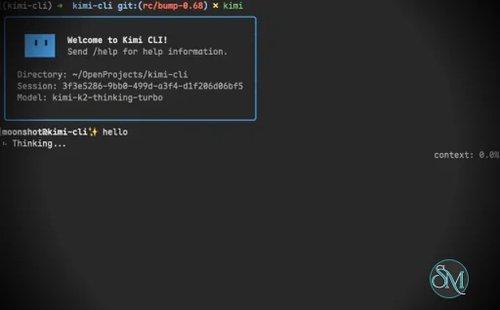
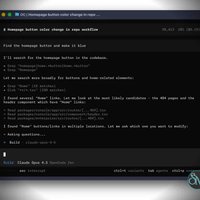

Kimi CLI is an open source AI coding agent developed by Moonshot AI that brings advanced AI assistance directly into the terminal. Unlike traditional command-line assistants, Kimi CLI can understand codebases, edit files, execute shell commands, search the web, interact with development tools, and autonomously plan multi-step tasks. It is designed for developers who prefer working from the terminal while benefiting from modern AI capabilities.
Kimi CLI goes beyond being a chatbot for code. It functions as an autonomous coding agent capable of reading project files, modifying source code, running commands, debugging issues, and deciding what actions to take based on command output.
Originally released as Kimi Code CLI, the project is evolving into the broader Kimi Code platform while maintaining compatibility with existing users and configurations. Existing installations are automatically migrated as development continues.
Key Features of Kimi CLI
AI Coding Agent
Kimi CLI can analyze entire codebases, understand project structure, generate new code, refactor existing files, fix bugs, and explain unfamiliar code with minimal user input. Rather than answering isolated questions, it performs complete development tasks.
Native Terminal Experience
The application runs entirely inside the terminal, allowing developers to stay within their preferred workflow instead of switching between browser tabs or standalone AI applications.
Shell Command Integration
A built-in shell mode lets users execute terminal commands directly from within Kimi CLI. The AI can inspect command output, detect errors, and determine the next action automatically during complex workflows.
File Editing
Kimi CLI can safely read, edit, create, rename, and organize project files. It understands project context instead of treating each file independently.
Web Search and Documentation
The agent can search documentation and retrieve web pages when additional information is needed, helping developers resolve unfamiliar APIs or framework behavior without leaving the terminal.
IDE Integration
Kimi CLI integrates with Visual Studio Code through an extension and supports the Agent Client Protocol (ACP), allowing it to work with editors such as Zed and JetBrains IDEs.
Multiple AI Provider Support
Although optimized for Moonshot AI's models, Kimi CLI can also be configured to use other compatible AI providers through OpenAI-compatible APIs, making it flexible for different development environments.
Open Source
Released under the Apache 2.0 License, the project is actively maintained on GitHub with frequent releases, public issue tracking, and community contributions.
Download Kimi CLI 1.52.0 - Software Mirrors |
|---|
Kimi CLI 1.52.0 for Windowskimi-1.52.0-x86_64-pc-windows-msvc.zip | 68.66 MB kimi-1.52.0-x86_64-pc-windows-msvc-onedir.zip | 70.36 MB |
Kimi CLI 1.52.0 for macOSkimi-1.52.0-x86_64-apple-darwin.tar.gz | 66.65 MB kimi-1.52.0-x86_64-apple-darwin-onedir.tar.gz | 66.21 MB |
Kimi CLI 1.52.0 for Linuxkimi-1.52.0-x86_64-unknown-linux-gnu.tar.gz | 91.22 MB kimi-1.52.0-x86_64-unknown-linux-gnu-onedir.tar.gz | 91.25 MB kimi-1.52.0-aarch64-unknown-linux-gnu.tar.gz | 88.56 MB kimi-1.52.0-aarch64-unknown-linux-gnu-onedir.tar.gz | 88.64 MB |
Kimi CLI 1.52.0 Source Code |
Kimi CLI 1.52.0 Release Notes:What's Changed
|
Performance and User Experience
Kimi CLI delivers a polished terminal interface with responsive interactions and impressive automation capabilities. Instead of simply generating code snippets, it behaves more like an AI development partner that can execute multi-step workflows while adapting to new information.
Installation is straightforward, and the project provides official installers for Windows, macOS, and Linux. Developers can also integrate it into existing shell environments and IDEs with minimal configuration.
One notable advantage is its rapid development cycle. New releases regularly introduce additional features, workflow improvements, and bug fixes, making the tool evolve quickly alongside modern AI coding practices.
Pros
Free and open source.
Excellent terminal-based AI coding experience.
Can edit files and execute shell commands.
Supports autonomous multi-step workflows.
Web search and documentation retrieval.
IDE integration through VS Code and ACP.
Compatible with multiple AI providers.
Active development with frequent updates.
Cons
Primarily aimed at developers comfortable with terminal workflows.
Some advanced capabilities require API credentials or supported AI providers.
Autonomous execution should still be reviewed before applying important changes.
Rapid development means interfaces and features may evolve frequently.
Who Should Use Kimi CLI?
Kimi CLI is an excellent choice for software developers, DevOps engineers, system administrators, and AI power users who spend most of their time in the terminal.
It is particularly valuable for users who want an AI assistant capable of performing complete development tasks rather than simply answering coding questions.
Final Verdict
Kimi CLI is one of the most capable open source AI coding agents currently available for the terminal. Its ability to understand projects, edit code, execute commands, search documentation, and integrate with popular development tools makes it a powerful productivity companion.
With active development, flexible AI provider support, and a growing ecosystem, Kimi CLI stands out as an excellent choice for developers seeking a modern AI-assisted terminal workflow.