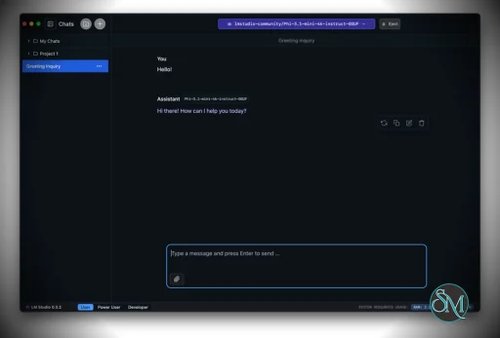



LM Studio is a local AI model runner for Windows, macOS, and Linux. It enables users to execute large language models such as LLaMA, Mistral, and other GGUF compatible models entirely offline.
Unlike web based AI tools, LM Studio processes everything on your local hardware, meaning your data never leaves your device.
Download LM Studio - Software Mirrors | |
|---|---|
Download LM Studio for Windows Download LM Studio for Windows ARM64 Download LM Studio for Linux x86_64 (deb) Download LM Studio for Linux x86_64 (AppImage) |
Key Features of LM Studio
LM Studio focuses on usability while still offering advanced control for technical users.
Main features include:
Run large language models fully offline
Simple graphical interface with chat style interaction
Built in model browser and downloader
Support for GGUF models
GPU and CPU acceleration support
Adjustable context length and inference settings
Local API server compatible with OpenAI style endpoints
Cross platform support
The application is suitable for both casual experimentation and serious development work.
Supported Operating Systems and Hardware
LM Studio supports modern desktop platforms:
Windows 10 and newer
macOS including Apple Silicon
Linux distributions
Hardware requirements depend on the model size. Smaller models can run on CPUs, while larger models benefit greatly from dedicated GPUs with sufficient VRAM.
Why LM Studio Is Popular
LM Studio has gained popularity because it removes the complexity of running local AI models. Users do not need to manually configure command line tools, dependencies, or environments.
Key advantages include:
Strong focus on privacy and offline usage
No subscription required for local inference
Easy model management without technical setup
Clean interface suitable for beginners
Flexible enough for advanced users
It bridges the gap between developer tools and consumer friendly AI software.
Common Use Cases
LM Studio is widely used for:
Offline AI chat assistants
Software development assistance
Research and experimentation with LLMs
Prompt engineering and model comparison
Running private AI for sensitive data
Testing AI workflows before deployment
The local API feature also allows integration with other applications and tools.
Ease of Use
LM Studio is very easy to use compared to traditional local LLM setups. Users can search for models, download them, and start chatting within minutes. Advanced settings are available but not required for basic usage.
This makes LM Studio accessible even for users with limited technical experience.
Is LM Studio Safe to Use
Yes, LM Studio is safe when downloaded from the official source. Since models run locally, there is no automatic data sharing or cloud processing. Users maintain full control over their data and models.
As with any AI software, model behavior depends on the model you choose to run.
Pros and Cons of LM Studio
Pros:
Fully offline AI execution
Excellent privacy protection
Beginner friendly interface
Wide model compatibility
Local API support
Cons:
Performance depends heavily on hardware
Large models require high RAM or VRAM
No mobile version
Model downloads can be large in size
Despite these limitations, LM Studio remains one of the best local AI tools available.
Final Verdict
LM Studio is an excellent solution for anyone who wants to run AI models locally without complexity. It combines ease of use with powerful features and strong privacy benefits.
Whether you are a developer, researcher, or AI enthusiast, LM Studio provides a reliable and efficient way to explore large language models on your own system.
LM Studio is a powerful desktop application that allows users to run large language models locally on their own computer. It is designed for developers, researchers, and privacy focused users who want full control over AI models without relying on cloud services.
With LM Studio, you can download, manage, and run popular open source language models directly on your system using a simple graphical interface.