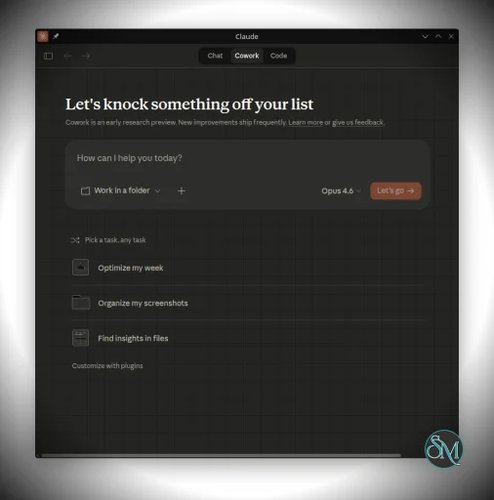



Claude Desktop for Linux is an open source project that brings Anthropic's Claude Desktop application to Linux by repackaging the official Windows release into native Linux packages. Developed by aaddrick, the project supports Debian, Ubuntu, Fedora, Arch Linux, NixOS, and other distributions through native packages and AppImages, making it one of the most polished ways to use Claude Desktop on Linux.
Although Anthropic does not currently provide an official Linux version of Claude Desktop, this project fills that gap by packaging the official application into Linux-native formats while preserving nearly all of its functionality.
Unlike running Claude through Wine or a virtual machine, Claude Desktop for Linux integrates directly with the operating system, providing native desktop integration, automatic updates through package managers, and full support for the Model Context Protocol (MCP).
It is important to note that this is an unofficial community project and is not affiliated with Anthropic.
Key Features of Claude Desktop for Linux
Native Linux Packages
The project distributes Claude Desktop as native packages for multiple Linux distributions, including:
Debian and Ubuntu (.deb)
Fedora and RHEL (.rpm)
Universal AppImage
This allows installation using each distribution's standard package management system.
Full MCP Support
One of the biggest advantages is complete support for the Model Context Protocol. Users can configure MCP servers using the same configuration file as the official desktop application, enabling integrations with local tools, databases, development environments, and custom workflows.
Desktop Integration
The application behaves like a native Linux program with features such as:
System tray integration
Desktop launcher
Global keyboard shortcuts
File associations
Native notifications
These small details make daily use feel much more polished than unofficial compatibility layers.
Automatic Updates
Users installing through the provided repositories receive updates through their normal package manager, making maintenance simple without manually downloading new releases. The project recently migrated to a dedicated package repository to improve distribution reliability.
Cross-Distribution Support
Rather than targeting only Ubuntu, the project actively supports multiple Linux ecosystems, making it accessible to a wide range of users.
Open Source
All packaging scripts and Linux-specific modifications are publicly available, allowing users to inspect the build process and contribute improvements.
Download Claude Desktop for Linux v3.3.9+claude2.31226.1 - Software Mirrors |
|---|
Claude Desktop for Linux v3.3.9+claude2.31226.1 for Linuxclaude-desktop_2.31226.1_arm64.deb | 166 MB claude-desktop_2.31226.1_amd64.deb | 172.98 MB claude-desktop_1.16000.0-1_all.deb | 626 B claude-desktop-unofficial_2.31226.1-3.3.9_arm64.deb | 185.7 MB claude-desktop-unofficial_2.31226.1-3.3.9_amd64.deb | 188.06 MB claude-desktop-unofficial-2.31226.1-3.3.9-arm64.AppImage.zsync | 389.96 kB claude-desktop-unofficial-2.31226.1-3.3.9-arm64.AppImage | 222.67 MB claude-desktop-unofficial-2.31226.1-3.3.9-amd64.AppImage.zsync | 394.08 kB claude-desktop-unofficial-2.31226.1-3.3.9-amd64.AppImage | 225.03 MB claude-desktop-unofficial-2.31226.1-3.3.9-1.x86_64.rpm | 188.42 MB claude-desktop-unofficial-2.31226.1-3.3.9-1.aarch64.rpm | 186.12 MB |
Others Download related to Claude Desktop for Linux v3.3.9+claude2.31226.1 |
Claude Desktop for Linux v3.3.9+claude2.31226.1 Source CodeClaude Desktop for Linux v3.3.9+claude2.31226.1 Source code (zip) Claude Desktop for Linux v3.3.9+claude2.31226.1 Source code (tar.gz) |
Claude Desktop for Linux v3.3.9+claude2.31226.1 Release Notes:Claude Desktop UpdateThis release updates the packaged Claude Desktop version to 2.31226.1.What's Changed
InstallationAPT (Debian/Ubuntu)DNF (Fedora/RHEL)AUR (Arch Linux)Manual DownloadDownload.deb, .rpm, or .AppImage from the assets below. |
Performance and User Experience
Claude Desktop for Linux feels remarkably close to a native application. Installation is straightforward, especially on Debian and Ubuntu systems using the official package repository.
Performance is responsive, startup times are reasonable, and the interface closely matches the official Windows and macOS versions. MCP support, one of the primary reasons many developers choose the desktop client, works well and has become one of the project's strongest features. Community feedback has generally been positive, with users praising both stability and Linux integration.
Because the project closely follows upstream Claude Desktop releases, Linux users typically receive updated packages soon after new official versions become available.
Pros
Free and open source.
Excellent Linux integration.
Full Model Context Protocol support.
Native packages for multiple distributions.
Automatic updates through package managers.
System tray and global shortcut support.
Active development with frequent updates.
No need for Wine or virtualization.
Cons
Not officially supported by Anthropic.
Compatibility depends on upstream Claude Desktop releases.
Occasionally requires updates after major Claude Desktop changes.
Some enterprise environments may prefer officially supported software.
Who Should Use Claude Desktop for Linux?
Claude Desktop for Linux is an excellent choice for developers, DevOps engineers, researchers, writers, and Linux enthusiasts who want the full Claude Desktop experience without leaving their preferred operating system.
It is particularly valuable for users who rely on MCP servers for coding assistants, local automation, or custom AI workflows.
Final Verdict
Claude Desktop for Linux is arguably the most complete unofficial Linux implementation of Claude Desktop available today. Its native packaging, excellent desktop integration, automatic updates, and full MCP compatibility make it feel much closer to an official Linux release than a community workaround.
While it is not maintained by Anthropic, the project's active development and rapid updates make it a reliable solution for Linux users who want access to Claude Desktop's full capabilities.