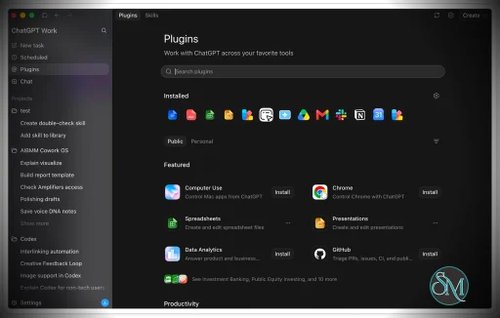



ChatGPT for macOS is OpenAI's official desktop application for bringing ChatGPT directly into the macOS workflow. The current application combines Chat, Work, and Codex in a single desktop environment, making it considerably more capable than a conventional web-app wrapper.
The app can work with local files, projects, desktop applications, development environments, and the user's computer. For developers, Codex provides access to local repositories, terminals, Git workflows, and other development tools. For general users, Work can research information and create documents, spreadsheets, presentations, reports, and other outputs.
Features
ChatGPT for macOS provides a broad collection of desktop-oriented features:
ChatGPT conversations
Projects
Work for research and content creation
Codex coding agent
Local files and folders
Desktop application integration
Computer Use
Built-in browser
Browser extensions
File previews
Git and repository workflows
Local terminals
Worktrees
MCP integrations
Plugins and skills
Scheduled tasks
Appshots for sharing the active application with ChatGPT
Long-running tasks
Remote Codex workflows
Configurable keyboard shortcuts
Always-on-top chat windows
Custom machine instructions through
AGENTS.md
One of the most useful macOS-specific features is Work with Apps. ChatGPT can read and, where supported, edit content in compatible applications such as coding environments and text editors. This allows a user to ask questions about code or documents without repeatedly copying content into the ChatGPT window.
The global Chat Bar is another convenient feature. Pressing Option + Space opens ChatGPT without requiring the user to switch manually to the application. The keyboard shortcut can be customized in Settings.
Download ChatGPT desktop app for macOS - Software Mirrors |
|---|
Download ChatGPT desktop app for macOS (Online Installer) Download ChatGPT desktop app for macOS (Offline installer Apple Silicon) Download ChatGPT desktop app for macOS (Offline installer Intel x64) |
Performance and Compatibility
The macOS application requires macOS 14 or later and supports both Apple Silicon and Intel Macs. OpenAI provides the appropriate installer based on the Mac's processor architecture.
The application integrates deeply with macOS through system permissions. Work with Apps can use the macOS Accessibility API to inspect supported applications, while Computer Use can use Screen Recording and Accessibility permissions to interact with the desktop. These permissions can be revoked through macOS Privacy & Security settings.
Computer Use is particularly interesting on macOS. ChatGPT can click, type, and navigate supported desktop applications and local files. Unlike the Windows implementation, macOS Computer Use can continue working in the background while the user uses other applications. A picture-in-picture preview shows what the agent is doing.
For developers, Codex provides a much deeper local workflow. It can work with repositories, local files, terminals, Git, worktrees, MCP servers and installed development tools. This turns the application into a useful development environment rather than simply a conversational client.
The application also supports remote workflows. Codex running on a Mac can be accessed remotely from supported mobile workflows, allowing work to continue on the Mac while being monitored from another device.
System Requirements
The current ChatGPT macOS app requires:
macOS 14 or later
Apple Silicon or Intel processor
Internet connection
ChatGPT account
The application supports both Intel and Apple Silicon Macs.
For advanced workflows, additional software may be required. Developers using Codex can use tools such as Git, programming language runtimes, terminals, IDEs, and MCP servers according to their particular workflow.
Pros and Cons
Pros
Official OpenAI macOS application
Combines Chat, Work and Codex
Excellent macOS integration
Global Option + Space shortcut
Local file and project support
Work with Apps integration
Computer Use
Codex for local development
Git and worktree workflows
Integrated browser
MCP and plugin support
Appshots
Long-running tasks
Remote Codex workflows
Supports Intel and Apple Silicon
Can continue Computer Use tasks in the background
Always-on-top and pop-out chat options
Cons
Requires macOS 14 or later
Some features require macOS system permissions
Advanced features can be complex to configure
Computer Use should be granted only the permissions necessary for the task
Some application integrations require additional extensions or configuration
The new application and ChatGPT Classic can coexist, which may initially be confusing for existing users
How to Install
Download the official ChatGPT macOS application and open the installer. Sign in using your ChatGPT account after launching the application.
OpenAI currently distinguishes the new application from ChatGPT Classic. The new application provides Chat, Work, and Codex, while Classic remains available for users who need the previous desktop experience and continues to receive maintenance and security updates.
After signing in, you can create a project, open a local folder, or start a normal conversation.
For developer workflows, select Codex from the application's top-left menu and open a project directory. Codex can then inspect files, edit code, run commands, and work with the development tools installed on the Mac.
For desktop automation, enable the required Accessibility and Screen Recording permissions under macOS Privacy & Security settings before using Computer Use.
Final Verdict
ChatGPT for macOS is one of the most capable AI desktop applications available for the Mac. Its value comes from how deeply it integrates ChatGPT into the operating system rather than simply reproducing the web interface in a desktop window.
The combination of Chat, Work, and Codex is particularly strong. General users can use Work for research and document creation, while developers can switch to Codex and work directly with repositories, terminals, Git and local development environments.
The macOS-specific integration is another major advantage. The global Chat Bar, Work with Apps, Appshots and Computer Use allow ChatGPT to operate in the context of what the user is actually doing on the desktop.
Computer Use is especially impressive because macOS can allow the agent to continue working in the background while the user does something else. That makes the Mac implementation particularly well suited to longer desktop automation tasks.
The main downside is complexity. Once Work, Codex, MCP, plugins, app permissions, browser tools and Computer Use are enabled, the application becomes a fairly sophisticated AI workspace rather than a simple chat client.
For Mac users who want ChatGPT integrated into everyday desktop work, especially developers and power users, ChatGPT for macOS is an excellent desktop application.