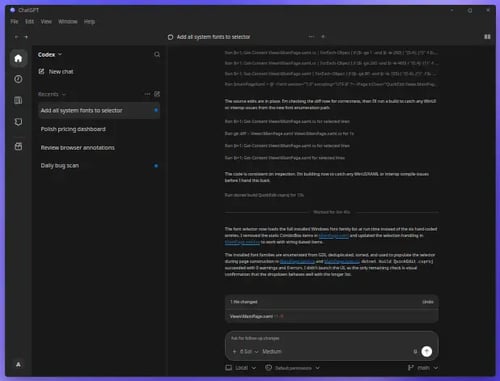
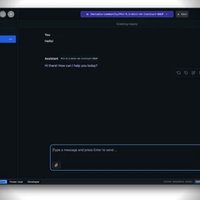


ChatGPT for Windows is OpenAI's native desktop application for using ChatGPT and Codex directly from Windows. It combines normal ChatGPT conversations with project workspaces, local files, developer tools, an integrated terminal, Git workflows, and agentic coding capabilities.
The current Windows app is considerably more capable than a traditional desktop wrapper. Codex can operate natively through PowerShell and the Windows sandbox, or run inside WSL2 when a Linux environment is preferable.
For developers, the combination of Codex, local projects, Git, terminals, file access and sandboxing makes the Windows application particularly useful.
Features
The ChatGPT Windows app provides a broad set of desktop-oriented features:
ChatGPT conversations and projects
Parallel chats and long-running work
Local project folders
Codex coding agent
Git integration and review panel
Worktrees
Integrated terminal
PowerShell
Command Prompt
Git Bash
WSL
Windows-native Codex execution
WSL2-based Codex execution
Windows sandbox
File previews
Built-in browser
Plugins and skills
Scheduled tasks
Computer Use
Appshots for sharing the active Windows application with ChatGPT
Configurable default code editor
GitHub integration through GitHub CLI
Node.js, Python and .NET development workflows
The ability to choose between Windows-native execution and WSL2 is particularly useful. Windows-native mode allows Codex to work directly with Windows tools and PowerShell, while WSL2 provides a Linux development environment when required.
The integrated terminal can also be configured independently of the Codex execution environment. This means, for example, that Codex can run inside WSL while the integrated terminal remains PowerShell.
Performance and Compatibility
The application is designed specifically for Windows and uses Windows-native capabilities when Codex runs in native mode.
The Windows sandbox provides an important security boundary. In its normal protected configuration, Codex is restricted from writing outside the working directory and cannot freely access the network without approval. Users can therefore give the agent access to a project without simply giving it unrestricted control over the entire computer.
For developers, this is one of the most important improvements over using ChatGPT purely in a browser.
WSL2 support provides another layer of flexibility. Users can either let the Windows-native agent work with WSL projects through the wsl command or configure Codex itself to run inside WSL2.
The application also integrates well with common development tools. Git powers the review workflow, while GitHub CLI enables GitHub-specific functionality. Node.js, Python and the .NET SDK can be used by Codex for development and build tasks.
Computer Use extends the application beyond coding. ChatGPT can interact with Windows applications and local files, allowing it to perform scoped tasks involving multiple desktop applications.
System Requirements
The application requires a supported Windows environment.
For developer workflows, OpenAI recommends having common development tools installed, including:
Git
Node.js
Python
.NET SDK
GitHub CLI
WSL2 is optional. It is only required if you want Codex itself to run inside a Linux environment.
The Windows application can be installed through the Microsoft Store or with Windows Package Manager:
winget install --id 9PLM9XGG6VKS -s msstoreEnterprise environments can also deploy the application through Microsoft Intune, Configuration Manager and other management systems.
Pros and Cons
Pros
Native Windows desktop experience
Codex integrated directly into ChatGPT
Windows-native PowerShell execution
Windows sandbox for agent operations
Optional WSL2 execution
Integrated terminal
Git review workflow
Worktree support
Local project folders
Built-in browser
File previews
Computer Use
Appshots
Plugins and skills
Scheduled tasks
Configurable editor and terminal
Strong developer workflow
Enterprise deployment options
Cons
Many advanced features are centered around Codex and developer workflows
WSL2 configuration adds complexity for users who want a simple setup
Native agent access requires careful attention to sandbox and approval settings
Full-access mode can potentially allow destructive actions
Some functionality depends on external tools such as Git, Node.js or GitHub CLI
Windows-specific behavior differs from the macOS and Linux applications
How to Install
The simplest installation method is the official Windows installer.
After installation, sign in with your ChatGPT account and create a project or open an existing folder.
For developers, install Git and the other tools required for your workflow. GitHub CLI can be authenticated with:
gh auth loginCodex can then work with the local project while using the configured editor and terminal.
If you prefer Linux-based development, open Settings and change the Codex agent environment from Windows native to Windows Subsystem for Linux. The application must be restarted for the change to take effect.
For security-sensitive workflows, keep Codex's approval and sandbox restrictions enabled rather than using unrestricted full-access mode.
Final Verdict
ChatGPT for Windows has become much more than a desktop client for ChatGPT. Its real strength is the integration of ChatGPT with local development environments through Codex.
Windows-native PowerShell execution, WSL2 support, sandboxing, Git, worktrees, integrated terminals, local files and Computer Use create a capable environment for developers who want an AI agent working alongside their normal Windows tools.
The ability to choose between Windows-native and WSL2 execution is particularly valuable. Windows developers can remain in their native environment, while Linux-oriented workflows can move the agent into WSL2 without abandoning the desktop application.
The main drawback is complexity. Users who only want a simple ChatGPT client will encounter a large number of developer-oriented features that they may never use. Conversely, developers will find considerably more value in the application than they would from a basic browser shortcut.
For Windows users who want ChatGPT primarily for coding, local files, automation and agentic development, this is a strong desktop implementation.