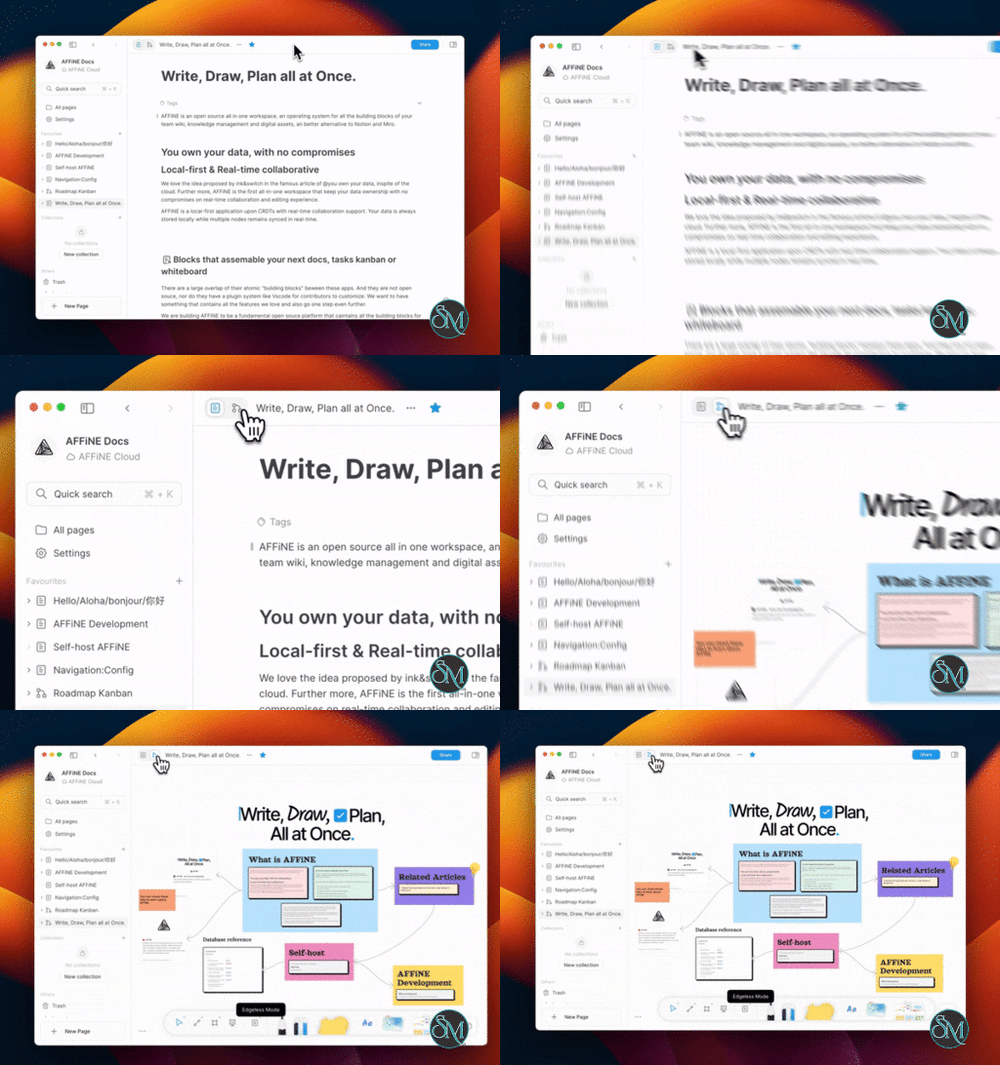

AFFiNE is an open-source workspace that integrates document editing, visual whiteboarding, and knowledge management into one application. Designed as an alternative to tools like Notion and Miro, it brings together structured documents, databases, and free-form visual canvases within a unified environment.
Rather than treating documents and whiteboards as separate tools, AFFiNE utilizes a block-based architecture that enables content to flow seamlessly between different formats. Users can take notes, organize information, build databases, plan projects, and develop visual presentations—all within the same workspace.
AFFiNE also places a strong emphasis on local data storage, privacy, and self-hosting. The platform offers a desktop application, browser-based access, cloud synchronization, and the option to use one’s own server for users who desire greater control over their data.
Download AFFiNE v0.27.4 - Software Mirrors |
|---|
AFFiNE v0.27.4 for Windowsaffine-0.27.4-stable-windows-x64.nsis.exe | 162.72 MB affine-0.27.4-stable-windows-x64.exe | 210.82 MB |
AFFiNE v0.27.4 for macOSaffine-0.27.4-stable-macos-x64.zip | 196.65 MB affine-0.27.4-stable-macos-x64.dmg | 165.95 MB |
AFFiNE v0.27.4 for Linuxaffine-0.27.4-stable-linux-x64.zip | 193.31 MB affine-0.27.4-stable-linux-x64.flatpak | 155.76 MB |
AFFiNE v0.27.4 Source Code |
AFFiNE v0.27.4 Release Notes:What's newWeb & Editor
Native Client
Backend
Breaking change Starting from client version 0.27, only server at version 0.27 or higher are supported to connect and sync. Starting from server version 0.27, only clients at version 0.26 or higher are supported to connect and sync. Starting from server version 0.27, environment variables are no longer the server’s preferred source for reading configuration, and some environment variables are no longer available. Please refer to https://docs.affine.pro/self-host-affine/install/configuration to migrate the configuration to |
Features
Document Editor and Knowledge Management
AFFiNE provides a block-based document editor for creating notes, articles, meeting records, research documents, and knowledge bases.
Its editing environment supports different content blocks, including:
Headings and paragraphs.
Lists and checklists.
Images and file attachments.
Tables and databases.
Embedded web content.
Mathematical expressions.
Code blocks.
Links and references.
Multimedia content.
Documents can be connected through backlinks and references, making it easier to build interconnected knowledge bases instead of maintaining isolated notes.
The block-based architecture also allows content to be reused across different documents without having to duplicate everything.
Edgeless Whiteboard
One of AFFiNE's most distinctive features is its Edgeless Mode, which transforms a document into an unlimited spatial canvas.
Unlike traditional document editors that arrange content in a linear sequence, Edgeless Mode allows users to position blocks freely. This is useful for brainstorming, mind mapping, project planning, presentations, and visual research.
You can combine text, images, shapes, and other content blocks on the same canvas. Documents can also switch between Page Mode and Edgeless Mode while preserving their underlying content and reading order.
This integration makes AFFiNE particularly interesting for users who frequently move between structured writing and visual thinking.
Database and Project Management
AFFiNE includes a database system for organizing structured information.
It supports different ways to manage content, including:
Table views.
Kanban boards.
Page properties.
Tags and backlinks.
Filters and collections.
Custom fields and metadata.
Databases can be used for project tracking, task management, reading lists, research collections, and other structured workflows.
Its block-based design also allows database content to connect with regular documents and visual canvases.
Collections and Organization
Collections provide another way to organize documents and workspace content.
Users can group pages manually or use rules to create collections that automatically organize matching documents.
Page properties can include dates, progress indicators, checkboxes, text, links, and tags. These properties make it easier to filter and manage larger knowledge bases.
AFFiNE AI
AFFiNE includes AI-assisted features through its Copilot system.
Depending on the configured provider and available capabilities, AI can help with:
Writing and rewriting content.
Summarizing documents.
Answering questions.
Generating structured content.
Producing images.
Transcribing audio.
Searching and indexing workspace information.
Self-hosted installations support Bring Your Own Key (BYOK), allowing workspace owners to configure supported AI providers rather than relying exclusively on a managed AI subscription.
Supported provider routes include OpenAI, Anthropic, Gemini, and FAL. Different operations have different provider requirements, and some features require server-side configuration or workspace indexing.
This flexibility is useful for users who want to choose their own AI provider and manage API credentials independently.
Local-First Workspaces
AFFiNE supports local workspaces that store data on the user's device.
This allows users to work without depending on a permanently available cloud account. For users who need synchronization across devices, cloud workspaces provide another option.
Its synchronization architecture uses CRDT-based technology to support collaborative editing and manage concurrent changes.
Users can choose between local storage, AFFiNE Cloud, and self-hosted deployments depending on their requirements.
Real-Time Collaboration
AFFiNE supports collaborative workspaces where multiple members can work on shared content.
Collaboration capabilities include shared documents, synchronized changes, workspace membership, and collaborative editing.
AFFiNE Cloud provides additional collaboration and synchronization services. Self-hosted deployments allow organizations to operate their own workspace infrastructure.
The exact availability of advanced collaboration and administration features depends on the deployment and edition.
Templates and Customization
AFFiNE provides templates for different workflows, helping users get started without building every workspace from scratch.
Templates can cover:
Project planning.
Personal knowledge management.
Meeting notes.
Research organization.
Lesson planning.
Vision boards.
Task management.
Its flexible block system also allows users to customize their own document and whiteboard layouts.
Import and Export
AFFiNE supports importing and exporting workspace content, making it easier to migrate information and maintain backups.
Users can work with supported document formats and export their content for use outside AFFiNE.
Workspace export and import are particularly important for local-first applications because they provide an additional way to manage data independently of a particular cloud service.
For larger self-hosted deployments, database and uploaded-file backups should also be maintained separately.
Self-Hosting
AFFiNE can be deployed on infrastructure controlled by the user or organization.
The official Docker Compose deployment includes the AFFiNE application, PostgreSQL, Redis, and supporting services.
Self-hosting provides control over:
Data storage locations.
Server configuration.
Workspace access.
Domain and HTTPS configuration.
Database backups.
Uploaded files.
AI provider configuration.
Infrastructure and deployment policies.
It is particularly useful for teams that want a private knowledge-management platform without depending entirely on a third-party cloud service.
Desktop and Web Applications
AFFiNE provides desktop applications and browser-based access.
The desktop applications are available for Windows, macOS, and Linux. Browser access provides another way to work with AFFiNE without installing a dedicated desktop client.
This makes it suitable for individuals who prefer a native application as well as teams that want to access their workspace through a self-hosted web deployment.
Performance and Compatibility
AFFiNE is primarily developed using TypeScript, with Rust components supporting parts of its backend and native functionality. Its editor architecture is built around BlockSuite, a block-based editing toolkit developed by the same organization.
The application uses CRDT technology for collaborative data synchronization and supports local-first workflows.
Its major capabilities include:
Block-based document editing.
Infinite visual whiteboards.
Structured databases and collections.
Local workspace storage.
Collaborative synchronization.
AI-assisted content workflows.
Desktop and browser access.
Self-hosted deployment.
The desktop application supports Windows, macOS, and Linux. Browser access is available through modern web browsers.
Self-hosting requires more resources than running the desktop application. The official documentation recommends at least four CPU cores and 2 GB RAM for basic deployments, with 4 GB RAM recommended for larger documents and more demanding workloads.
PostgreSQL is the primary database, while Redis provides caching, background-task processing, and synchronization infrastructure. Uploaded files also require persistent storage.
AFFiNE Community Edition is available under the MIT license, but the repository contains separately licensed Enterprise Edition backend components. Organizations should review the individual license files before modifying or deploying those components in production.
System Requirements
Desktop:
Windows, macOS, or Linux.
A modern processor and sufficient memory for the size of the workspace.
A supported desktop application or modern web browser.
Internet connectivity for cloud synchronization and external AI services.
Self-hosted server:
Linux server or another supported Docker environment.
Docker Engine and Docker Compose v2.
At least 4 CPU cores recommended.
At least 2 GB RAM for basic usage.
4 GB RAM recommended for larger documents.
Persistent storage for PostgreSQL, uploaded files, and configuration.
PostgreSQL and Redis, included in the recommended Compose deployment.
Pros and Cons
Pros
Combines document editing and visual whiteboarding.
Open-source Community Edition.
Local-first architecture.
Supports Windows, macOS, Linux, and web access.
Flexible block-based editing system.
Built-in databases and Kanban views.
Supports backlinks and interconnected knowledge bases.
AI-assisted writing and content generation.
Supports multiple AI providers through BYOK.
Real-time collaboration and workspace synchronization.
Official Docker Compose self-hosting support.
Customizable templates and workspace layouts.
Cons
The application is still evolving, with some features and workflows subject to change.
Self-hosting requires PostgreSQL, Redis, persistent storage, and ongoing maintenance.
AI functionality may require external API credentials.
Advanced enterprise capabilities have separate licensing considerations.
Large collaborative workspaces can require substantial server resources.
Its extensive feature set can take time to learn.
How to Install
AFFiNE can be used through its hosted service, desktop applications, or a self-hosted deployment.
Install the Desktop Application
Download the appropriate installer from the official AFFiNE download page.
Available desktop platforms include:
Windows.
macOS.
Linux.
Install the application, launch it, and create a local workspace or connect to an existing AFFiNE Cloud or self-hosted workspace.
Run AFFiNE with Docker Compose
Docker Compose is the recommended method for self-hosting AFFiNE.
First, create a deployment directory:
mkdir -p affine/config
cd affine
Download the official Compose configuration:
curl -L -o docker-compose.yml \
  https://github.com/toeverything/AFFiNE/releases/latest/download/docker-compose.yml
Download the example configuration:
curl -L -o config/config.json \
  https://github.com/toeverything/AFFiNE/releases/latest/download/config.json.example
Edit config/config.json and configure the server URL:
{
  "$schema": "https://github.com/toeverything/affine/releases/latest/download/config.schema.json",
  "server": {
    "name": "AFFiNE Self-hosted",
    "externalUrl": "https://affine.example.com"
  },
  "copilot": {
    "enabled": true,
    "byok": {
      "enabled": true
    }
  }
}
Replace the example domain with your actual deployment address.
Start the services:
docker compose up -dCheck the running containers:
docker compose psOnce the services are ready, open your configured domain or visit:
http://localhost:3010For the initial setup, visit the administration page:
http://localhost:3010/adminCreate the first administrator account and complete the setup.
Configure HTTPS and Backups
For public deployments, configure a reverse proxy with HTTPS before inviting users.
Make sure the following data is backed up:
PostgreSQL database.
Uploaded files and blob storage.
AFFiNE configuration.
Test the restore procedure before upgrading the deployment. AFFiNE's database schema and Compose configuration can change between releases, so review the upgrade documentation before replacing an existing installation.
Final Verdict
AFFiNE is a compelling open-source workspace for users who want document editing, visual whiteboarding, and knowledge management without maintaining separate applications for each workflow.
Its block-based architecture is its biggest advantage. The ability to move between structured documents, databases, and unlimited visual canvases makes it more flexible than a conventional note-taking application. Local-first storage and self-hosting also provide meaningful control over personal and organizational data.
The addition of AI features and BYOK support makes the platform even more versatile, particularly for users who want to integrate their preferred AI providers into their knowledge-management workflow.
However, AFFiNE is not without limitations. Its development is active, some capabilities are still evolving, and self-hosting requires a properly maintained server environment. Organizations should also understand the distinction between the MIT-licensed Community Edition components and separately licensed Enterprise components.
Overall, AFFiNE is an excellent choice for individuals, developers, researchers, and teams looking for a flexible alternative to Notion and Miro.