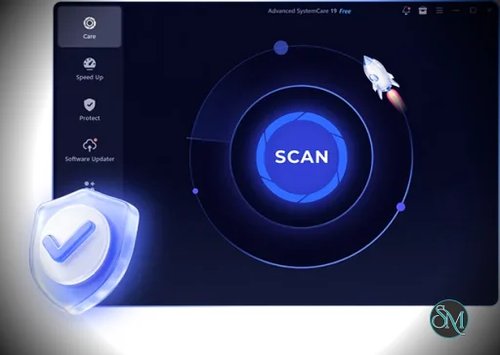

IObit Advanced SystemCare Pro is a Windows maintenance utility that combines junk-file cleaning, performance optimization, privacy protection, and automated system care in one application. It is designed to help users maintain their computers without manually searching for temporary files, adjusting startup settings, or managing every background process.
The Pro edition expands on the free version with deeper cleaning, automated optimization, additional privacy tools, software updates, and enhanced protection features. Its interface emphasizes one-click maintenance, making it accessible to users who prefer a straightforward alternative to configuring individual Windows utilities.
However, system-cleaning software cannot overcome every performance limitation. The actual benefits depend on the computer's condition, installed applications, and hardware. Advanced SystemCare Pro is best viewed as a convenience tool for routine maintenance rather than a guaranteed way to make every PC dramatically faster.
Features
AI-Powered Cleaning and Optimization
Advanced SystemCare Pro includes an AI-assisted scanning mode designed to identify unnecessary files, browser caches, system clutter, and other maintenance opportunities.
Its cleaning tools can remove temporary files and selected application leftovers to reclaim disk space. The software also scans for certain Windows issues and offers automated fixes, reducing the amount of manual maintenance required.
Users can review detected items and adjust cleaning settings. This is useful because automated cleaning should be configured carefully when application caches, browser data, or system settings need to be preserved.
Startup and Performance Optimization
The software helps identify startup applications and background processes that may contribute to slow boot times or unnecessary resource usage.
Its optimization tools can disable selected startup items and manage background activity. The Pro edition also includes automatic RAM cleaning, which attempts to free memory by managing unused processes and applications.
These features may improve responsiveness on computers burdened by unnecessary startup programs. However, memory cleaning does not replace additional RAM, and aggressively closing background applications can interfere with software that users want to keep running.
Deep Cleaning and Registry Maintenance
Advanced SystemCare Pro can scan for junk files, obsolete registry entries, broken shortcuts, and other potential maintenance issues.
Its registry-cleaning functionality is intended to remove invalid entries that accumulate after software installation and removal. Although this can identify some unnecessary data, registry cleaning is not a reliable general-purpose performance upgrade. Removing the wrong entries can also cause problems, so users should review settings and keep recovery options available.
The application includes a Rescue Center for supported rollback operations, providing a way to reverse certain changes when necessary.
Privacy Protection
The software includes privacy-related tools that clear selected browsing traces and application activity. These can help users remove local records they no longer want stored on their computers.
Additional features include digital fingerprint protection and tools intended to limit online tracking. Their effectiveness depends on the protection mechanism and the websites or applications involved.
Clearing local browser traces does not make someone anonymous online. Websites, network operators, and other services may still collect information through accounts, cookies, IP addresses, or other tracking methods.
Security and Ransomware Protection
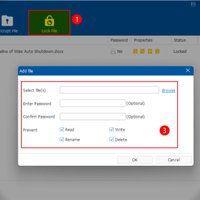
Advanced SystemCare Pro includes browser and email protection features, tools for detecting certain security threats, and Safe Folder functionality intended to protect sensitive files from unauthorized access and ransomware.
These additions provide another layer of maintenance and protection, but they should not be treated as a replacement for a reputable antivirus product, Windows Security, regular software updates, and reliable backups.
Users should also verify which security components are active in their installation and avoid assuming that every protection feature provides the same coverage as a dedicated security product.
Software Updating
The Pro edition includes a software updater that identifies supported outdated applications and offers update assistance.
Keeping software current is important for security and compatibility. Automated updating can simplify maintenance, although users should still review update results and confirm that critical applications remain compatible with their workflows.
Automatic Maintenance
Advanced SystemCare Pro can automate selected cleaning and optimization tasks. Its monitoring and AutoCare functions are designed to reduce the need for repeated manual scans.
This is convenient for users who want routine maintenance to happen with minimal intervention. More experienced users can also customize scanning and optimization settings to avoid unnecessary changes.
Get Discount 20% OFF using "SWMR" Coupon code for the IObit Products below:
IObit Advanced SystemCare 19 PRO (1 year subscription / 3 PC) Discount 77% OFF
IObit Advanced SystemCare 19 PRO (2 year subscription / 3 PC) Black Friday Discount 70% OFF
Advanced SystemCare Ultimate 18 (1 year subscription / 3 PCs) - Discount 50% OFF
IObit Uninstaller 15 PRO (1 Year Subscription, 3 PCs)
IObit Driver Booster 13 PRO (1 Year Subscription, 3 PCs)
IObit Malware Fighter 12 PRO (1 year subscription / 1 PCs) - Exclusive 35% OFF
Performance and Compatibility
Advanced SystemCare Pro is designed for Windows computers and provides a graphical interface for common maintenance tasks. Its combination of cleaning, startup management, privacy controls, and automation makes it easier to access several utilities from one place.
Performance improvements are workload-dependent. Removing junk files can recover storage space, and reducing unnecessary startup applications can shorten boot times. However, a modern PC with adequate storage and little background clutter may show minimal improvement. Claims of doubling PC speed or tripling browsing speed should be treated as vendor marketing claims rather than guaranteed results.
The software supports multiple Windows generations, including Windows 11 and Windows 10, according to IObit's published compatibility information. Some older versions of Windows are also listed, but users should verify compatibility with their particular system before installing.
The free edition provides basic cleaning and optimization, while the Pro edition unlocks deeper cleaning, automatic RAM management, additional privacy and security features, and other advanced maintenance functions.
System Requirements
IObit's published requirements for Advanced SystemCare list the following:
Operating system: Windows 11, Windows 10, Windows 8.1, Windows 8, Windows 7, Windows Vista, and Windows XP, subject to the support status of the particular release.
Free disk space: 300 MB.
Display resolution: 1024 × 768 or higher.
Internet connection: Recommended for software updates, online protection updates, and other connected features.
The listed disk-space requirement is modest, so the application should be accessible on many existing Windows computers. Actual resource usage can vary depending on enabled features and background monitoring settings.
For security reasons, users running unsupported Windows releases should consider upgrading to a supported operating system rather than relying on a maintenance utility to compensate for missing security updates.
Pros and Cons
Pros
Combines junk-file cleaning, startup optimization, privacy tools, and system maintenance in one interface.
AI-assisted scanning simplifies routine PC maintenance.
Automatically manages selected background processes and memory-cleaning tasks.
Includes privacy cleanup, browser protection, and Safe Folder functionality.
Provides software updating and automatic maintenance features.
Offers a free edition for basic cleaning and optimization.
Supports multiple Windows versions, including Windows 11.
Includes recovery options for certain optimization changes.
Cons
Advertised speed improvements are not guaranteed and depend on the computer's condition.
Registry cleaning can introduce stability problems if important entries are removed.
Automatic RAM cleaning may provide little benefit on computers with sufficient memory.
Some security and privacy features overlap with capabilities already available in Windows or dedicated security software.
The Pro edition requires a license to unlock its full feature set.
Users need to review automated changes carefully to avoid disrupting their preferred settings.
How to Install
Visit the official Advanced SystemCare Pro website.
Download the installer from IObit's official website.
Run the downloaded installer and approve the Windows permission prompt if required.
Follow the installation wizard to complete setup.
Launch Advanced SystemCare and review its scan and optimization settings.
Run an initial scan and inspect the detected items before applying changes.
Activate your Pro license to unlock the paid features.
Tip: Create a Windows restore point before performing extensive system optimization or registry cleaning. Keep automatic changes conservative until you understand what each feature modifies.
Final Verdict
IObit Advanced SystemCare Pro is a convenient Windows maintenance suite for users who want cleaning, optimization, privacy controls, and automated maintenance in one application. Its accessible interface and broad feature set make routine PC maintenance less intimidating, especially for less technical users.
Its main advantage is convenience rather than a guaranteed performance boost. Cleaning unnecessary files can recover storage space, and managing startup programs can improve boot times. However, the benefits of registry cleaning and memory optimization are less predictable, and Windows already includes several maintenance tools.
Advanced SystemCare Pro is worth considering if you prefer an all-in-one maintenance interface and are comfortable reviewing its proposed changes. Users who prefer a minimal setup can achieve many routine maintenance tasks with built-in Windows tools. Avoid running aggressive registry cleaning without a clear reason, and do not rely on this utility as a substitute for dedicated antivirus protection.