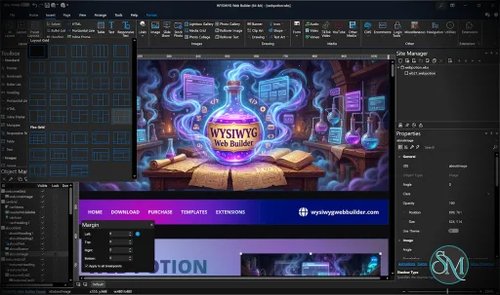



WYSIWYG Web Builder is a desktop website design application that lets users create and publish websites without writing HTML and CSS manually. Its visual editor uses a drag-and-drop workflow, automatically generating website code from the elements and layouts users create.
The software combines responsive design tools, reusable content blocks, navigation menus, forms, animations, and publishing features. It also includes AI-assisted website generation, allowing users to create page layouts from text descriptions or reference images.
Unlike hosted website builders, WYSIWYG Web Builder produces website files that users can publish to their own hosting provider. This approach provides greater control over deployment and hosting, making it suitable for small businesses, freelancers, designers, and users who prefer a desktop-based workflow.
Features
Drag-and-Drop Website Design
WYSIWYG Web Builder provides a visual workspace for arranging text, images, buttons, navigation menus, forms, and other website elements.
The application generates HTML and CSS based on the design, reducing the need to write code manually. Users can adjust object properties, configure page layouts, and preview the results during development.
This workflow is particularly useful for users who prefer visual design over manual coding. Developers can also add custom HTML, CSS, and JavaScript when the built-in tools are insufficient.
Responsive Layouts
The software supports several layout approaches, including fixed positioning, layout grids, Flexbox, and CSS Grid. Users can configure breakpoints to adapt pages to different screen sizes.
Its Easy Breakpoints feature allows individual elements to have responsive adjustments without requiring a full-page breakpoint for every change. Depending on the object, users can adjust visibility, font size, spacing, padding, and alignment.
These tools provide flexibility for building mobile-friendly websites, although users still need to test the published pages on different screen sizes to ensure that layouts behave as expected.
AI Website Generation
WYSIWYG Web Builder includes AI-assisted website creation using text descriptions or reference images.
Users can describe a website's structure, colors, content, and visual style. The software sends the instructions to a selected AI provider, which generates layout instructions that the application uses to construct the website.
Supported integrations include OpenAI, Google Gemini, Ollama, and LM Studio, depending on the configured workflow. Local model integrations can reduce dependence on external AI services, provided the necessary models and supporting software are installed.
AI generation can accelerate initial prototyping, but the resulting website still requires review. Users should verify the generated content, links, accessibility, responsive behavior, and overall design before publishing.
Templates and Pre-Made Blocks
The application includes templates and reusable content blocks that help users start projects without building every section from scratch.
Blocks can be used to assemble common website sections, such as hero banners, feature grids, testimonials, and content layouts. Users can customize their appearance and combine them into complete pages.
The Website Wizard also helps users create a starting design through guided configuration. These features make the application approachable for beginners while allowing more experienced designers to refine individual elements.
Navigation and Interactive Elements
WYSIWYG Web Builder includes navigation components such as dropdown menus, mega menus, fullscreen menus, breadcrumbs, pagination, and panel menus.
It also supports animations, transitions, galleries, carousels, lightboxes, image filters, and embedded media from services such as YouTube and Vimeo.
More advanced effects include mesh gradients and glass-style visual treatments. These tools make it possible to create visually elaborate websites without implementing every effect manually.
Forms and Content Management
The application provides form tools for collecting user input, sending emails, uploading files, validating fields, and storing supported data in MySQL or CSV files.
It also includes PHP-based content management functionality and editable content features. Login-related components provide capabilities such as user registration, password recovery, and role management.
These features can be useful for small websites that need more than static pages. However, dynamic functionality depends on the generated code, server configuration, database setup, and correct security practices.
Users should test authentication, file uploads, and database operations carefully before deploying them on a public server.
E-Commerce Integrations
WYSIWYG Web Builder supports integrations with third-party e-commerce services, including PayPal, Ecwid, Stripe, Snipcart, Paddle, Gumroad, WebMoney, and Vibracart Pro.
These integrations allow users to add purchasing and payment functionality without building an entire commerce backend from scratch.
The available capabilities depend on the selected provider and integration. Businesses should review each provider's current requirements and ensure that payment handling, order processing, and customer data are configured correctly.
SEO and Website Publishing
The software includes an SEO Assistant and tools for generating XML sitemaps and robots.txt files.
Users can configure page metadata, organize website content, and prepare files for publication. Built-in publishing tools support FTP, FTPS, and secure FTP workflows, allowing websites to be uploaded directly to compatible hosting services.
Because the generated files can be hosted independently, users are not restricted to a proprietary hosting platform. They can select a hosting provider based on their own technical requirements.
SEO performance still depends on content quality, crawlability, site speed, internal linking, accessibility, and other factors beyond the presence of SEO tools.
Buy Products by WYSIWYG Web Builder - Discount 25% Off - Software Mirrors |
|---|
Performance and Compatibility
WYSIWYG Web Builder is a Windows desktop application rather than a browser-based website editor. This makes it suitable for users who prefer working with locally stored project files and publishing the resulting website to their own hosting environment.
Its main strength is the combination of visual editing and code generation. Users can build websites through the graphical interface while retaining the ability to customize generated pages with code when necessary.
The software is designed primarily for Windows. The developer offers Quick 'n Easy Web Builder as a separate product for macOS and Linux, so users on those platforms should not assume that the Windows application itself is natively supported.
Website performance depends on the code generated, the assets included, the layout complexity, and the hosting environment. Although the visual editor simplifies development, users should still optimize images, test mobile layouts, check accessibility, and measure page performance before publishing.
The application also has a substantial feature set. Beginners may need time to understand its layout systems, object properties, extensions, and publishing options. Starting with a template or pre-made blocks can make the initial learning process easier.
System Requirements
WYSIWYG Web Builder is designed for Windows PCs. Its official website lists support for Windows 11 and Windows 10, as well as certain older Windows releases.
The published download page offers both 64-bit and 32-bit editions. The 32-bit build is intended for older computers.
Other considerations include:
Operating system: Windows, with compatibility depending on the application build.
Architecture: 64-bit or 32-bit, depending on the selected installer.
Internet connection: Useful for downloading the software, obtaining extensions, using online AI providers, and publishing websites.
Hosting: Any compatible hosting service that supports the generated website files and required server-side technologies.
Database and server-side functionality: PHP and MySQL must be configured on the hosting environment when required by the project.
For precise hardware requirements, consult the official download page and documentation before installing the application on an older computer.
Pros and Cons
Pros
Visual drag-and-drop website creation with automatic HTML and CSS generation.
Supports Flexbox, CSS Grid, layout grids, and responsive breakpoints.
Includes AI-assisted website generation from text and reference images.
Offers templates and reusable content blocks.
Provides extensive navigation, animation, gallery, and media components.
Includes forms, PHP-based CMS functionality, and login-related tools.
Supports integrations with third-party e-commerce services.
Provides SEO tools, sitemap generation, and
robots.txtsupport.Publishes directly to compatible hosting services through FTP and related protocols.
Allows custom code for additional flexibility.
Cons
The main application is Windows-focused, requiring a separate product for macOS and Linux.
Its large feature set can take time to learn.
AI-generated layouts and content require manual review.
Dynamic features depend on correct server and database configuration.
Extensions and third-party integrations may require additional setup.
Website quality and performance still depend on design decisions, content, and optimization.
Projects are built around the application's own editing workflow, which may not suit developers who prefer maintaining websites entirely in source code.
How to Install
Visit the official WYSIWYG Web Builder website.
Open the Downloads page and choose the appropriate Windows installer.
Run the installer and follow the setup wizard.
Launch the application and create a new website or open an existing project.
Start with a template, pre-made blocks, or a blank page.
Arrange elements using the visual editor and configure responsive layouts.
Preview the website, test its behavior, and adjust the design.
Configure the publishing settings for your hosting provider.
Publish the generated website files and test the live site.
A free trial is available, allowing users to evaluate the software before purchasing a license.
Final Verdict
WYSIWYG Web Builder is a capable desktop website design application for users who want visual website creation without giving up control over hosting and generated files. Its combination of responsive layout tools, reusable blocks, interactive components, forms, SEO utilities, and direct publishing makes it suitable for a wide range of small and medium-sized websites.
The AI website generation features are a useful addition, particularly for building initial layouts quickly. However, the application is still a visual editor rather than a complete substitute for web development knowledge. Complex dynamic sites require careful configuration, and generated websites still need testing and optimization.
WYSIWYG Web Builder is a strong choice for Windows users who want to design and publish websites visually while retaining control over hosting. It is particularly useful for freelancers, small businesses, and designers who prefer a desktop workflow. Developers who prioritize source-code-first workflows or need a native macOS or Linux application may prefer a different solution.