

Apple Container is a lightweight containerization framework developed by Apple that brings native Linux container support to macOS. Designed specifically for Apple Silicon and modern macOS environments, it aims to provide developers with a faster and more integrated alternative to traditional container solutions while maintaining compatibility with standard container workflows.
Containers have become a core part of modern software development, but running Linux containers on macOS has traditionally required third-party virtualization layers. Apple Container seeks to streamline this experience by offering a native solution that integrates closely with macOS and Apple’s virtualization technologies.
The project focuses on simplicity, performance, and developer productivity. Instead of managing a full virtual machine manually, developers can run Linux containers using a lightweight environment optimized for macOS.
Download Apple Container 1.7.1 - Software Mirrors |
|---|
Apple Container 1.7.1 for macOS |
Others Download related to Apple Container 1.7.1 |
Apple Container 1.7.1 Release Notes:Highlights⌨️ denotes breaking CLI changes. 👩💻 denotes breaking API changes.
What's Changed
New Contributors
|
Key Features of Apple Container
Native macOS Integration
Apple Container is built specifically for macOS, allowing tighter integration with the operating system than many third-party alternatives. This can lead to a smoother development experience and more predictable behavior.
Linux Container Support
The framework enables developers to run Linux containers on macOS while maintaining compatibility with common container images and workflows used throughout the software industry.
Apple Silicon Optimization
One of the most attractive aspects of Apple Container is its optimization for Apple Silicon hardware. Developers using M-series chips can benefit from improved efficiency and performance compared to solutions that rely heavily on emulation.
Lightweight Virtualization
Rather than requiring large virtual machine environments, Apple Container uses Apple's virtualization technologies to provide a leaner runtime environment for containers.
Command Line Workflow
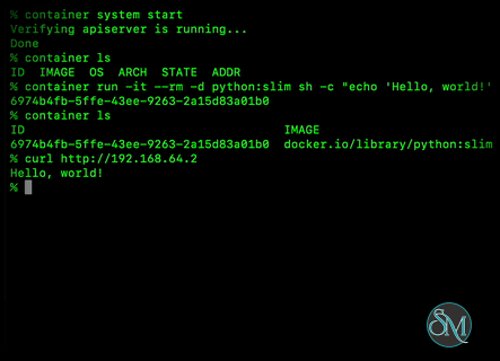
The tool is designed for developers who prefer terminal-based workflows. Commands are straightforward and fit naturally into existing development and automation pipelines.
Performance and User Experience
Apple Container delivers impressive startup times and efficient resource utilization. Container operations generally feel responsive, and the integration with macOS reduces some of the complexity commonly associated with container virtualization.
Developers already familiar with Docker concepts will find the learning curve relatively manageable. However, because the project is newer than established container platforms, some workflows and ecosystem integrations may still be evolving.
The overall experience feels modern and aligned with Apple's broader strategy of providing native developer tools optimized for its hardware platform.
Pros
Native Linux container support on macOS.
Optimized for Apple Silicon hardware.
Lightweight virtualization architecture.
Fast startup and efficient resource usage.
Simple command-line workflow.
Strong integration with Apple's development ecosystem.
Cons
Newer ecosystem compared to mature container platforms.
Feature set may not yet match every capability offered by established alternatives.
Primarily targeted at macOS users.
Some third-party tooling integrations may still be developing.
Who Should Use Apple Container?
Apple Container is best suited for developers building and testing applications on macOS, especially those using Apple Silicon devices. It is particularly appealing for software engineers who want a lightweight container experience without relying heavily on third-party virtualization solutions.
Developers working with cloud-native applications, microservices, and containerized development environments may find it an attractive addition to their workflow.
Final Verdict
Apple Container represents an important step toward a more native container experience on macOS. Its focus on performance, simplicity, and Apple Silicon optimization makes it a compelling option for developers who want efficient Linux container support directly from Apple.
While it is still maturing compared to long-established container platforms, its strong integration with macOS and promising performance characteristics make it a project worth watching.