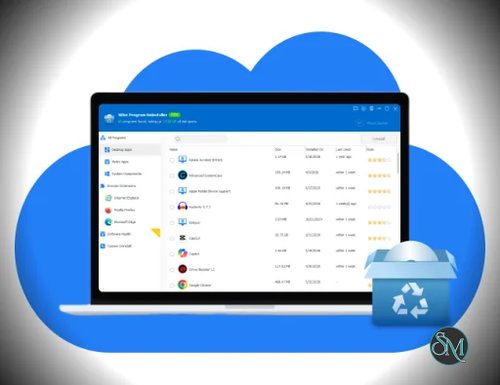


Wise Program Uninstaller is a Windows utility designed to remove installed applications and clean up leftover files and registry entries. It provides standard Safe Uninstall, Force Uninstall for stubborn programs, and Custom Uninstall for applications that do not appear in the normal Windows program list.
Features
Wise Program Uninstaller provides several ways to remove software from Windows.
Safe Uninstall first uses the application's own uninstaller and then scans for leftover files, folders, and registry entries. This makes it different from simply removing an application's entry from Windows' installed-program list.
Force Uninstall is intended for programs that cannot be removed normally because their uninstallers are missing, corrupted, or no longer working. Wise Program Uninstaller searches for associated files, folders, and registry entries before removing them.
Custom Uninstall can target programs that are hidden or missing from the normal Windows application list. Users can specify the program's installation folder and let the application search for associated components.
The Software Health feature checks applications for redundant files and uninstallation leftovers. Recent versions improved its detection rules and added the ability to export leftover details after an uninstall.
The application can also remove Windows built-in and UWP applications, as well as browser plug-ins, add-ons, and extensions. A context-menu option can be enabled to uninstall programs directly from their shortcuts.
Performance and Compatibility
Wise Program Uninstaller is a small utility. The application supports both 32-bit and 64-bit versions of Windows 7, 8, 8.1, 10, and 11. A portable version is also available, so the utility does not have to be permanently installed.
Force Uninstall should be used carefully. Because it searches for files, folders, and registry entries associated with a program, users should review the detected items before deleting them. The official manual specifically recommends checking the results for unrelated items.
System Requirements
According to the developer:
Windows 11, 10, 8/8.1, or 7
32-bit or 64-bit Windows
1 GHz processor or faster
4 GB RAM or more
40 MB available disk space
A portable version is also available.
Pros and Cons
Pros
Lightweight
Free version available
Portable version available
Safe Uninstall
Force Uninstall
Custom Uninstall
Removes leftover files and registry entries
Supports UWP and Windows built-in applications
Can remove browser extensions
Software Health analysis
Can export leftover details
Supports Windows 7 through Windows 11
Available in 32-bit and 64-bit versions
Cons
Force Uninstall requires careful review of detected items
Registry cleanup can carry risks if unrelated entries are selected
Some features overlap with functionality already available in Windows
Windows-only
How to Install
Download the latest Wise Program Uninstaller installer from the official WiseCleaner website.
Run the installer and follow the Windows installation wizard. Alternatively, download the portable version if you prefer to run the application without installing it.
After launching Wise Program Uninstaller, select the application you want to remove. Use Safe Uninstall for normal software removal. If the application's own uninstaller does not work, Force Uninstall can be used instead.
After the application's uninstaller finishes, review the detected leftover files, folders, and registry entries before confirming their removal.
Final Verdict
Wise Program Uninstaller is a focused utility for users who want more control over software removal than the standard Windows uninstall process provides. Safe Uninstall, leftover detection, Force Uninstall, and Custom Uninstall cover both ordinary applications and programs that are difficult to remove.
Its small size and portable version also make it convenient to keep as a troubleshooting utility. The main area requiring caution is Force Uninstall, since aggressive removal of files and registry entries should always be reviewed before deletion.
For users who regularly deal with stubborn applications or want to check for leftovers after uninstalling software, Wise Program Uninstaller is a useful Windows utility.