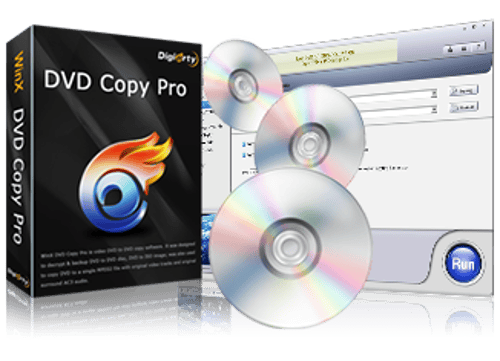

WinX DVD Copy Pro is a Windows utility designed to back up DVD collections and preserve physical discs in digital formats. It can duplicate DVDs to blank discs, create ISO images, save DVD folders to a hard drive, and extract video or audio content. It also includes tools for mounting ISO images and burning DVD backups.
The software is particularly useful for people who want to preserve their DVD collections or create backup copies of aging and scratched discs. Its nine copy modes provide flexibility for different backup needs, although its focus on DVD media means it is not a general-purpose video converter.
Features
Nine DVD Copy Modes
WinX DVD Copy Pro offers several ways to copy and manage DVD content:
DVD to DVD: Clone a DVD to a compatible blank disc while preserving the original structure.
DVD to ISO: Create an ISO image for storage, transfer, or later burning.
DVD to VIDEO_TS folder: Save DVD files to a computer or other storage device.
DVD to MPEG-2: Extract video content into a single MPEG-2 file.
DVD chapter copying: Copy selected chapters instead of an entire disc.
Video extraction: Extract video content from a DVD.
Audio extraction: Extract audio tracks from a DVD.
ISO mounting: Mount ISO images as virtual discs.
DVD burning: Burn ISO images or DVD folders to writable discs.
These options make the software suitable for both complete DVD backups and more selective extraction tasks.
1:1 DVD Backup
The software supports copying DVDs to compatible discs, ISO images, and DVD folders while retaining the original DVD structure. This includes supported menus, audio tracks, and subtitle tracks.
Its sector-by-sector copying approach is also designed to help with discs that have read errors or damaged sectors. However, success depends on the condition of the disc, the optical drive, and the protection mechanism involved. Severely damaged discs may still be unreadable.
Support for Different DVD Types
WinX DVD Copy Pro supports DVD discs, DVD folders, and ISO images. Its documented compatibility includes homemade DVDs, commercial DVDs, region restrictions, and several DVD protection mechanisms.
The manufacturer also advertises support for certain older and scratched discs. Protection compatibility can vary by disc, and users should check applicable copyright laws before making copies of protected media.
DVD Burning and ISO Mounting
The built-in ISO mounter and DVD burner reduce the need for separate utilities when managing backups. You can mount an ISO image to access its contents or burn a saved DVD folder or ISO image to a writable disc.
Straightforward Workflow
The basic process is simple: select a source DVD or image, choose a copy mode, configure the destination, and start the operation. Users who only need a straightforward backup do not have to work through a complex video-conversion workflow.
Buy WinX DVD Copy Pro - Software Mirrors |
|---|
WinX DVD Copy Pro (Lifetime) - Discount 50% Off WinX DVD Copy Pro [Lifetime / 1 PC ] WinX DVD Copy Pro for 1 PC - Discount 20% Off WinX DVD Copy Pro [Full License] |
Performance and Compatibility
WinX DVD Copy Pro focuses on preserving DVD content rather than converting it into modern formats such as MP4 or MKV. This makes it appropriate for maintaining DVD backups, but less suitable for people who want to prepare videos for smartphones or streaming devices.
The manufacturer estimates that a full dual-layer DVD copy can take around 12 to 17 minutes under its testing conditions. Actual results depend on the optical drive, disc condition, computer hardware, and writing speed. This estimate should not be treated as a guaranteed completion time.
The software is intended for Windows PCs. Its official specifications list support for Windows 11, Windows 10, Windows 8 and 8.1, Windows 7, and several older Windows releases. It does not provide a native macOS version on the product page.
One important limitation is DVD capacity. The manufacturer documents 1:1 copying for DVD-5 to DVD-5 and DVD-9 to DVD-9, but does not support compressing a DVD-9 onto a smaller DVD-5 disc through its DVD-copy mode. Users who need disc compression should consider a different workflow.
System Requirements
The official specifications list the following requirements and compatibility details:
Operating system: Windows 11, Windows 10, Windows 8/8.1, Windows 7, and older supported Windows versions.
Processor: Intel or AMD processor.
Input sources: DVD discs, DVD folders, and ISO images.
Output formats: DVD discs, ISO images, DVD folders, and MPEG-2 files.
Optical drive: Required for reading physical DVDs; a DVD burner is required to write physical backup discs.
Storage: At least 9 GB of free temporary storage is recommended for DVD-to-DVD copying, with additional space needed for retained backups.
The software's legacy hardware requirements are modest, but users should consult the official specifications and test the trial version to confirm compatibility with their particular Windows installation and optical drive.
Pros and Cons
Pros
Nine copy modes for different DVD backup tasks.
Supports DVD-to-DVD, ISO, VIDEO_TS, and MPEG-2 output.
Preserves DVD structure when making supported 1:1 copies.
Includes ISO mounting and DVD burning tools.
Designed to handle some scratched discs and read errors.
Supports a range of DVD types and documented protection mechanisms.
Provides a relatively straightforward copying workflow.
Cons
Limited to Windows rather than offering native macOS support.
Focuses on DVD media instead of modern video conversion.
Cannot perform DVD-9 to DVD-5 compression in its documented DVD-copy workflow.
Physical disc copying requires suitable optical-drive hardware and blank media.
The trial version restricts copying to ISO output, limiting the ability to evaluate other modes fully.
Successful recovery of scratched or protected DVDs is not guaranteed.
How to Install
Visit the official WinX DVD Copy Pro website.
Download the Windows installer.
Run the installer and approve the Windows permission prompt if required.
Follow the setup wizard to select the installation location and complete installation.
Launch the application and load a DVD disc, DVD folder, or ISO image.
Select the desired copy mode and destination, then start the operation.
If you purchase a license, enter the registration code to unlock the full functionality.
The free trial can create ISO copies, but the manufacturer states that the other copying limitations are removed after purchasing and activating the full version.
Final Verdict
WinX DVD Copy Pro is a practical choice for Windows users who want to preserve DVD collections without dealing with a complicated interface. Its combination of disc cloning, ISO creation, folder backups, chapter extraction, ISO mounting, and DVD burning makes it a useful all-in-one tool for DVD preservation.
Its main strength is maintaining the original DVD structure rather than converting content into a different video format. However, its limitations around disc compression and its narrow focus on DVD media make it less appealing to users who primarily want modern video conversion or playback files.
WinX DVD Copy Pro is worth considering for DVD backup and preservation, particularly if you need multiple copying options in one Windows application. Try the free version with your own discs and optical drive before purchasing, especially if you rely on a specific copy mode or need to handle damaged DVDs.