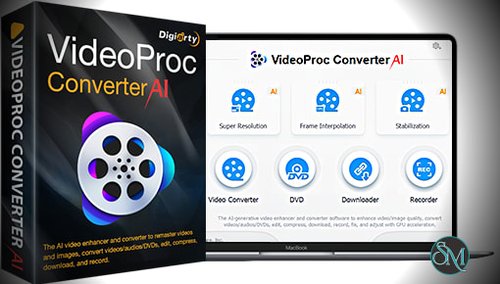

Digiarty VideoProc Converter AI is a premium multimedia software developed by Digiarty Software. It focuses on video conversion, AI enhancement, video compression, screen recording, and media downloading. The AI engine is trained to upscale videos, improve clarity, and enhance old or low resolution footage while maintaining natural details.
The software supports a wide range of video formats and works efficiently on both modern and older systems thanks to full GPU acceleration.
Get Discounts for the Digiarty Software Products below: | ||
|---|---|---|
$29.95 | ||
$119.90 | ||
VideoProc Converter AI (Lifetime License for 2-5 PCs) + Gifts | VideoProc Converter AI (Lifetime License for 2-5 Mac) +Gifts | $39.95 |
$78.90 | ||
$38.90 | ||
VideoProc Converter AI [Premium 365 for 3 Macs] + Bonus Gift | $59.95 | |
Key Features of Digiarty VideoProc Converter AI
AI Video Upscaling
The AI engine enhances video resolution by intelligently adding detail and improving sharpness. This feature is ideal for restoring old videos or improving footage captured at low quality.
AI Noise Reduction
Digiarty VideoProc Converter AI removes grain, artifacts, and visual noise from videos. It helps produce cleaner and more professional looking results, especially for night footage or older recordings.
AI Frame Interpolation
The software can increase frame rates smoothly, making motion appear more fluid. This is useful for action videos, gaming clips, and sports recordings.
GPU Accelerated Video Conversion
Full support for GPU acceleration allows extremely fast video conversion while keeping CPU usage low. Supported hardware includes Intel, NVIDIA, and AMD graphics processors.
Wide Format Support
The software supports popular formats such as MP4, MKV, MOV, AVI, HEVC, and many others. It also provides ready made profiles for devices like smartphones, tablets, TVs, and gaming consoles.
Video Compression Without Quality Loss
Users can reduce video file sizes significantly while preserving visual quality. This is useful for storage optimization and faster sharing.
Screen Recording
Digiarty VideoProc Converter AI includes a built in screen recorder that captures desktop activity, webcam input, and system audio. It is suitable for tutorials, gameplay recording, and presentations.
Video Downloading
The software supports downloading videos from many online platforms. Users can save content for offline viewing or editing.
Simple and User Friendly Interface
Despite its advanced features, the interface remains intuitive. Beginners can complete tasks easily while advanced users benefit from deeper customization options.
Benefits of Using Digiarty VideoProc Converter AI
Saves Time and Effort
Fast processing and batch operations allow users to handle large video collections efficiently.
Enhances Video Quality
AI powered tools significantly improve clarity, smoothness, and overall appearance of videos.
All in One Video Solution
Users do not need multiple programs for conversion, enhancement, compression, and recording.
Suitable for Beginners and Professionals
The software balances ease of use with powerful features, making it accessible to all skill levels.
Reliable Performance
GPU acceleration ensures stable performance even when working with large or high resolution video files.
Digiarty VideoProc Converter AI is a powerful and versatile video processing tool that combines speed, quality, and intelligent enhancement. With its AI driven upscaling, noise reduction, fast conversion, and all in one functionality, it offers excellent value for anyone working with video content. For users seeking an efficient and modern video solution, Digiarty VideoProc Converter AI stands out as a reliable and high performance choice.
Digiarty VideoProc Converter AI is an advanced video processing solution designed for users who want fast conversion, high quality enhancement, and efficient media handling. The software combines GPU acceleration with artificial intelligence to improve video resolution, stabilize footage, reduce noise, and convert media files with minimal quality loss. It is widely used by content creators, video editors, and everyday users who need a reliable all in one video tool.