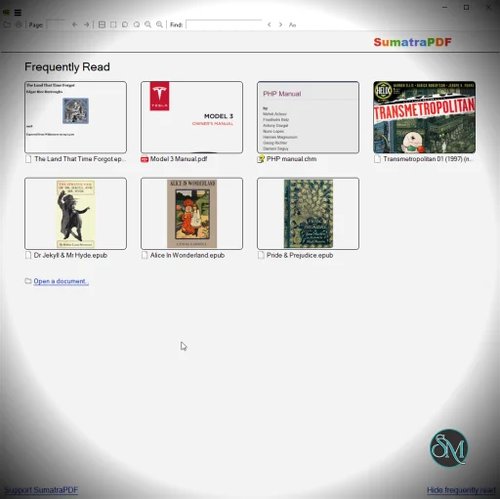

Sumatra PDF is a free and open source document viewer for Windows created by developer Krzysztof Kowalczyk. The software focuses on speed, simplicity, and portability rather than complex editing features.
Unlike heavier PDF readers, Sumatra PDF launches almost instantly and runs smoothly even on older or low performance computers.
Although primarily designed for PDF files, the viewer supports multiple document formats, making it a versatile reading tool.
Key Features
Fast and Lightweight Performance
One of the main strengths of Sumatra PDF is its extremely small size and fast startup time.
Benefits include:
Very low memory usage
Instant document loading
Smooth navigation in large PDFs
Works well on older Windows systems
This makes it ideal for users who want a simple and fast document reader.
Multiple File Format Support
While best known for PDFs, Sumatra PDF supports many document types:
PDF
EPUB
MOBI
XPS
DjVu
CHM
Comic book formats (CBZ and CBR)
This allows the program to function as a general purpose document and ebook reader.
Portable Version
Sumatra PDF offers a portable version that does not require installation.
Advantages of the portable version:
Can run from a USB drive
Leaves no system traces
Easy to use on multiple computers
This is particularly useful for technicians and users who frequently work on different systems.
Clean and Minimal Interface
The program is designed with a minimal user interface that focuses on reading content without distractions.
Interface highlights:
Simple toolbar
Quick page navigation
Keyboard shortcuts
Full screen reading mode
The simplicity helps reduce clutter and improves reading focus.
Tabbed Document Viewing
Sumatra PDF supports opening multiple documents in tabs.
Benefits include:
Easy switching between documents
Organized document management
Efficient workflow for research or study
This feature makes it easier to work with several files simultaneously.
Open Source Software
Because Sumatra PDF is open source, developers and advanced users can review or modify the source code.
Advantages include:
Transparency and security
Community contributions
Regular improvements and updates
Open source development also keeps the software free to use.
Performance and Usability
Sumatra PDF is designed primarily for reading documents, not editing them. As a result, the software loads quickly and remains responsive even with large files.
However, users looking for advanced PDF tools like editing, form filling, or annotations may need a more feature rich program.
Pros and Cons
Advantages
Extremely lightweight and fast
Supports multiple document formats
Portable version available
Clean and distraction free interface
Completely free and open source
Limitations
Limited advanced PDF features
Minimal annotation or editing tools
Interface customization options are limited
Despite these limitations, its speed and simplicity make it one of the most popular lightweight document readers.
Who Should Use Sumatra PDF
This software is ideal for:
Users who want a fast PDF reader
People using older or low power computers
Students reading ebooks or documents
Users who prefer portable applications
Anyone who wants a simple PDF viewer without bloat
Final Verdict
Sumatra PDF is one of the best lightweight document viewers available for Windows. Its fast performance, small size, and support for multiple file formats make it a great alternative to heavier PDF readers.
For users who only need a quick and efficient way to read documents, Sumatra PDF is an excellent choice.
Lightweight software is often preferred for everyday tasks like reading documents. Sumatra PDF is a fast, minimalistic document viewer for Windows designed to open PDFs and several other file formats with very low system resource usage.