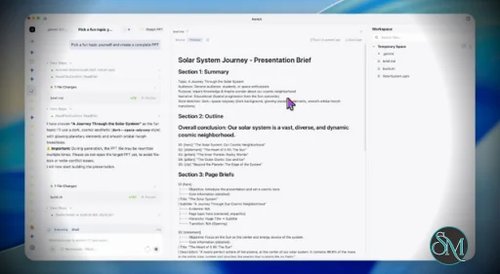



OfficeCLI is an open source command-line productivity tool developed by iOfficeAI that brings AI-powered document creation and editing directly to the terminal. Instead of using a traditional graphical office suite, OfficeCLI lets users generate, edit, convert, and manage documents using simple commands and natural language prompts. It is designed for developers, technical writers, automation engineers, and anyone who prefers a keyboard-driven workflow.
OfficeCLI takes a different approach from conventional office software. Rather than opening a graphical editor, users interact with documents through a command-line interface enhanced by AI. This makes it particularly useful for scripting, automation, remote servers, and development environments where a graphical interface may not be available.
The project is open source and actively developed, making it an attractive option for users who want transparency and the ability to customize or contribute to the software.
Key Features of OfficeCLI
AI-Powered Document Generation
OfficeCLI can generate documents from natural language prompts, helping users create reports, letters, meeting notes, summaries, and other content with minimal effort.
Command Line Workflow
Everything is managed through terminal commands, allowing users to integrate document creation into shell scripts, automation workflows, and CI/CD pipelines.
Multiple Document Formats
OfficeCLI supports working with common office document formats, making it easier to generate and manage files without relying on a full desktop office suite.
AI-Assisted Editing
Users can rewrite, summarize, expand, translate, or improve existing documents using AI directly from the command line.
Automation Friendly
Because it is designed as a CLI application, OfficeCLI fits naturally into automated workflows where documents need to be created or updated programmatically.
Open Source
The project is released as open source, allowing developers to inspect the code, contribute improvements, and adapt it to their own environments.
Download OfficeCLI v1.0.154 - Software Mirrors |
|---|
OfficeCLI v1.0.154 for Windows |
OfficeCLI v1.0.154 for macOS |
OfficeCLI v1.0.154 for Linuxofficecli-linux-x64 | 33.79 MB officecli-linux-arm64 | 33.23 MB |
Others Download related to OfficeCLI v1.0.154 |
OfficeCLI v1.0.154 Source Code |
OfficeCLI v1.0.154 Release Notes:Full Changelog: v1.0.153...v1.0.154 |
Performance and User Experience
OfficeCLI is lightweight and fast to install for users familiar with command-line tools. Commands are straightforward, and the AI integration reduces the amount of manual writing required for many common tasks.
The terminal-based interface will appeal to developers and system administrators, but users accustomed to traditional word processors may face a learning curve. Since the project is actively evolving, new features and improvements continue to be added over time.
Pros
Free and open source.
AI-powered document generation and editing.
Excellent for terminal-based workflows.
Easily integrates into automation and scripting.
Lightweight compared to traditional office suites.
Suitable for remote and headless environments.
Active development on GitHub.
Cons
Command-line interface may not appeal to all users.
Lacks the visual editing experience of traditional office applications.
Some features are still evolving as the project matures.
Best suited for technical users familiar with terminal workflows.
Who Should Use OfficeCLI?
OfficeCLI is ideal for developers, DevOps engineers, technical writers, system administrators, and AI enthusiasts who spend much of their time in the terminal. It is especially useful for automating document generation, integrating AI into development workflows, or creating documents on systems without a graphical desktop.
Users looking for a full-featured visual office suite for everyday document editing may be better served by traditional desktop applications.
Final Verdict
OfficeCLI offers an innovative approach to document creation by combining AI capabilities with the flexibility of the command line. Its focus on automation, scripting, and natural language document generation makes it a valuable tool for technical users who want to streamline repetitive writing tasks.
While it is not intended to replace conventional office suites for every scenario, OfficeCLI stands out as a promising open source solution for AI-assisted productivity in terminal-based environments.