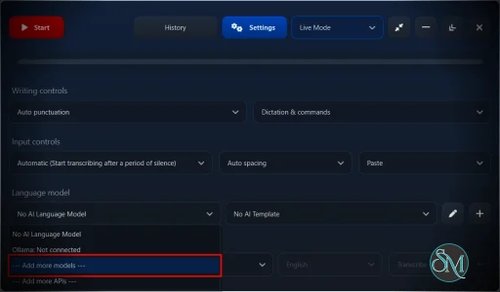



SpeechPulse for Windows is a speech-to-text and voice typing application that converts spoken words into text directly on a Windows PC. It supports real-time dictation across text editors, web browsers, and office applications, while also offering offline transcription using Whisper and other supported speech models. SpeechPulse can also process audio files, format text with AI models, and create transcriptions without sending voice data to the cloud when offline models are used.
Features
SpeechPulse is primarily designed for voice typing. It can insert transcribed speech into text fields in applications such as Microsoft Word, web browsers, and text editors. Real-time processing provides live transcription while you dictate.
The application supports offline speech recognition using Whisper models, allowing transcription without an internet connection. It supports transcription in 99 languages, including English, Indonesian, Japanese, Chinese, German, French, Spanish, and Italian.
SpeechPulse also includes file transcription. Users can load audio or video files, select a speech model, and export the resulting transcription or subtitle files.
Another useful feature is AI-based text processing. SpeechPulse can correct spelling and grammar, improve punctuation, summarize text, and format dictated content for applications such as email and chat. It supports customizable prompts and AI templates.
Windows users can run supported speech models on the CPU or NVIDIA GPU. The application includes a built-in downloader for additional speech models and CUDA libraries.
SpeechPulse also includes speech profiles for improving recognition when background noise causes unwanted transcription. Training features can be used to improve recognition of specific words.
Buy SpeechPulse with Discount 20% Off - Software Mirrors | |
|---|---|
SpeechPulse for macOS - Discount 20% Off |
Performance and Compatibility
SpeechPulse offers both CPU and GPU processing. Smaller speech models can be practical on CPU hardware, while larger models are better suited to an NVIDIA GPU for real-time dictation. The developer reports that the Multi large model can transcribe a short sentence in under two seconds on an RTX 3060, compared with around 16 seconds on an Intel Core i5-12400 CPU.
For Windows users with NVIDIA graphics hardware, GPU acceleration can significantly reduce latency with larger models. SpeechPulse supports NVIDIA GPUs and provides CUDA libraries through its built-in downloader. The minimum listed VRAM requirement for the Multi large model is 4 GB, although more demanding configurations may require additional VRAM.
SpeechPulse is actively maintained. Version 10.21.0 for Windows was released in August 2026 and added manual punctuation support for Ukrainian. Earlier 2026 releases added Indonesian manual punctuation, Parakeet V3 support, automatic language detection, and other improvements.
There are some application-specific limitations. Real-time and Type modes currently have compatibility issues with Windows 11 Notepad, where the developer recommends using Paste mode instead. SpeechPulse also normally runs without administrator privileges, so it may not be able to type into applications that are themselves running as administrator.
System Requirements
SpeechPulse does not publish a simple traditional minimum hardware specification for every speech model. Requirements depend heavily on the selected model and whether CPU or GPU processing is used.
Windows requirements:
Windows PC
Microphone for voice typing
CPU processing supported
NVIDIA GPU supported for GPU-accelerated speech recognition
At least 4 GB of NVIDIA VRAM for the Multi large model
Additional disk space for downloaded speech models and CUDA libraries
Larger models require more RAM and processing power. NVIDIA GPUs are recommended for medium and large models when real-time dictation performance is important.
Pros and Cons
Pros
Offline speech recognition
Supports 99 languages
Real-time voice typing
Works with text editors, browsers, and office applications
Supports Whisper speech models
NVIDIA GPU acceleration
Audio and video file transcription
AI-based grammar and punctuation processing
Custom AI prompts and templates
Speech profiles and word training
No subscription requirement
Regular Windows updates
Cons
Larger models require considerably more processing power
NVIDIA GPU is recommended for demanding real-time models
Large models consume more RAM and storage
Some Windows applications require additional configuration
Windows 11 Notepad has limitations with Real-time and Type modes
The full offline functionality requires downloading additional models
How to Install
Download the Windows installer and install SpeechPulse normally. The installer includes the English base speech model, while additional models can be downloaded through the application's built-in model downloader.
After installation, open SpeechPulse and select a microphone and speech model. For basic voice typing, open the application where you want to enter text, activate SpeechPulse, click the target text field, and start speaking.
For NVIDIA GPU acceleration, use the built-in GPU library downloader to install the required CUDA libraries. The developer recommends NVIDIA GPUs for medium and large models when using live dictation.
For audio or video transcription, switch to File mode, add the media file, select the speech model and output format, then start the transcription process.
Final Verdict
SpeechPulse for Windows is a capable voice typing and speech transcription application with a strong focus on offline processing. Its combination of Whisper-based recognition, GPU acceleration, multi-language support, file transcription, and AI text processing makes it more versatile than a basic voice dictation tool.
Its biggest advantage is flexibility. Users can choose between CPU and NVIDIA GPU processing, use offline models when privacy is important, and process both live speech and existing recordings. The main limitation is hardware demand when using larger models, particularly for real-time dictation.
For Windows users looking for accurate voice typing without depending entirely on cloud speech recognition, SpeechPulse is a strong option.