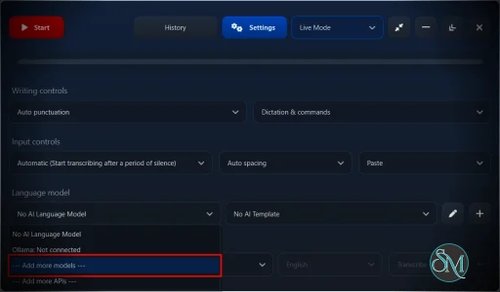


SpeechPulse for macOS is a voice typing and speech-to-text application designed for dictating text across macOS applications. It can perform speech recognition locally using supported offline models, allowing users to dictate without sending voice data to a cloud service. It also supports audio transcription, system audio transcription, AI text processing, multiple languages, and custom voice commands.
Features
SpeechPulse can insert dictated text into text input areas across macOS, including text editors, web browsers, and office applications. Its real-time speech recognition is designed to work across different applications rather than being limited to a built-in editor.
The application supports offline speech recognition with Whisper models and supports transcription in 99 languages. English translation is also available through supported Whisper models and APIs.
SpeechPulse includes File mode for transcribing existing audio and video recordings. Transcriptions can also be processed using AI models for tasks such as summarization, formatting, spelling correction, and grammar correction.
System Audio Mode can transcribe microphone and system audio in real time without requiring a text field to have mouse focus. It can also record microphone and system audio to WAV files. Speaker diarization can identify different speakers in supported recordings and meetings.
SpeechPulse provides customizable AI prompts and templates, allowing users to control how dictated text is formatted. It can also process copied clipboard text using an AI language model.
Other features include voice commands, configurable hotkeys, custom voice hotkeys, custom vocabularies, word mappings, and speech profiles. Speech profiles are designed to reduce unwanted transcription caused by background noise.
The macOS version also supports Whisper MLX models optimized for Apple silicon. SpeechPulse added this support specifically to improve transcription performance on Apple silicon Macs.
Buy SpeechPulse with Discount 20% Off - Software Mirrors | |
|---|---|
SpeechPulse for macOS - Discount 20% Off |
Performance and Compatibility
SpeechPulse for macOS is specifically optimized for Apple silicon Macs. The application supports Whisper MLX models, which are designed for Apple's machine learning framework and take advantage of Apple silicon hardware.
This gives the macOS version an important advantage over the Windows version, which relies on NVIDIA GPU acceleration for its larger speech models. On compatible Mac hardware, SpeechPulse can perform speech recognition locally without requiring a discrete NVIDIA GPU.
The application has received regular macOS updates. Version 10.21.0 was released on September 1, 2026 and added manual punctuation support for Ukrainian. Earlier releases added Indonesian manual punctuation, automatic language detection, Parakeet V3 support, improved Whisper MLX performance, and additional AI features.
SpeechPulse also supports external speech and language APIs. This provides an alternative when users prefer cloud-based processing or want to use services that are not available through local models. Supported integrations have included OpenAI-compatible Whisper APIs, Microsoft Azure speech services, and external LLM APIs.
The main compatibility limitation is hardware. The current macOS release requires an Apple silicon Mac and does not support Intel-based Macs. It also requires macOS 13 or newer.
System Requirements
macOS requirements:
Apple silicon Mac
macOS 13 or newer
Microphone for voice typing
Additional storage for downloaded speech and language models
Intel-based Macs are not supported by the current macOS version of SpeechPulse.
For local AI language models, available memory becomes more important as model size and context length increase. SpeechPulse's documentation recommends at least 16 GB of RAM for AI language models on macOS.
Pros and Cons
Pros
Offline speech recognition
Optimized Whisper MLX models for Apple silicon
Supports 99 languages
Real-time voice typing
Works across macOS applications
Audio and video transcription
System audio transcription
Speaker diarization
AI text enhancement
Custom AI prompts and templates
Voice commands and custom hotkeys
Custom vocabularies and word mappings
Speech profiles for noisy environments
Regular updates
Cons
Current macOS version requires Apple silicon
Intel Macs are not supported
Larger local AI models require more memory and storage
Some advanced AI features require additional models or API services
Offline models need to be downloaded separately for additional languages and capabilities
How to Install
Download the latest macOS version of SpeechPulse and install it on an Apple silicon Mac running macOS 13 or newer. The current release is version 10.21.0.
After installation, configure the microphone and select a speech model. The application includes a base speech model, while additional models can be downloaded through the built-in model downloader.
For local speech recognition, select a compatible Whisper or Whisper MLX model. Apple silicon users can use the MLX models specifically optimized for their hardware.
Once configured, place the cursor in the application where you want to enter text, activate SpeechPulse, and start speaking. For existing recordings, use File mode to select the audio or video file and process the transcription.
Final Verdict
SpeechPulse for macOS is a strong voice typing and transcription application, particularly for Apple silicon users who want local speech recognition. Its support for Whisper MLX models makes good use of Apple's hardware, while features such as system audio transcription, speaker diarization, AI text processing, custom vocabularies, and voice commands give it considerably more functionality than a basic dictation utility.
The requirement for Apple silicon is the main limitation. Intel Mac users cannot use the current macOS release, and users running larger local AI models will also need sufficient memory.
For Apple silicon Mac users who want private offline dictation combined with transcription and AI text processing, SpeechPulse is a capable and flexible choice.