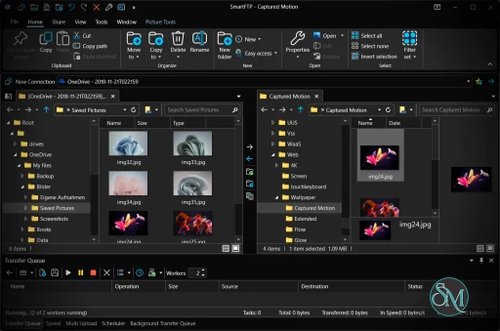

SmartFTP is a Windows based FTP client that supports FTP, FTPS, SFTP, and WebDAV. It allows users to securely transfer files between local computers, remote servers, and cloud storage services through a single interface.
It is suitable for both personal and professional use, especially in enterprise and business environments.
Download Latest SmartFTP - Software Mirrors | ||
|---|---|---|
Key Features of SmartFTP
SmartFTP focuses on security, automation, and flexibility.
Main features include:
Support for FTP, FTPS, SFTP, and WebDAV
Secure file transfers with strong encryption
Multi connection and multi tab interface
Drag and drop file management
Scheduled transfers and automation tools
Remote file editing support
Resume interrupted transfers
Cloud storage integration including Google Drive and OneDrive
These features make SmartFTP ideal for large and frequent file transfers.
Security and Protocol Support
Security is one of SmartFTP’s strongest points. It supports modern encryption standards and secure authentication methods. FTPS and SFTP ensure data is protected during transfer, making it suitable for sensitive or business critical data.
Certificate management and connection profiles allow users to maintain consistent security settings.
Performance and Reliability
SmartFTP is optimized for stability and speed. It handles large files and multiple simultaneous transfers without performance issues. Automatic reconnect and resume features help prevent data loss due to network interruptions.
This reliability is especially valuable for professional workflows.
Ease of Use and Interface
The interface is clean and professional, with a layout similar to traditional file managers. Beginners can perform basic transfers easily, while advanced users can access detailed settings for automation and security.
Although feature rich, SmartFTP remains well organized and efficient.
Supported Platforms
SmartFTP is available for Windows. It supports modern Windows versions and integrates well with system security and networking features.
There is no native macOS or Linux version, which may limit cross platform users.
Licensing and Pricing
SmartFTP offers different license options, including free use for non commercial purposes. Commercial and enterprise users require a paid license, which includes additional features and professional support.
This licensing model makes it suitable for both individuals and businesses.
Pros and Cons of SmartFTP
Pros:
Strong security and encryption support
Wide protocol compatibility
High performance and stability
Cloud storage integration
Suitable for professional use
Cons:
Windows only
Paid license required for commercial use
Interface may feel advanced for casual users
Despite these limitations, SmartFTP remains a trusted FTP solution.
Common Use Cases
SmartFTP is commonly used for:
Website deployment and maintenance
Secure file transfers for businesses
Managing cloud and remote servers
Automating recurring file transfers
Handling large or sensitive data
Its reliability makes it a popular choice in professional environments.
Final Verdict
SmartFTP is a robust and secure FTP client built for users who need more than basic file transfer functionality. Its strong security features, protocol support, and performance make it a top choice for professionals working with remote servers and cloud storage.
For business and enterprise users, SmartFTP offers excellent value and reliability.
SmartFTP is a powerful file transfer client designed for secure and efficient data management. It is widely used by developers, system administrators, and web professionals who need reliable access to remote servers. With support for modern protocols and cloud integrations, SmartFTP goes beyond a basic FTP client.