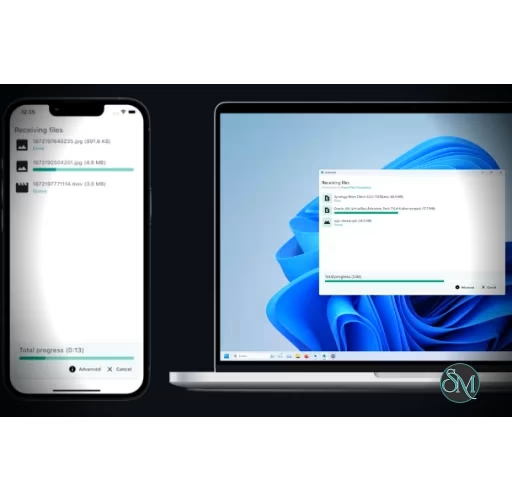



LocalSend is an open source file sharing application that makes it easy to transfer files and messages between nearby devices over a local network. It works across Windows, macOS, Linux, Android, and iOS, making it an excellent alternative to AirDrop and other platform-specific sharing tools.
Its biggest advantage is simplicity. There are no accounts, cloud uploads, or third-party servers involved. Install LocalSend on the devices you want to connect, open the application, select a nearby device, and send the files.
Moving files between different operating systems can be surprisingly inconvenient. AirDrop works extremely well inside Apple's ecosystem, while other platforms have their own solutions. Problems start when you need to move a file from Android to Windows, Linux to iPhone, or macOS to Android.
LocalSend solves this with a cross-platform approach. Devices communicate directly over the local network, so files do not need to travel through the internet or a cloud storage service.
The project is open source and released under the Apache-2.0 license, giving users and developers access to the source code.
Key Features
Cross-Platform File Sharing
LocalSend supports Windows, macOS, Linux, Android, and iOS. Fire OS is also listed among its supported platforms.
This makes it particularly useful in households and workplaces where people use different operating systems.
You can transfer files between combinations such as Android and Windows, iPhone and Linux, or Mac and Android without needing separate applications for each pair of platforms.
No Internet Required
LocalSend operates over your local network.
The devices communicate directly rather than uploading files to a remote server. This means you can continue transferring files even when the internet connection is unavailable, as long as the devices can communicate over the same local network.
This is also useful when transferring large files because the data does not have to make a round trip through a cloud service.
Secure Transfers
LocalSend uses HTTPS encryption for communication between devices. Its protocol uses certificates generated locally on each device to secure the connection.
This provides an important layer of protection when transferring personal documents, photographs, videos, or other files over a local network.
No Account or Server
There is no requirement to create an account or maintain a LocalSend cloud service.
The project specifically avoids the server-based model used by many file-sharing services. This keeps the architecture simple while also reducing privacy concerns.
Files and Messages
LocalSend is not limited to traditional file transfers. It can also send text and messages between nearby devices.
This can be useful when you need to quickly move a URL, piece of text, or small piece of information from one device to another.
Fast Local Transfers
Because transfers happen over the local network, performance is primarily limited by the network and devices involved rather than an external service.
On a fast Wi-Fi network, large files can be transferred considerably faster than uploading them to cloud storage and downloading them again. The official project describes transfers as operating at the maximum speed supported by the local Wi-Fi network.
Simple Device Discovery
LocalSend is designed around a straightforward workflow. Once the applications are running on the relevant devices, nearby devices can be discovered without requiring users to manually configure a remote server or account.
This is one of the reasons the application feels closer to AirDrop than to conventional network file-sharing software.
Download LocalSend v1.18.2 - Software Mirrors |
|---|
LocalSend v1.18.2 for WindowsLocalSend-CLI-1.18.2-windows-x86-64.exe | 9.28 MB LocalSend-CLI-1.18.2-windows-arm-64.exe | 7.97 MB |
LocalSend v1.18.2 for macOSLocalSend-CLI-1.18.2-macos-x86-64.tar.gz | 4.19 MB |
LocalSend v1.18.2 for LinuxLocalSend-CLI-1.18.2-linux-x86-64.tar.gz | 4.54 MB LocalSend-CLI-1.18.2-linux-arm-64.tar.gz | 4.42 MB LocalSend-1.18.2-linux-x86-64.tar.gz | 30.53 MB LocalSend-1.18.2-linux-x86-64.deb | 23.52 MB LocalSend-1.18.2-linux-x86-64.AppImage | 63.39 MB |
LocalSend v1.18.2 for AndroidLocalSend-1.18.2-android-x64.apk | 46.67 MB LocalSend-1.18.2-android-google-play.apk | 122.35 MB |
LocalSend v1.18.2 Source Code |
LocalSend v1.18.2 Release Notes:This release fixes compatibility issues with 1.17.0 and earlier. Unfortunately, the Windows EXE installer is not published yet (#3270).
|
Performance and User Experience
LocalSend gets the most important part of file sharing right: it stays out of the way.
There is no need to create an account, upload a file, copy a cloud link, wait for synchronization, and then download it on another device. You simply select the destination device and transfer the file.
The cross-platform nature is particularly valuable. Someone using an iPhone does not need to know whether the other person is using Windows, Linux, or macOS. The same application provides the transfer mechanism on both sides.
The project has also gained a substantial community. The official GitHub organization currently lists more than 82,000 stars for the main repository, with development continuing through 2026.
There are some practical limitations. LocalSend depends on local network connectivity and device discovery. Corporate, guest, or otherwise isolated Wi-Fi networks may prevent devices from seeing each other. Community reports also show that occasional platform-specific interface or file-handling issues can occur.
These limitations are relatively minor for normal home-network use.
Pros
Free and open source.
Windows, macOS, Linux, Android, and iOS support.
No account required.
No cloud storage required.
No internet connection required.
Transfers stay on the local network.
HTTPS-encrypted communication.
Fast transfers over Wi-Fi.
Supports files and text.
Very simple setup.
Excellent alternative to AirDrop for mixed platforms.
No advertising or tracking.
Active open source project.
Cons
Devices need to be able to communicate on the same local network.
Restricted or isolated networks can interfere with discovery.
It is designed for local transfers rather than remote file sharing.
Very large transfers are still dependent on Wi-Fi quality and device performance.
Some platform-specific behaviors can occasionally be inconsistent.
Who Should Use LocalSend?
LocalSend is an excellent choice for almost anyone who regularly moves files between different devices.
It is especially useful for people who use a combination of Windows, Linux, macOS, Android, and iOS devices. It is also a great solution for photographers, students, developers, and anyone who frequently transfers large files without wanting to rely on cloud storage.
For a mixed-device household, LocalSend can effectively provide the convenience of AirDrop without locking everyone into Apple's ecosystem.
Final Verdict
LocalSend is one of those applications that solves a frustrating problem with remarkably little complexity.
It combines open source development, strong privacy, local networking, encryption, broad platform support, and an extremely simple interface. There is no cloud account to manage and no external service sitting between your devices.
Its biggest limitation is also its defining characteristic. LocalSend is designed for nearby devices on a local network, so it is not a replacement for cloud storage or remote file transfer services. For its intended purpose, however, that simplicity is a major advantage.
If you regularly move files between devices, particularly across different operating systems, LocalSend is one of the easiest open source applications to recommend.