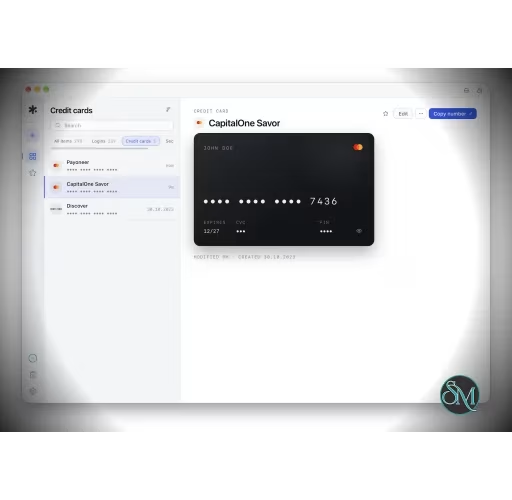



Rowel is an open-source password manager designed around an offline-first approach. Instead of relying on a central cloud service to store your vault, it keeps encrypted password data locally on your device and provides optional synchronization through Google Drive.
It supports passwords, credit cards, secure notes, TOTP codes, password generation, browser autofill, and passkeys. The project is built with Tauri, using Rust for the application backend and a TypeScript, React, and Vite frontend.
Features
Rowel can store login credentials, credit card information, secure notes, and TOTP secrets. It also includes a built-in strong password generator.
The application uses an encrypted SQLite database based on SQLCipher for the local vault. The project also states that individual secrets receive an additional application-level AEAD encryption layer and are decrypted only when they need to be revealed or copied.
Browser integration is handled through the KeePassXC-Browser protocol. This allows the standard KeePassXC-Browser extension to autofill credentials from Rowel. Rowel also supports passkeys through this integration, including confirmation dialogs before credentials are supplied to a website.
The project also contains its own browser extension for Chrome, Edge, and Firefox. On macOS, the same extension can operate with Safari.
Optional Google Drive synchronization provides a way to migrate or synchronize the encrypted vault between computers. Users can also migrate using a backup file.
Download Rowel v1.0.0 - Software Mirrors |
|---|
Rowel v1.0.0 for Windows |
Rowel v1.0.0 for macOS |
Rowel v1.0.0 for LinuxRowel_1.0.0_amd64.deb | 13.77 MB |
Others Download related to Rowel v1.0.0 |
Rowel v1.0.0 Source Code |
Rowel v1.0.0 Release Notes:ReleaseStable release of a complete redesign of the app. |
Performance and Compatibility
Rowel is available for Windows, macOS, and Linux, making it suitable for users who want a single password-management solution across desktop operating systems.
Its offline-first architecture is one of its defining characteristics. The application does not depend on a Rowel-operated backend to hold the user's vault. Password data remains encrypted locally, while Google Drive synchronization is optional.
The project also puts considerable attention into software supply-chain security. Releases include SLSA build provenance and CycloneDX software bills of materials, while automatic updates use signed update packages. This gives technically minded users additional ways to verify what they install.
There are still some limitations to consider. The project is relatively young, and its GitHub repository currently has open enhancement and bug issues. Its own browser extension is also not yet available through the major browser extension stores, requiring manual installation if users choose that implementation instead of KeePassXC-Browser.
System Requirements
Windows, macOS, or Linux
Desktop system capable of running a Tauri application
Internet connection is optional for the core offline vault
Google Drive connection is required only when using Google Drive synchronization
Browser extension support for autofill and passkeys
Pros and Cons
Pros
Open-source
Free to use
Offline-first architecture
Encrypted local SQLite vault
Additional encryption layer for stored secrets
Supports passwords, cards, notes, and TOTP
Strong password generator
Browser autofill
Passkey support
Optional Google Drive synchronization
Windows, macOS, and Linux support
Release provenance and SBOM support
Signed automatic updates
Built with Rust and Tauri
Cons
Relatively young project compared with established password managers
Some features are still under active development
Rowel's own browser extension is not yet available through browser extension stores
KeePassXC-Browser integration can conflict with an installed KeePassXC installation
Google Drive is currently the primary optional synchronization method
The offline-first approach means users need to manage backups and synchronization carefully
How to Install
Download the appropriate Rowel package for Windows, macOS, or Linux from the project's GitHub releases.
Install and launch the application, then create or restore your encrypted vault. Passwords, secure notes, TOTP credentials, and other stored information can then be added to the vault.
For browser autofill, enable the browser extension integration in Rowel and connect it to KeePassXC-Browser. The project also provides instructions for manually installing its own browser extension.
Final Verdict
Rowel takes a different approach from cloud-first password managers by making the local encrypted vault the center of the product. It provides the essential password-manager features while adding TOTP, passkeys, browser autofill, and optional Google Drive synchronization.
Its open-source codebase, local storage model, cross-platform support, and release verification mechanisms make it particularly interesting for users who prioritize control over their password data.
The main drawback is maturity. Some functionality remains under development, and parts of the browser integration are not yet as polished or convenient as those of more established password managers.