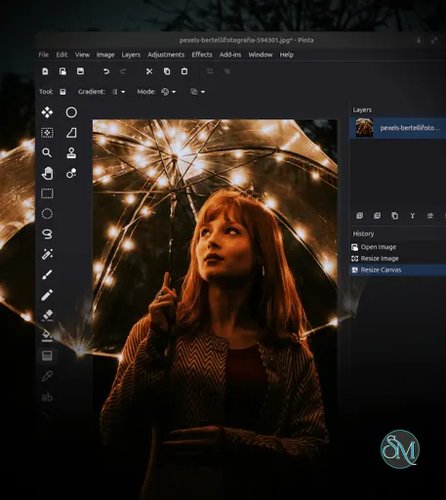


Pinta is a cross platform image editing application inspired by Paint.NET. It is designed to provide a balance between simplicity and functionality, offering more tools than basic editors like Microsoft Paint while remaining easier to use than complex software such as GIMP.
It supports:
Windows
macOS
Linux
The software is free and open source, making it accessible for personal, educational, and professional use.
Download Pinta 3.1.2 - Software Mirrors |
|---|
Download Pinta 3.1.2 for Windows - x86_64 Download Pinta 3.1.2 for macOS - Intel Download Pinta 3.1.2 for macOS - ARM64 |
Pinta 3.1.2 Release Notes:This is a bug fix release for Pinta 3.1Fixed
Checksums
|
Key Features
Simple and Intuitive Interface
Pinta is built around a clean and straightforward interface.
Users can:
Quickly access tools like selection, crop, and resize
Work with a familiar layout similar to Paint.NET
Focus on editing without unnecessary complexity
This makes it ideal for beginners and casual users.
Layer Based Editing
Unlike very basic editors, Pinta supports multiple layers.
Benefits include:
Non destructive editing
Better organization of elements
Ability to combine images and effects
Layer support is a major advantage over simple paint tools.
Drawing and Editing Tools
Pinta includes a full set of essential tools:
Brush and pencil
Shapes and lines
Text tool
Clone stamp
These tools are suitable for both image editing and simple digital drawing.
Image Adjustments and Effects
The software offers a variety of built in effects and adjustments:
Brightness and contrast
Color correction
Blur and sharpen
Artistic filters
Many effects include real time previews, making editing faster and easier.
Unlimited Undo History
Pinta allows users to undo and redo actions without limits.
This is especially useful for:
Experimenting with edits
Fixing mistakes quickly
Iterative design work
Cross Platform and Lightweight
Pinta is designed to run efficiently across different systems:
Fast startup
Low resource usage
Works well on older hardware
This makes it a practical alternative to heavier image editors.
Performance and Usability
Pinta performs well for basic and moderately complex tasks. It is optimized for speed and simplicity, making it responsive even on low end systems.
Recent updates have improved:
User interface design
Performance and stability
Support for modern display systems
However, performance may degrade when working with large or complex projects.
Pros and Cons
Advantages
Free and open source
Easy to learn and use
Lightweight and fast
Layer support for better editing
Cross platform compatibility
Limitations
Fewer advanced features than professional editors
Limited plugin ecosystem
Some users report stability issues in complex tasks
Not suitable for advanced graphic design or professional workflows
Who Should Use Pinta
Pinta is ideal for:
Beginners learning image editing
Students and educators
Users needing quick edits or annotations
Linux users looking for a lightweight editor
Anyone who finds advanced tools too complex
Final Verdict
Pinta is a well balanced image editor that fills the gap between overly simple paint programs and complex professional software. With its intuitive interface, layer support, and essential editing tools, it provides everything needed for everyday image editing tasks.
For users who want a free, lightweight, and easy to use alternative to heavier editors, Pinta is a reliable and practical choice.
Simple image editors are still essential for quick edits, annotations, and lightweight creative work. Pinta is a free, open source raster graphics editor that focuses on ease of use while offering more features than basic paint programs.