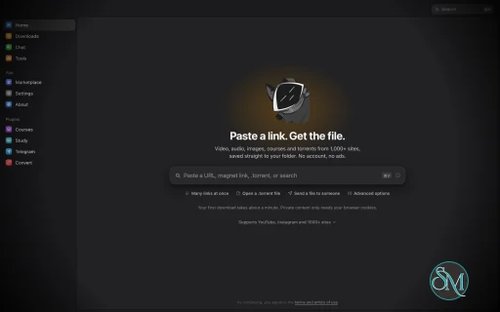



OmniGet is a free, open source desktop download manager for Windows, macOS, and Linux. It provides a graphical interface for downloading videos, audio, online courses, images, and other content from supported websites. It uses yt-dlp as its main download engine and supports more than 1,800 sites, while also adding built-in tools for playback, reading, transcription, conversion, and study.
The application is a good choice for users who want the capabilities of yt-dlp without having to work from the command line.
Features
OmniGet combines downloading with several additional tools:
Support for more than 1,800 websites through yt-dlp
Native support for platforms including YouTube, Instagram, TikTok, X, Pinterest, Twitch, Vimeo, Reddit, Udemy, Hotmart, Telegram, and Bilibili
Video and audio downloads
Playlist and channel downloads
Online course downloads
Browser extension
Logged-in content using browser cookies
Download queue with resume and retry support
Clipboard download shortcuts
Audio-only downloads
Subtitle downloads
Built-in video player
PDF and EPUB reader
Audio transcription
Flashcards and study tools
108 additional tools across 16 categories
Torrent support
FFmpeg integration
aria2 support
gallery-dl integration
Command line interface
Portable mode
Multiple themes and languages
Windows, macOS, and Linux support
GPL-3.0 open source license
Review
OmniGet's main advantage is simplicity. yt-dlp is already one of the most capable download tools available, but it can be intimidating for users who are unfamiliar with command-line options. OmniGet puts those capabilities behind a graphical interface where users can paste a URL, select the available quality, and start downloading.
The application goes beyond being a graphical frontend for yt-dlp. It includes a download queue, automatic retries, resume support, browser cookie integration, and download rules. This makes it more suitable for managing larger collections instead of handling one URL at a time.
The browser extension is another useful feature. It can send supported pages directly to OmniGet and can forward cookies and referrers for content that requires an authenticated browser session. This is particularly useful for supported logged-in content such as private videos or courses that the user is authorized to access.
OmniGet also tries to keep users inside the application after downloading. The built-in player, PDF and EPUB reader, transcription tools, flashcards, notes, and other utilities make it more of a media and study workspace than a conventional download manager.
There is also a command-line interface for users who prefer automation. This is a useful addition because users can start with the graphical interface and switch to command-line workflows when they need batch downloads or scripting.
The biggest drawback is that OmniGet has a very large feature set. Users who only want a simple graphical interface for yt-dlp may find the number of tools and settings unnecessary. In that case, a smaller frontend or yt-dlp itself may be a better fit.
OmniGet is also a relatively young project compared with established download utilities. The latest listed release is v0.9.1, so users should expect continued development and occasional changes as the application matures.
Performance and Compatibility
OmniGet uses Tauri 2 with a Rust backend and SvelteKit for its frontend. Its downloading functionality is built around yt-dlp, while FFmpeg, aria2, gallery-dl, whisper.cpp, and other specialized tools handle additional tasks.
Downloads can resume after interruptions, retry failed requests with backoff, and adjust connections based on how a website responds. OmniGet also keeps the exact yt-dlp command used for each download, which is useful when troubleshooting or reproducing a download from the command line.
The current releases support Windows 10 and 11, macOS 10.15 and newer, and Linux distributions through DEB, RPM, and AppImage packages. Windows provides both installer and portable builds.
Actual download performance depends primarily on the target website, network connection, available formats, and server restrictions rather than OmniGet itself.
System Requirements
OmniGet supports:
Windows 10 and 11
macOS 10.15 or newer
Linux on x86_64 and ARM64
Windows x64 installer and portable builds
macOS Intel and Apple Silicon builds
Linux DEB, RPM, and AppImage packages
Users building OmniGet from source need Rust, Node.js 18 or newer, and pnpm. The project uses a pinned Rust toolchain for its plugin system.
Pros and Cons
Pros
Free and open source
Supports more than 1,800 sites
User-friendly alternative to direct yt-dlp usage
Windows, macOS, and Linux support
Built-in browser extension
Supports authenticated browser sessions
Download queue and resume support
Built-in player and document reader
Audio transcription
Course and study features
Command-line interface
Portable Windows mode
Uses yt-dlp, FFmpeg, and other established open source tools
No account required
No advertisements
GPL-3.0 licensed
Cons
Large feature set can feel overwhelming
Primarily focused on users who need downloading and media management
Some websites may require frequent yt-dlp updates when their platforms change
The project is still relatively young
macOS releases are not notarized with Apple's paid developer certificate
Linux AppImage users on some distributions may need additional FUSE compatibility packages
How to Install
Download the appropriate OmniGet release for your operating system.
Windows users can choose between the regular installer, portable executable, or MSI package. Windows also supports installation through WinGet.
macOS users can install the Apple Silicon or Intel build depending on their Mac.
Linux users can choose between DEB, RPM, and AppImage packages. The DEB package is the simpler option on Debian and Ubuntu systems where AppImage FUSE compatibility can otherwise be an issue.
After launching OmniGet, the initial setup can install yt-dlp and FFmpeg automatically. The application checks the yt-dlp download using SHA-256 before running it.
Frequently Asked Questions
What is OmniGet?
OmniGet is an open source desktop application for downloading and managing videos, audio, courses, images, and other online content.
Is OmniGet free?
Yes. OmniGet is free and licensed under GPL-3.0.
What websites does OmniGet support?
OmniGet uses yt-dlp for support across more than 1,800 sites, while also providing native functionality for services such as YouTube, Instagram, TikTok, X, Pinterest, Udemy, Hotmart, Twitch, Vimeo, Reddit, Telegram, and Bilibili.
Does OmniGet use yt-dlp?
Yes. yt-dlp is the main download engine used by OmniGet.
Can OmniGet download online courses?
Yes. OmniGet has support for courses from platforms including Udemy and Hotmart, with additional course functionality provided through its Courses plugin.
Does OmniGet support Windows?
Yes. OmniGet supports Windows 10 and Windows 11 and provides installer, portable, and MSI packages.
Does OmniGet work on Linux?
Yes. Linux packages include DEB, RPM, and AppImage builds for supported architectures.
Can OmniGet download logged-in content?
Yes, for supported sites and content that the user is authorized to access. Its browser extension can pass browser cookies and referrers to OmniGet.
Does OmniGet have a portable version?
Yes. Windows has a portable executable, and OmniGet also supports a portable mode where application data can be stored next to the executable.
Does OmniGet have a command-line interface?
Yes. The project provides an omniget command-line interface with commands for inspecting URLs, downloading content, batch processing, and importing cookies.