
Surfblocker is a Windows internet access control application designed to help users control when and how a computer can access the internet. It can be useful for parents managing children's screen time, businesses limiting workplace distractions, or individuals who want to reduce their own time spent on distracting websites.
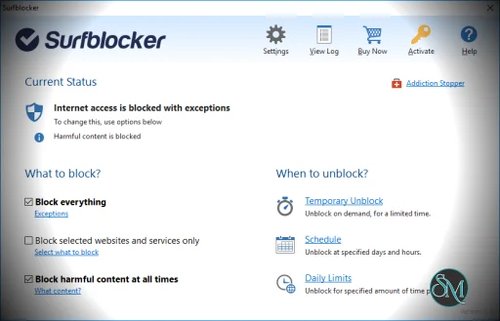
The biggest advantage of Surfblocker is its simplicity. Instead of providing an elaborate monitoring dashboard, the application focuses on controlling internet access directly. You can block the entire internet, restrict selected websites and services, or allow only specific resources. This makes it relatively easy to configure compared with more complicated parental control solutions.
One particularly useful feature is the ability to allow selected websites, programs, or services while blocking everything else. This can work well for situations where someone needs internet access for a specific purpose, such as email, work, or school, without having unrestricted access to the rest of the web.
Surfblocker also includes scheduling and daily usage quotas. Parents can set periods when internet access is available and limit how much time can be spent online each day. The software can then automatically restrict access when the scheduled period or usage allowance expires.
Password protection adds another useful layer. Surfblocker can require a password before internet restrictions are changed or removed, which helps prevent other users from simply disabling the restrictions. The software also provides options intended to make bypassing restrictions more difficult, although no local Windows blocking application should be treated as impossible to circumvent by a technically capable user.
Get Discount 20% OFF using "SWMR" Coupon code for the Blumentals Products below:
Screensaver Factory 7 Standard
Screensaver Factory 7 Professional
Screensaver Factory 7 Enterprise
Easy Button & Menu Maker 5 Personal
Easy Button & Menu Maker 5 Pro
Program Protector 4 Professional
Rapid SEO Tool 2 Standard (Discount 30% Off)
Rapid SEO Tool 2 Enterprise (Discount 30% Off)
Easy Button & Menu Maker 5 Personal (Extended)
Easy Button & Menu Maker 5 Pro (Extended)
Rapid SEO Tool 2 Professional (Discount 30% Off)
The harmful content filter is another feature aimed primarily at parents and organizations. Surfblocker can automatically block categories of potentially harmful websites, including adult and hazardous content. It can also block websites associated with services such as online gaming and social networking when those are considered distractions.
For businesses, Surfblocker can be used to limit non-work-related internet activity and allow only work-related websites and programs. This makes it more than a traditional parental control application, although organizations with many employees may eventually need a centralized network-level solution instead of installing software individually on computers.
The main limitation is platform support. Surfblocker is currently a Windows application, with the official download page listing Windows 7, 8, 10, and 11. Users looking for a solution covering phones, tablets, macOS, and multiple operating systems will need a different approach.
The interface also prioritizes functionality over modern design. That is not necessarily a problem for its target audience, but users looking for detailed activity reports, mobile management, advanced monitoring, or a modern cloud dashboard may find Surfblocker too basic.
Pricing is straightforward. Surfblocker Home is currently listed at $39.95 for personal use, while Surfblocker Pro is $59.95 for commercial use on one computer. A Business Pack for up to five office computers is listed at $129.95. The licenses include one year of database updates and Surfblocker Connect.
Pros
Simple and easy to configure
Block or allow specific websites and services
Can completely disable internet access
Password protection
Internet scheduling
Daily internet usage quotas
Harmful content filtering
Can allow selected resources while blocking everything else
Useful for both home and business environments
Lightweight Windows focused solution
Cons
Windows only
No comprehensive activity monitoring dashboard
Limited compared with full parental control suites
Not designed for managing large numbers of devices centrally
Users who need mobile support will need another solution
Final Verdict
Surfblocker is a straightforward solution for controlling internet access on Windows. Rather than trying to become an all-in-one monitoring platform, it focuses on the basics: blocking websites, restricting internet access, setting schedules, controlling daily usage, and preventing unauthorized changes.
That simplicity is its biggest strength. Parents can use it to establish healthier internet limits, while individuals can use it to eliminate distractions during work or study. Businesses can also use it to restrict unnecessary online activities on individual computers.
It is not the right choice if you need detailed activity monitoring, mobile device management, or centralized administration across many platforms. For simple Windows internet blocking and access control, however, Surfblocker remains a practical and easy-to-use option.