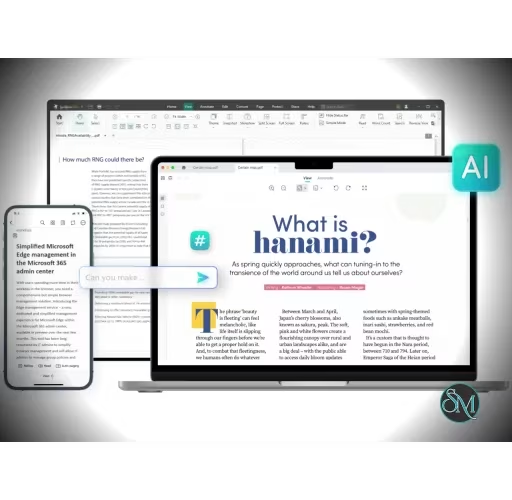


SwifDoo PDF is an all-in-one PDF application that combines PDF editing, conversion, annotation, OCR, page management, compression, signing, encryption, and AI-powered document tools in a single package. It is available across Windows, macOS, iOS, and Android, with online PDF tools available as well.
Its biggest selling point is breadth. Instead of requiring separate applications for editing, converting, compressing, signing, and organizing PDFs, SwifDoo attempts to put most common PDF workflows into one interface.
SwifDoo PDF is primarily positioned as a professional PDF editor rather than simply a PDF reader.
It can directly modify text and images inside PDFs, add annotations and hyperlinks, organize pages, convert documents between numerous formats, recognize scanned documents with OCR, and protect documents with passwords and signatures.
It also includes an AI PDF feature for asking questions about documents, summarizing, translating, proofreading, rewriting, explaining, and analyzing PDF content.
Key Features of SwifDoo PDF
PDF Editing
SwifDoo can directly edit existing PDF text rather than requiring users to convert the document to Word first.
You can modify text, fonts, sizes, colors, images, and links. It also provides several editing modes for working with different PDF text structures.
The ability to search and replace text is particularly useful when making repetitive corrections across a document.
PDF Conversion
SwifDoo supports an unusually broad range of conversion formats.
It can convert PDFs to and from formats including:
Word
Excel
PowerPoint
JPG
PNG
TIFF
HTML
EPUB
TXT
CAD formats such as DWG and DXF
PDF/A
Markdown
It can also create PDFs from Office documents, images, scans, and CAD files.
This makes it useful for users who regularly move documents between PDF and editable formats.
OCR
The built-in OCR engine can recognize text in scanned and image-based PDFs.
After OCR processing, scanned documents can become searchable and editable, and SwifDoo can also convert OCR-processed documents into editable formats such as Word.
SwifDoo lists support for a broad range of OCR languages, including English, Indonesian, Malay, Chinese, Japanese, Korean, Arabic, and many European languages.
PDF Organization
SwifDoo provides tools for managing PDF pages, including:
Merge
Split
Rotate
Delete
Extract
Rearrange
It can also process multiple PDF files in batches, which is useful when dealing with large document collections.
Compression
The PDF compressor can reduce document size while allowing users to select different compression levels and image-quality settings.
Batch compression is also supported, making it practical for processing multiple documents at once.
Annotation
SwifDoo includes the standard annotation tools expected from a professional PDF application:
Highlights
Comments
Sticky notes
Shapes
Stamps
Text boxes
Attachments
This makes it suitable for reviewing documents and collaborating on PDF files.
Electronic Signatures
Users can create signatures by drawing, typing, or importing an image.
SwifDoo also supports digital signatures, along with tools for signing and protecting PDF documents.
Encryption and Protection
PDFs can be protected with passwords and restrictions controlling whether documents can be opened, copied, edited, or printed.
This is useful for documents containing confidential or sensitive information.
AI PDF
One of SwifDoo's newer features is its AI-powered PDF functionality.
Users can interact with PDF documents conversationally and ask questions about their contents. The AI features can also summarize, explain, translate, proofread, rewrite, and analyze documents.
This is particularly useful when dealing with long reports, manuals, research papers, or other documents where finding specific information manually can be time-consuming.
The AI functionality is subject to usage limits depending on the plan.
PDF Translation
SwifDoo can translate selected text or entire PDF documents.
The company states that full-document translation can preserve formatting and layout and supports more than 100 languages.
This makes the feature more useful than simply copying text from a PDF into a separate translation service.
PDF Reader
SwifDoo also works as a conventional PDF reader.
It supports different viewing modes, including side-by-side viewing, dark mode, fullscreen, and presentation mode. It can also read PDF text aloud and provide translation tools while reading.
This means you don't need a separate PDF reader if you already use SwifDoo for editing.
Download SwifDoo PDF - Software Mirrors |
|---|
Download SwifDoo PDF for Windows (exe) |
Cross-Platform Support
SwifDoo is available on:
Windows
macOS
iOS
Android
Web
The feature set varies between platforms, with Windows offering the most complete desktop editing functionality.
There is also SwifDoo Cloud for storing, sharing, and accessing PDF files across devices.
Performance and User Experience
SwifDoo follows the familiar ribbon-style PDF editor approach, making its major functions relatively easy to locate.
The interface is designed around common document workflows rather than requiring users to understand PDF internals.
Its strongest aspect is the sheer number of features available from one application. A typical workflow could involve opening a scanned document, running OCR, editing the recognized text, converting it to Word, compressing the result, adding a signature, and protecting the final PDF without leaving the application.
That convenience is one of SwifDoo's biggest advantages.
The trade-off is that the large feature set can make the application feel more complex than a lightweight PDF reader.
Pros
Comprehensive PDF editor.
Direct editing of PDF text and images.
Excellent format conversion support.
OCR for scanned PDFs.
Broad OCR language support.
PDF merging and splitting.
PDF compression.
Batch processing.
Annotation tools.
Electronic and digital signatures.
Password protection and encryption.
AI-powered PDF analysis.
PDF translation.
Text-to-speech.
Cross-platform availability.
Online PDF tools.
SwifDoo Cloud integration.
Perpetual desktop license available.
Cons
Full functionality requires a paid plan.
Free version has significant limitations after the trial.
AI features have usage limits.
Some advanced functionality is Windows-focused.
Large feature set can feel overwhelming for users who only need a reader.
Complex PDFs may not always convert perfectly between formats.
Who Should Use SwifDoo PDF?
SwifDoo PDF is particularly suitable for students, businesses, office workers, researchers, and professionals who regularly work with PDF documents.
It is especially attractive if you need more than simply reading PDFs and regularly perform tasks such as editing, OCR, conversion, signing, compression, and document organization.
Users looking for an alternative to Adobe Acrobat will also find SwifDoo interesting, particularly if they prefer a perpetual desktop license rather than relying entirely on a subscription model.
Final Verdict
SwifDoo PDF is a surprisingly comprehensive PDF suite.
Its strongest advantage is that it combines the functions of a PDF editor, converter, OCR application, document organizer, PDF reader, compression utility, signing tool, and AI document assistant into one package.
The extensive format conversion support and OCR capabilities make it particularly useful for professional document workflows, while AI features provide a modern way to work with long PDFs.
The free version is useful for testing the application, but serious users will likely need the Pro version to unlock the software's real potential. The availability of a perpetual desktop license makes SwifDoo particularly appealing to users who don't want another mandatory subscription.
Overall, SwifDoo PDF is a strong alternative to established PDF suites and deserves consideration from anyone who needs more than a basic PDF reader.