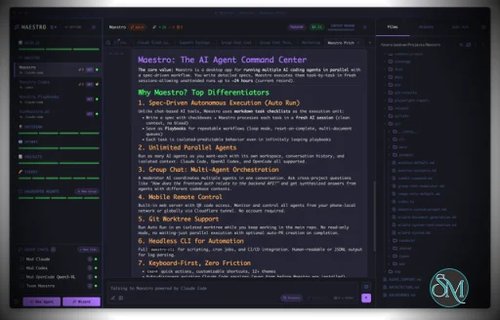

Maestro is a cross platform desktop application built to orchestrate multiple AI agents with isolated contexts. Each agent operates independently while still being managed under a unified command center. This allows users to execute complex workflows, parallel tasks, and long running processes efficiently.
The tool is open source and actively developed, targeting users who work with AI assisted development, research, automation, and experimentation.
Download Maestro v1.0.0 - AI Agent Command Center - Software Mirrors |
|---|
Maestro v1.0.0 - AI Agent Command Center for Windows |
Maestro v1.0.0 - AI Agent Command Center for macOSmaestro-1.0.0-x64-mac.zip | 246.35 MB maestro-1.0.0-x64-mac.dmg | 248.29 MB |
Maestro v1.0.0 - AI Agent Command Center for Linuxmaestro-1.0.0-x86_64.rpm | 142.5 MB maestro-1.0.0-x86_64.AppImage | 246.45 MB maestro-1.0.0-arm64.deb | 174.56 MB maestro-1.0.0-arm64.AppImage | 246.73 MB |
Maestro v1.0.0 - AI Agent Command Center Source CodeMaestro v1.0.0 - AI Agent Command Center Source code (zip) Maestro v1.0.0 - AI Agent Command Center Source code (tar.gz) |
Maestro v1.0.0 - AI Agent Command Center Release Notes:1.0.0 HighlightsMaestro 1.0 is the first major release. It brings the entire 0.18 release-candidate line to the stable channel in one step, so if you have been running stable, everything below is new to you: agents that consult each other, a fleet you can spread across windows and screens, the full app in any browser, and Auto Run that keeps working toward a goal while you are away. 🌐 The whole Maestro app now runs in your browser. Turn Live on and any laptop, tablet, or phone on your network gets the real desktop interface, not a cut-down companion. On a phone it switches to a layout built for thumbs, with drawers, a folding composer, swipe to dismiss, and a tab bar where a tap switches tabs and a long press opens the menu, and you can add it to your Home Screen. A large fleet opens quickly because each conversation loads when you open it. Want more than a URL standing between a browser and your machine? Turn on Web Login in Settings > Plugins and everyone signs in with a username and password, with every turn credited to the account that sent it. 💬 Your agents can ask each other for help. Type@, pick another agent, and Maestro hands it the relevant part of your conversation, runs it in the background, and brings its answer back stamped with who replied. Each consult is read-only or read/write, so you decide whether a teammate may touch your files, and Stop ends every consult a message fanned out. When your own agent is working on the same message, it holds its final reply behind a WAITING FOR CONSULT item until every mentioned agent has answered, then writes its reply with their findings in hand. Agents can do the same from their own shell with maestro-cli ask, which lands in a private thread instead of interrupting the chat you have open.
🪟 Spread your fleet across windows and panes. Right-click an agent and choose Move to Window to give it its own OS window on another monitor, with its tabs, files, and running turn coming along untouched. Inside any window, tile tabs together: drag a tab onto the one that is showing, or press Ctrl+Cmd+T, B, F, or J to tile a new chat, browser, file, or terminal below the pane you are in, and the new pane takes the keyboard right away. A tiled set sits in the tab bar as one chip you can rename, give an emoji, or snooze as a whole, and a tab you close and reopen goes back into the tile it came from.
🎹 Pianola watches your agents so you do not have to. Agents rarely fail loudly. They stop and wait for a yes, and you find four of them parked on questions twenty minutes later. Pianola is a manager agent pinned to the top of the Left Bar that watches the agents you point it at, spots the ones waiting on a permission prompt, a plan, or a question, and either answers from a rule you wrote or escalates to you. Its Dashboard shows who needs you, who is working, and every decision it made and why, and it can read your past transcripts to suggest rules that match how you already answer. Pianola is an opt-in plugin, and with no rules it only reports.
🎯 Auto Run can chase a goal, show its work, and pick itself back up. Switch the Run dialog to Goal-Driven, describe the objective in plain English, and each pass makes one increment of progress until the goal is met, a real blocker stops it, or progress stalls. maestro-cli goal-run runs the same thing headless. The Thought Stream shows a running agent's reasoning with every tool call reduced to one plain line, and its compass button is now where you steer a run, so a message typed in the chat goes to the agent again. A run that hits a usage limit resumes by itself once the window reopens, even across a restart, and a run stopped by an ordinary error retries on its own a few times before it asks for you.
🧩 Encore Features become plugins, and two new ones let agents see what you see. Settings > Plugins lists every built-in feature as a card with its permissions spelled out, and the same catalog is ready for third-party plugins once you switch them on. Coworking lets Claude Code, Codex, OpenCode, and Factory Droid read your terminal scrollback and look at your in-app browser tabs, so an agent can see the stack trace your dev server just printed without you pasting it. Clicking and typing are allowed only for agents you add to a list that starts empty, and every action is audited. Concerto lets an agent answer with something you can look at: live panels of stats, tables, and progress on a floating stage. Both stay off until you turn them on.
🤖 Five more providers join the lineup. Antigravity CLI, Grok CLI, Hermes, Oh My Pi, and Pi now run alongside Claude Code, Codex, OpenCode, Factory Droid, and Copilot CLI, locally or over SSH, and the provider pickers only offer the ones your machine can actually run.
Also in 1.0.0
|
Key Features
Maestro allows users to run multiple AI agents in parallel while keeping their context, state, and execution separated. This enables large tasks to be broken down and handled simultaneously.
The Auto Run and Playbook system lets users define workflows that execute steps automatically. These workflows can loop, batch tasks, or run unattended, making them suitable for long or repetitive operations.
Maestro supports group chat coordination where multiple agents collaborate within a single task. The tool handles routing and coordination to produce unified results.
Remote monitoring and control features allow users to observe and manage agent activity even when away from the main workstation.
A built in command line interface enables headless execution and scripting, allowing Maestro to integrate into broader automation workflows.
Ease of Use
Maestro is designed for users with technical experience. While it is not a beginner focused tool, its interface is structured for efficiency, especially for users familiar with development tools and multitasking environments.
Once configured, workflows are repeatable and easy to manage.
Performance and Compatibility
Maestro runs on Windows, macOS, and Linux. Performance scales based on system resources and the number of agents running concurrently. The application remains responsive even during complex orchestration tasks when used on modern hardware.
Because Maestro coordinates agents rather than performing heavy computation itself, overall performance largely depends on external AI services and configurations.
Pros and Cons
Advantages include powerful multi agent orchestration, parallel execution, automation through playbooks, command line support, and open source flexibility.
Limitations include a learning curve for new users, reliance on external AI models for functionality, and a focus on advanced workflows rather than simple chat usage.
Final Verdict
Maestro is a capable and thoughtfully designed orchestration tool for managing AI agents at scale. Its focus on parallel workflows, automation, and centralized control makes it a strong choice for advanced users working with AI assisted tasks.
For those who need structured AI agent orchestration rather than simple interaction, Maestro delivers a reliable and efficient solution.
Maestro is an open source agent orchestration tool that provides a centralized desktop environment for managing and running multiple AI agents and workflows simultaneously. It is designed for developers and advanced users who need structured coordination, parallel execution, and automation across AI driven tasks.
Maestro focuses on improving productivity when working with multiple agents by offering orchestration, monitoring, and workflow control from a single interface.