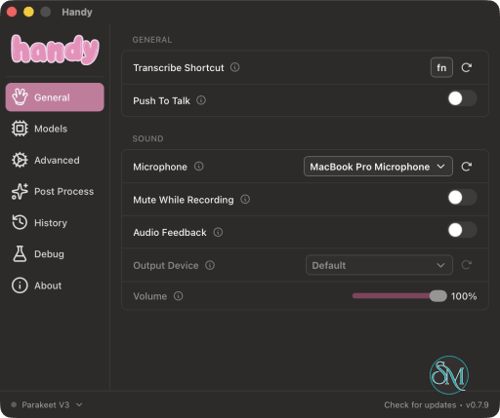



Handy is a free, open-source desktop application for speech-to-text conversion that transforms spoken words into written text, inserting them directly into whatever application you happen to be using. Instead of recording audio and manually transcribing the content via other services, Handy allows you to dictate triggered by a simple keyboard shortcut directly into web browsers, text editors, messaging apps, and any other text input fields.
The application prioritizes simplicity and privacy. Speech recognition is performed locally using artificial intelligence models such as Whisper and Parakeet, this means that, for standard transcription, there is no need to upload your microphone recordings to any cloud-based service.
Developed using Rust and Tauri, Handy is available for Windows, macOS, and Linux. It is highly useful for writers, software developers, students, and anyone who prefers speaking over typing.
Features
Speech-to-Text Anywhere
Handy's primary function is inserting transcribed speech into the currently active text field.
Users can press a configurable keyboard shortcut, speak naturally, and release the key or press the shortcut again to finish recording. Handy processes the audio and types the resulting transcript into the active application.
This makes it convenient for:
Writing emails and documents.
Composing messages and replies.
Entering text into web forms.
Dictating notes and technical documentation.
Writing content in code editors and other desktop applications.
Unlike conventional transcription applications, Handy does not require users to work inside a dedicated editor.
Multiple Speech Recognition Models
Handy supports different speech recognition models to accommodate different languages, hardware configurations, and transcription requirements.
Whisper is suitable for multilingual transcription and supports more than 99 languages. Users can choose different model sizes depending on their hardware and preferred balance between speed and accuracy.
Parakeet V3 is optimized for CPU-based processing and offers automatic language detection. It is particularly useful for users who want relatively fast transcription without relying on a dedicated GPU.
Cohere Transcribe is another available option, designed for high-quality English transcription. It is larger and more demanding, making it better suited to computers with capable graphics hardware.
Model selection is important because transcription speed, accuracy, language support, and resource consumption vary considerably.
Completely Offline Processing
One of Handy's strongest advantages is local speech recognition. Once the required model has been downloaded, ordinary transcription can run without sending microphone audio or transcript content to an external transcription service.
This is useful for people who regularly dictate private messages, business documents, personal notes, or other sensitive content.
Handy does not require an account or cloud subscription for its basic transcription functionality. Network access is used for activities such as downloading models and application updates, along with optional services that users choose to configure.
Voice Activity Detection
Handy uses Silero Voice Activity Detection to identify speech and filter silence from recordings.
This helps reduce unnecessary audio processing and improves the transcription workflow, particularly when users pause naturally while speaking.
Removing silence can also make the application more convenient for longer dictation sessions.
Push-to-Talk and Toggle Modes
The application provides different recording controls.
In push-to-talk mode, users hold the configured shortcut while speaking and release it when finished. Toggle mode starts recording with one shortcut press and stops it with another.
Keyboard shortcuts can be customized to suit individual workflows and avoid conflicts with existing application shortcuts.
AI Post-Processing
Handy also provides an optional post-processing workflow for cleaning up transcribed text.
This can help improve punctuation, formatting, and readability after speech recognition. Depending on the configuration, post-processing can use an external AI provider, so it should not be confused with the fully local transcription workflow.
Users who prioritize privacy can use ordinary local transcription without enabling an external post-processing service.
Custom Dictionary and Transcription Settings
Handy provides settings for controlling transcription behavior, including model selection, language configuration, keyboard shortcuts, and custom vocabulary.
A custom dictionary is particularly useful when dictating technical terms, product names, abbreviations, or words that speech recognition models might otherwise misinterpret.
These options make the application more adaptable to specialized writing and professional workflows.
Cross-Platform Support
Handy supports Windows, macOS, and Linux.
It integrates with the desktop environment through global keyboard shortcuts and system-level text input. Depending on the operating system, it may require microphone and accessibility permissions.
Linux users may need additional utilities for reliable text insertion, depending on whether they use X11 or Wayland.
Download Handy v0.9.8 - Software Mirrors |
|---|
Handy v0.9.8 for WindowsHandy_0.9.8_x64_en-US.msi | 35.1 MB Handy_0.9.8_x64-setup.exe | 18.71 MB |
Handy v0.9.8 for macOS |
Handy v0.9.8 for LinuxHandy_0.9.8_arm64.deb | 35.11 MB Handy_0.9.8_amd64.AppImage | 122.72 MB Handy_0.9.8_aarch64.AppImage | 116.27 MB |
Others Download related to Handy v0.9.8 |
Handy v0.9.8 Source Code |
Handy v0.9.8 Release Notes:bug fixes What's Changed
New Contributors
Full Changelog: v0.9.7...v0.9.8 |
Performance and Compatibility
Handy is built using Rust and Tauri, with a React and TypeScript interface. Audio processing and speech recognition are handled locally through its underlying transcription libraries.
Performance depends primarily on the selected model and available hardware.
Whisper can use GPU acceleration when supported, while Parakeet V3 is designed to work efficiently on CPUs. This makes Handy accessible to users without dedicated graphics cards, although larger models generally require more processing resources.
The application is lightweight compared with full-featured voice assistants because it concentrates on one main task: converting speech into text.
There are some platform-specific limitations worth considering:
Windows: Supports x64 and ARM64 releases, with microphone access and global shortcut support.
macOS: Supports Intel and Apple silicon Macs. Microphone and Accessibility permissions are required for normal operation.
Linux: Supports x64 and ARM64 distributions, but text insertion may require additional utilities such as
xdotool,wtype, ordotool, depending on the desktop environment.
Handy is not intended to replace professional audio transcription suites with advanced speaker identification, subtitle editing, or transcription management. Its strength is quick, direct dictation into existing applications.
System Requirements
Handy's requirements depend on the selected speech recognition model.
Windows: Compatible with supported 64-bit Windows systems, including x64 and ARM64 builds.
macOS: Supports Intel and Apple silicon Macs.
Linux: Supports x64 and ARM64 environments.
Whisper: Can use compatible Intel, AMD, or NVIDIA hardware, with GPU acceleration when available.
Parakeet V3: CPU-only operation is supported, with Intel Skylake or equivalent AMD processors recommended.
Storage: Additional space is required for downloaded speech recognition models.
Permissions: Microphone access is required, along with appropriate permissions or system utilities for text insertion.
For users with limited hardware, Parakeet V3 or a smaller Whisper model is a reasonable starting point.
Pros and Cons
Pros
Completely free and open-source under the MIT License.
Runs speech recognition locally without requiring cloud transcription.
Inserts transcribed text directly into almost any active text field.
Supports Whisper and Parakeet speech recognition models.
Supports multilingual transcription through Whisper.
Parakeet V3 provides CPU-based processing and automatic language detection.
Configurable keyboard shortcuts and push-to-talk controls.
Uses Silero for voice activity detection.
Optional AI post-processing for improving transcripts.
Available for Windows, macOS, and Linux.
Does not require an account or subscription for basic functionality.
Cons
Transcription speed depends on hardware and model selection.
Larger Whisper models require more processing resources.
Linux users may need additional packages for reliable text insertion.
Some optional post-processing features require external AI services.
Does not provide a full transcription editor or advanced audio-management tools.
Requires manual model downloads before offline transcription can begin.
How to Install
Visit the official Handy website.
Download the installer for Windows, macOS, or Linux.
Install the application using the downloaded package.
Launch Handy and grant microphone permissions.
Grant Accessibility permissions on macOS when requested.
Select a speech recognition model, such as Whisper or Parakeet V3.
Wait for the model download to finish.
Configure your preferred keyboard shortcut and recording mode.
Open any application with a text field.
Press the shortcut, speak, and finish recording to insert the transcription.
Linux users should check the installation documentation for additional text-input dependencies and display-server compatibility.
Final Verdict
Handy is an excellent lightweight speech-to-text application for users who want convenient voice typing without depending on cloud transcription services. Its ability to insert text directly into existing applications makes it more practical than traditional transcription tools for everyday writing.
Support for Whisper and Parakeet provides flexibility across different languages and hardware configurations. The local processing approach is another major advantage for privacy-conscious users, while its open-source MIT license makes the project accessible to developers who want to inspect, modify, or extend the software.
Its main limitations are the lack of advanced transcription management features and some platform-specific setup requirements, particularly on Linux. Optional AI post-processing also requires additional configuration and may involve external services.
Handy is highly recommended for anyone looking for free, private, and convenient offline voice typing. Its focused design, cross-platform support, and local AI transcription make it a useful everyday productivity tool.