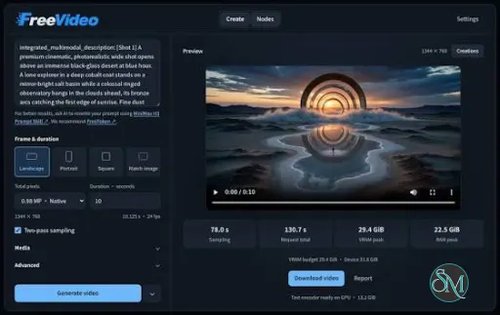


FreeVideo is a free, open-source AI video generation application that enables users to create videos locally, eliminating the need to rely on cloud-based generation services. Developed using MiniMax H3 and Video DeltaNet, the application is designed to run on consumer-grade NVIDIA graphics cards, even on systems with relatively limited video memory.
Rather than requiring users to manually configure complex AI workflows, FreeVideo provides a desktop launcher and a dedicated creative workspace based on ComfyUI. The application automatically handles model setup, hardware detection, memory management, and inference optimization.
In addition to video generation, FreeVideo supports AI image generation, reference-based creation, community LoRAs, batch processing, and timeline editing. Its integration with MCP (Model Context Protocol) is another notable feature, allowing AI coding agents to control video generation through natural language instructions.
Download FreeVideo v0.6.16 - Local AI Video Generator - Software Mirrors |
|---|
FreeVideo v0.6.16 - Local AI Video Generator for Windows |
FreeVideo v0.6.16 - Local AI Video Generator for macOS |
FreeVideo v0.6.16 - Local AI Video Generator for Linux |
FreeVideo v0.6.16 - Local AI Video Generator Source CodeFreeVideo v0.6.16 - Local AI Video Generator Source code (zip) FreeVideo v0.6.16 - Local AI Video Generator Source code (tar.gz) |
FreeVideo v0.6.16 - Local AI Video Generator Release Notes:-- --  Download / 下载
Windows: run FreeVideo.exe, choose an existing ComfyUI folder or install a new one, then click Install & launch. Offline packages are on Quark and ModelScope. macOS: open the DMG and drag FreeVideo.app into Applications. If macOS asks you to confirm the first launch, see the first-open steps. Linux: make the AppImage executable ( What's new0\.6\.16 keeps the command that connects MCP clients the same across updates, adds playback controls to the players in the edit view, Creations and the share page, checks the Visual C\+\+ libraries for each processor type on Windows, and makes several buttons, cards and messages clearer\.
更新内容0\.6\.16 让连接 MCP 客户端的命令在更新后保持不变;剪辑页、作品库和分享页的播放器增加了播放控件;Windows 按处理器类型检查 Visual C\+\+ 运行库;多处按钮、卡片和提示更加清楚。
sha256 |
Features
Local AI Video Generation
FreeVideo uses MiniMax H3 through the OpenVDN VDN-H3 model and Video DeltaNet's hybrid attention architecture.
Its primary purpose is to make local video generation more accessible without requiring expensive workstation GPUs or large amounts of dedicated video memory.
Users can describe a scene using a text prompt and generate a video directly on their computer. The application provides four quality levels:
Light: Prioritizes faster generation and lower resource consumption.
Medium: Provides a balance between generation time and visual quality.
High: Uses more computation to improve output quality.
Max: Prioritizes the highest available generation quality at the cost of longer processing times.
The application also supports preview-first generation. Users can generate a lower-resolution preview before committing to a more expensive final render.
This is particularly useful when experimenting with prompts, compositions, and different generation settings.
Adaptive GPU and Memory Optimization
One of FreeVideo's strongest features is its adaptive execution planner.
Running large video-generation models locally can require substantial GPU memory. FreeVideo addresses this by distributing model weights and intermediate data across GPU memory, system RAM, and disk storage.
Its execution planner automatically evaluates available hardware resources before each generation request.
Key optimization techniques include:
Dynamic model-weight placement across VRAM and system memory.
INT8 and FP8 computation paths depending on GPU architecture.
Asynchronous weight prefetching.
Disk streaming when system memory is insufficient.
Chunked computation to reduce peak memory usage.
Automatic attention-backend selection.
GPU memory monitoring and resource-aware execution.
Automatic retries with lighter memory configurations after out-of-memory errors.
This approach allows FreeVideo to run with as little as 8 GB of VRAM and 16 GB of system RAM on supported NVIDIA hardware.
However, lower memory requirements do not mean generation will be fast. Systems with limited VRAM may rely heavily on CPU memory and disk transfers, increasing rendering time considerably.
Text-to-Video and Reference-Based Generation
FreeVideo supports several input types for controlling generated videos.
Users can start with a text prompt or provide visual and audio references to guide the generation process.
Supported inputs include:
Text descriptions.
First-frame and last-frame images.
Image references.
Video references.
Audio references.
First-frame and last-frame conditioning provides additional control over how a generated video begins and ends. Reference images and videos can help maintain a desired visual composition, character appearance, or scene style.
The application also supports combining multiple references and keyframes in a single generation workflow.
This makes it more flexible than a basic text-to-video interface.
AI Image Generation
FreeVideo also includes local image generation through its H3 Image functionality.
It can generate images at resolutions up to 16 megapixels, with hardware optimization designed to work on supported systems with relatively limited VRAM.
Image generation is integrated into the same creative environment as video generation, allowing users to work with visual references and generated assets without switching between separate applications.
This is useful for creating source images, scene concepts, and reference materials for subsequent video generation.
Timeline Editing
FreeVideo includes an editing workspace for modifying generated videos and combining media.
Users can arrange video segments on a timeline, adjust their sequence, and work with additional audio tracks. The editing interface also provides playback controls, source previews, and options for reusing generation settings.
This is particularly useful when generating longer videos in multiple sections rather than attempting to create an entire sequence in one generation request.
The application also supports videos longer than one minute through its generation and editing workflow.
Although the editing capabilities make FreeVideo more versatile, it should primarily be considered an AI generation tool rather than a full replacement for dedicated professional video editors.
Community LoRA Support
FreeVideo supports community-created LoRA models for customizing MiniMax H3 generation.
LoRAs can influence the visual appearance and style of generated content without requiring users to modify the underlying base model.
This opens up additional possibilities for experimenting with different artistic styles and specialized generation workflows.
Users can incorporate compatible LoRAs through the dedicated workspace or switch to ComfyUI's node interface for more detailed workflow customization.
Compatibility depends on the particular LoRA and its intended model configuration.
ComfyUI Integration
FreeVideo is built around ComfyUI, which provides the underlying workflow environment and model execution infrastructure.
Its dedicated workspace simplifies common operations, while the standard ComfyUI node interface remains available for users who want more control.
The integration provides:
A dedicated FreeVideo creative workspace.
Custom ComfyUI nodes and example workflows.
Two-pass sampling.
Batch generation.
Generation history.
Model and LoRA configuration.
Workflow customization.
Reuse of existing ComfyUI installations and model directories.
Users who already run ComfyUI can install FreeVideo as a custom node instead of setting up a completely separate environment.
This is a significant advantage for existing ComfyUI users who want to add MiniMax H3 video generation to their current workflow.
AI Agent and MCP Integration
FreeVideo includes Model Context Protocol integration, allowing compatible AI assistants to interact with its generation capabilities.
AI agents such as Claude Code and Codex can connect to FreeVideo and automate tasks through its supported interface.
Depending on the connected tools and workflow, agents can help with:
Creating video-generation requests.
Preparing and improving prompts.
Managing reference materials.
Generating images and videos.
Working with existing creations.
Adjusting generation settings.
Automating repetitive production tasks.
This is particularly interesting for users building automated content-generation pipelines.
The MCP connection is designed to work through FreeVideo's local application environment. Users should review the connection instructions and permissions before allowing an AI agent to access their projects or media.
Batch Generation and Creation History
FreeVideo provides batch generation capabilities for producing multiple variations or separate videos without manually starting each task.
Its creation history keeps generated content organized and makes it easier to revisit previous results.
Users can reuse generation settings, compare results, and continue working with existing creations.
The application also supports exporting generated results as shareable images or videos, including information about generation time and the hardware used.
Offline Installation
FreeVideo is designed for local operation and supports offline installation.
Its launcher can install ComfyUI, prepare the runtime environment, and download the required model files. Existing ComfyUI installations and model directories can also be reused to avoid unnecessary downloads.
For offline deployments, users can import the required environment and model packages through the launcher.
The model packages include:
Video generation model.
Text encoder.
Video and audio decoder.
Sampling caches.
An additional audio-reference cache is optional.
This makes FreeVideo suitable for systems with limited or restricted internet connectivity, provided the required installation packages and models have already been obtained.
Performance and Compatibility
FreeVideo is designed primarily for NVIDIA GPUs with CUDA compute capability 8.0 or higher.
Its supported hardware includes GeForce RTX 30, RTX 40, and RTX 50 series graphics cards, as well as compatible professional and workstation GPUs.
The execution planner automatically selects suitable computation formats and attention implementations based on the detected hardware.
For supported GeForce RTX 30, 40, and 50 series GPUs, it uses INT8 computation paths. Newer workstation and datacenter GPUs can use FP8 where supported.
FreeVideo also supports Apple Silicon through a separate preview implementation based on Metal and MLX. This is a distinct execution path from the NVIDIA CUDA implementation.
The main limitation is generation speed. Although FreeVideo can operate with relatively little VRAM, streaming model weights between GPU memory, system RAM, and storage can significantly increase processing time.
Its performance therefore depends on more than GPU specifications. Available system memory, storage speed, generation resolution, video duration, and selected quality level also influence the results.
The application is actively developed, with frequent improvements to its launcher, generation workflow, editing interface, and hardware compatibility.
System Requirements
FreeVideo has relatively specific GPU requirements. Its supported hardware includes:
Windows: Windows 10 or Windows 11 with an NVIDIA RTX 30 series or newer GPU.
Linux: x86-64 system with an NVIDIA RTX 30 series or newer GPU.
macOS: Apple Silicon running macOS 14 or later. This implementation is still a preview.
GPU memory: 8 GB VRAM or more recommended.
System memory: 16 GB RAM recommended.
GPU architecture: NVIDIA CUDA compute capability 8.0 or higher.
Storage: Additional space required for ComfyUI, model weights, runtime dependencies, and generated content.
The following graphics hardware is not supported by the main NVIDIA implementation:
NVIDIA GTX 10 series.
NVIDIA GTX 16 series.
NVIDIA RTX 20 series.
AMD graphics cards.
Intel graphics cards.
The macOS implementation is limited to Apple Silicon and is still under development. It has been tested on an M5 Mac with 24 GB of unified memory.
Pros and Cons
Pros
Free and open-source under the Apache-2.0 license for its code.
Generates AI videos locally using MiniMax H3.
Supports relatively low-memory NVIDIA GPUs.
Adaptive GPU and system-memory management.
Supports INT8 and FP8 computation paths.
Supports text, image, video, and audio references.
First-frame and last-frame conditioning.
Four generation quality levels.
Preview-first generation.
Supports community LoRAs.
Includes local AI image generation up to 16 megapixels.
Provides batch generation and creation history.
Includes a timeline editing workspace.
Integrates with ComfyUI.
Supports MCP integration with AI agents.
Provides Windows, Linux, and Apple Silicon launchers.
Supports offline installation and existing ComfyUI environments.
Cons
Requires an NVIDIA RTX 30 series or newer GPU for the main implementation.
AMD and Intel graphics are not supported.
GTX 10, GTX 16, and RTX 20 series GPUs are unsupported.
Limited VRAM can significantly increase generation time.
Requires substantial storage for models and runtime dependencies.
Apple Silicon support is still a preview.
The macOS application is not yet notarized by Apple.
Linux desktop release packages are currently limited to x86-64.
Not a complete replacement for professional video editing software.
Model weights use a separate license with additional restrictions.
How to Install
Windows
Visit the official FreeVideo GitHub repository.
Open the Releases page and download the Windows launcher.
Run
FreeVideo.exe.Select an existing ComfyUI installation or choose to install a new one.
Add existing model directories if you want to reuse downloaded models.
Click Install & Launch.
Wait for the environment and required models to finish installing.
ComfyUI opens in your browser with the FreeVideo workspace.
Linux
Download the Linux AppImage from the Releases page.
Make it executable:
chmod +x FreeVideo-Linux-x86_64.AppImageRun the application:
./FreeVideo-Linux-x86_64.AppImageFor a terminal or server installation, clone the repository and execute its setup script:
git clone https://github.com/FlashML-org/FreeVideo.git
cd FreeVideo
./setup.sh
After installation, launch FreeVideo using:
freevideoFor remote access on a local network, the server can be started with:
freevideo server --listen 0.0.0.0Make sure the server is protected by appropriate firewall rules and is not exposed directly to an untrusted public network.
macOS
Download the Apple Silicon DMG package.
Open the DMG file.
Drag FreeVideo.app into the Applications folder.
Launch FreeVideo and select an existing ComfyUI installation or create a new one.
Complete the runtime and model installation.
Click Install & Launch.
Because the macOS preview is not notarized, Gatekeeper may block its first launch. Follow the project's official instructions to approve the application without disabling Gatekeeper globally.
Existing ComfyUI Installation
Users who already have ComfyUI can install FreeVideo as a custom node:
cd ComfyUI/custom_nodes
git clone https://github.com/FlashML-org/FreeVideo.git
Restart ComfyUI and open:
Workflow → Browse Templates → FreeVideo → FreeVideo-All-in-One
Complete the remaining setup through FreeVideo Settings.
Final Verdict
FreeVideo is an impressive local AI video-generation project that makes MiniMax H3 more accessible to users with consumer NVIDIA graphics cards. Its adaptive execution planner is its biggest technical advantage, intelligently managing VRAM, system memory, and disk storage to run a demanding video-generation model on hardware that would otherwise struggle with conventional inference workflows.
The combination of text-to-video, reference-based generation, image creation, LoRA support, batch processing, and timeline editing provides a useful creative environment. ComfyUI integration also gives advanced users the flexibility to customize workflows, while MCP support opens the door to automated video production using AI agents.
However, hardware compatibility is its biggest limitation. Users with older NVIDIA GPUs, AMD graphics cards, or Intel GPUs cannot use the main implementation. Even on supported hardware, lower VRAM can result in considerably longer generation times. The separate MiniMax H3 Community License for model weights also means that the Apache-2.0 code license does not automatically make every generated model component unrestricted.
Despite these limitations, FreeVideo is a compelling choice for creators and developers interested in running AI video generation locally. Its hardware optimization, ComfyUI integration, and automation capabilities make it one of the more interesting open-source projects in this category.