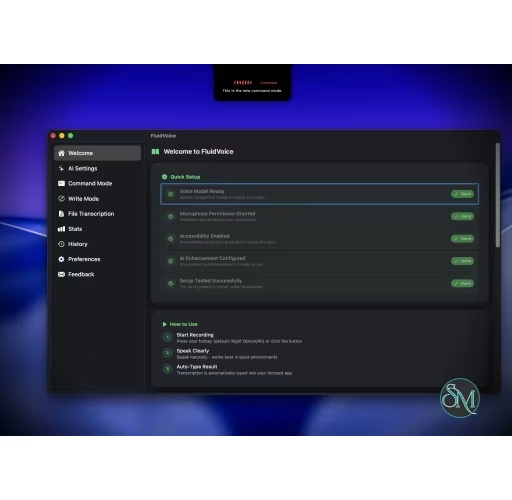



FluidVoice is a free and open source voice-to-text application for macOS that brings fast, local AI-powered dictation to virtually any app. Designed with privacy and performance in mind, it performs speech recognition directly on your Mac, allowing users to dictate text into documents, emails, chat applications, code editors, and more without relying on cloud-based transcription services.
Unlike many dictation tools that require subscriptions or send recordings to remote servers, FluidVoice adopts a local-first approach. It supports multiple on-device speech recognition models, including Parakeet, Whisper, Apple Speech, and Cohere Transcribe, allowing users to choose between speed, language support, and transcription accuracy. Optional AI enhancements can be enabled using providers such as OpenAI or Groq, but these features are entirely optional.
The application integrates seamlessly with macOS, enabling users to dictate directly into nearly any text field using a global keyboard shortcut.
Key Features of FluidVoice
Local AI Speech Recognition
FluidVoice performs transcription locally whenever supported models are used. This improves privacy while reducing latency, making dictation feel nearly instantaneous on Apple Silicon Macs.
Multiple Speech Models
Users can choose from several transcription engines, including Apple Speech, Whisper, NVIDIA Parakeet, and Cohere models. This flexibility allows users to balance speed, hardware requirements, and multilingual support according to their needs.
Universal Dictation
The application works across virtually any macOS application. Whether writing emails, editing documents, chatting in Slack, coding in an IDE, or taking notes, FluidVoice can insert text directly into the active application.
Command Mode
One of the standout additions is Command Mode, which enables voice commands to perform actions on macOS beyond simple dictation. This expands the application into a lightweight voice assistant for productivity workflows.
AI Text Enhancement
Raw dictation can be automatically cleaned up with optional AI processing. Grammar correction, punctuation, rewriting, and formatting are available when compatible AI providers are configured.
Open Source
FluidVoice is fully open source, allowing developers and security researchers to inspect the codebase, contribute improvements, and verify its privacy claims.
Download FluidVoice v1.6.9 - Software Mirrors |
|---|
FluidVoice v1.6.9 for macOS |
FluidVoice v1.6.9 Release Notes:FluidVoice v1.6.9
|
Performance and User Experience
FluidVoice delivers an impressive user experience, especially on Apple Silicon hardware. Dictation starts quickly, transcription appears with minimal delay, and the lightweight interface stays out of the way during everyday work.
The application integrates well with macOS through menu bar controls, global shortcuts, and accessibility features. Users who spend long hours writing documentation, emails, or code can significantly reduce keyboard usage.
Community feedback has also been overwhelmingly positive, with many users praising its performance, privacy, and the fact that it remains completely free and open source.
Pros
Completely free and open source.
Local-first speech recognition for improved privacy.
Extremely fast transcription on Apple Silicon.
Supports multiple AI speech models.
Works across nearly all macOS applications.
Optional AI-powered text enhancement.
Active development with frequent updates.
Cons
Primarily optimized for macOS.
Best performance requires Apple Silicon hardware.
Some advanced AI features require external API keys.
Initial model downloads can consume significant disk space.
Who Should Use FluidVoice?
FluidVoice is ideal for writers, developers, students, journalists, content creators, and professionals who spend significant time typing on a Mac. It is especially valuable for users seeking a private, subscription-free alternative to commercial dictation software.
Those who prioritize offline processing and open source software will find it particularly appealing.
Final Verdict
FluidVoice demonstrates that high-quality voice dictation does not require expensive subscriptions or cloud processing. Its combination of local AI transcription, excellent performance, broad application compatibility, and active open source development makes it one of the strongest dictation solutions available for macOS.
For Mac users looking for a fast, privacy-focused voice-to-text application, FluidVoice is an outstanding choice.