
Dive is an open source command line tool designed to inspect Docker and OCI container images layer by layer. It helps developers understand exactly what is inside an image, identify files added or removed by each layer, and discover wasted space that can be eliminated to make container images smaller.
For developers working regularly with Docker, Dive is one of those tools that can quickly become part of the normal build workflow. Instead of guessing why an image has become hundreds of megabytes larger, you can inspect the image and see where that space is coming from.
Container images are built from layers, but understanding those layers is not always straightforward. A Dockerfile may look relatively small while the resulting image contains unnecessary packages, temporary files, duplicated data, or files that were added in one layer and removed in another.
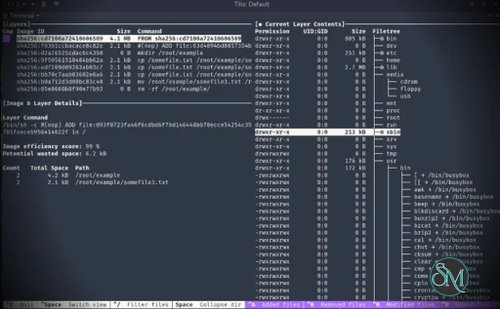
Dive provides an interactive terminal interface for exploring these layers. Selecting a layer shows the resulting filesystem and highlights files that were added, modified, or removed. This makes it much easier to understand how a Docker image was constructed.
The tool can also calculate an experimental image efficiency score and estimate the amount of wasted space in an image. This is particularly useful when optimizing production images or reducing container registry and deployment costs.
Download dive v0.13.1 - Software Mirrors |
|---|
dive v0.13.1 for Windows |
dive v0.13.1 for macOS |
dive v0.13.1 for Linuxdive_0.13.1_linux_ppc64le.tar.gz | 3.52 MB dive_0.13.1_linux_ppc64le.rpm | 3.61 MB dive_0.13.1_linux_ppc64le.deb | 3.52 MB dive_0.13.1_linux_arm64.tar.gz | 3.53 MB dive_0.13.1_linux_arm64.rpm | 3.63 MB dive_0.13.1_linux_arm64.deb | 3.54 MB dive_0.13.1_linux_amd64.tar.gz | 3.84 MB |
Others Download related to dive v0.13.1 |
dive v0.13.1 Source Code |
dive v0.13.1 Release Notes:Bug Fixes -- -- -- -- -- -- -- -- -- -- -- -- -- -- -- -- -- -- -- -- -- -- -- -- -- -- -- -- -- -- -- -- -- -- -- -- -- -- -- -- -- -- -- -- -- --
Additional Changes -- -- -- -- -- -- -- -- -- -- -- -- -- -- -- -- -- -- -- -- -- -- -- -- -- -- -- -- -- -- -- -- -- -- -- -- -- -- -- -- -- -- -- --
|
Key Features of dive
Docker Image Layer Analysis
Dive's main purpose is to let you inspect an image one layer at a time.
The interface shows the image layers on one side and the resulting filesystem on the other. You can move through the layers and see how the filesystem changes as each Dockerfile instruction is applied.
This is considerably more informative than simply looking at the output of docker images or docker history.
Identify Wasted Space
One of Dive's most useful features is its ability to estimate wasted space.
For example, installing a package in one layer and deleting it in a later layer does not necessarily remove the data from the final image history. Dive can help identify this type of waste and other situations where files are duplicated or unnecessarily retained.
This makes it particularly valuable when optimizing large Docker images.
File-Level Changes
Dive does not simply show layer sizes. It provides visibility into which files changed between layers.
Added, modified, removed, and unchanged files can be identified directly through the interface, making it easier to trace where unexpected files or large amounts of data entered an image.
Image Efficiency Score
Dive provides an experimental efficiency metric that estimates how effectively an image uses its layers.
While this score should not be treated as an absolute measurement of image quality, it gives developers a useful indicator when comparing Docker image builds.
Build and Analyze in One Command
Dive can build a Docker image and immediately analyze it using:
dive build -t image-name .
This is particularly convenient during Dockerfile optimization because you do not need to build the image separately and then start another analysis command.
CI Integration
Dive can also be integrated into CI pipelines.
When running with CI=true, the interactive interface is skipped and Dive evaluates the image against configured efficiency and wasted-space thresholds. A build can then pass or fail depending on those rules.
This makes it possible to prevent container images from gradually accumulating unnecessary data as a project grows.
Docker and Podman Support
Dive supports multiple image sources and container engines.
Docker is the default, while Podman is supported on Linux. Dive can also analyze Docker archive files, which is useful when working with images saved to disk instead of directly through a container engine.
Cross-Platform Availability
Dive is available on Linux, macOS, and Windows, with installation options including native packages, Homebrew, Chocolatey, Scoop, Winget, and Docker.
This makes it practical for development teams using different operating systems.
Performance and User Experience
Dive is a terminal user interface rather than a graphical desktop application, but its interactive design makes image analysis surprisingly approachable.
The layer view and filesystem view complement each other well. You can select a suspicious layer, inspect the affected files, and determine what caused the image to grow without manually unpacking the image yourself.
The tool is especially useful during Dockerfile optimization. You can make a change, rebuild the image, run Dive again, and immediately see whether the change actually reduced wasted space.
Its CI functionality is another strong point. Rather than relying entirely on developers to remember to inspect image sizes, projects can establish thresholds for efficiency and wasted data and enforce them automatically.
Dive is not intended to replace security scanners. It focuses on understanding image composition and storage efficiency rather than finding CVEs or other security vulnerabilities. That distinction is important when building a complete container security workflow.
Pros
Free and open source.
Excellent Docker image layer visualization.
Shows file-level changes between layers.
Helps identify wasted image space.
Provides an image efficiency metric.
Supports Docker and Podman.
Can analyze Docker archives.
Build and analysis can be combined.
CI integration with configurable thresholds.
Available on Linux, macOS, and Windows.
Lightweight and focused.
Very useful for Dockerfile optimization.
Cons
Primarily a command line tool.
The efficiency score is an estimate rather than a complete measure of image quality.
Does not replace vulnerability scanners.
Large and complex images can still require some Docker knowledge to interpret.
Some advanced image comparison workflows require other tools.
Who Should Use Dive?
Dive is an excellent tool for developers, DevOps engineers, system administrators, and anyone responsible for building Docker or OCI container images.
It is particularly useful when container images are becoming unnecessarily large, when build performance matters, or when teams want to enforce image efficiency through CI.
For developers already using Docker regularly, Dive is worth adding to the toolkit even if it is only used when investigating unexpectedly large images.
Final Verdict
Dive solves a very specific problem exceptionally well: understanding what is actually inside a container image and where unnecessary space is being used.
Its interactive layer analysis makes Docker images much easier to understand, while its wasted-space estimates provide useful guidance for optimizing Dockerfiles. The ability to integrate those checks into CI makes it even more valuable for production development workflows.
It is not a security scanner, full container management platform, or replacement for Docker itself. Instead, it complements those tools by giving developers visibility into the structure and efficiency of their images.
For anyone serious about keeping Docker images lean and maintainable, Dive is an excellent addition to the development workflow.