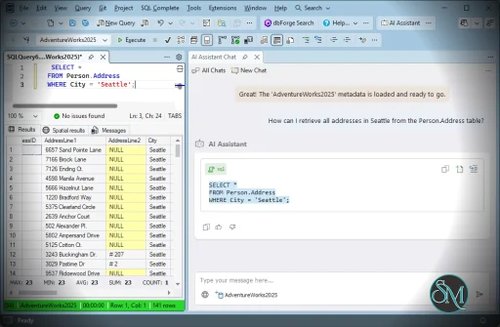




dbForge SQL Tools is a collection of database development and administration utilities from Devart. Designed for Microsoft SQL Server and Azure SQL Database, the suite brings together tools that help developers, database administrators, and DevOps engineers work more efficiently with database code, schemas, data, and deployment workflows.
Rather than relying on a single application for every task, dbForge SQL Tools bundles 15 specialized tools that integrate with SQL Server Management Studio (SSMS), Visual Studio, or run as standalone applications. This approach makes it useful for teams that want to improve their existing database development environment without replacing it entirely.
Features
SQL Coding Assistance
SQL Complete enhances the SQL editing experience with code completion, formatting, code snippets, and other productivity features. These tools can help developers write queries more efficiently and maintain consistent SQL formatting across projects.
For teams working with large SQL scripts or complex stored procedures, coding assistance can reduce repetitive typing and make database code easier to read.
Schema and Data Comparison
The suite includes tools for comparing database schemas and table data between different environments. Developers can identify differences, review changes, and synchronize databases when preparing updates or deployments.
Schema comparison is useful when keeping development, testing, and production databases aligned. Data comparison can help identify differences in table contents and synchronize selected records when appropriate.
These capabilities are particularly valuable when managing multiple database environments or coordinating changes across a development team.
Visual Query Building
The visual Query Builder helps users construct SQL queries through a graphical interface. Instead of writing every part of a query manually, users can work with tables, relationships, and query conditions visually.
This feature can be useful for developers who want to explore data or build complex queries more conveniently. Experienced SQL users can still write queries directly when that is faster.
Data Import and Export
The Data Pump utility supports importing and exporting SQL Server data in common formats. It can simplify moving information between databases and external files for reporting, migration, testing, and data exchange.
Having these operations available through a graphical workflow can reduce the amount of manual scripting required for routine data management tasks.
Test Data Generation
The Data Generator creates sample data for development, testing, and integration environments. Developers can populate tables with realistic-looking test records without manually preparing every entry.
This is useful when validating application behavior, testing database procedures, or preparing datasets for performance and integration tests. Generated data should be reviewed to ensure it matches the application's requirements and does not introduce misleading test results.
Source Control Integration
The Source Control tool connects database objects and supported static data with version control systems. This helps teams track database changes alongside application code and maintain a clearer history of database development.
Version control is particularly important when several developers work on the same database project. It makes changes easier to review and can support more consistent development and release processes.
Database Documentation
The Documenter tool generates database documentation, helping teams understand database structures and maintain technical references.
Automatically generated documentation can be useful for onboarding developers, reviewing database designs, and supporting maintenance. Teams should still verify that the generated documentation reflects their intended design and operational practices.
Database Testing and DevOps Automation
The suite includes database unit testing and DevOps automation capabilities. These features help teams test database logic and automate selected steps in database development and deployment workflows.
Integrating database testing into continuous integration processes can help identify problems before changes reach production. Automation can also reduce repetitive manual work, although deployment pipelines still need appropriate validation, access controls, and rollback procedures.
Monitoring and Administration Utilities
Additional tools include database monitoring, event profiling, object search, index management, and transaction log analysis. These utilities address different operational needs, from investigating database activity to finding objects and examining performance-related issues.
The collection is useful because developers and administrators can select tools for specific tasks instead of relying on one general-purpose interface.
Performance and Compatibility
dbForge SQL Tools is designed to complement existing SQL Server development environments. Its integration with SSMS and Visual Studio allows users to continue working with familiar applications while adding specialized database development features.
The suite supports a range of SQL Server environments, including newer SQL Server releases, Azure SQL Database, and selected related Microsoft database services. Compatibility varies by individual tool and integration, so teams should check the official compatibility documentation before deploying it across their development machines.
The suite is primarily designed for Windows. Some tools can run on Linux and macOS through CrossOver, a compatibility layer for Windows applications, but this is not equivalent to native support for the entire collection.
Performance benefits depend on the tasks being performed, database size, and the tools used. Features such as code completion, comparison, and automation can streamline routine work, but complex database comparisons, large data transfers, and monitoring operations still depend on the underlying system and database workload.
System Requirements
The core dbForge SQL Tools suite is designed for Windows environments. Its documented requirements include:
A supported Windows desktop or Windows Server operating system.
Microsoft .NET Framework 4.7.2 or later.
A compatible version of SQL Server Management Studio or Visual Studio for the integrations being used.
Network access and appropriate database permissions when connecting to remote SQL Server instances.
Some tools have additional requirements, particularly those used for DevOps automation or integration with specific development environments.
Linux and macOS users may be able to run selected components using CrossOver and the required .NET Framework installation, but compatibility should be verified for each component.
Pros and Cons
Pros
Combines 15 database development and administration tools in one suite.
Integrates with familiar SQL Server development environments.
Provides SQL coding assistance and visual query building.
Supports schema and data comparison.
Includes data import, export, and test data generation.
Offers source control integration and database documentation.
Provides database testing and DevOps automation capabilities.
Includes monitoring, event profiling, and other administrative utilities.
Cons
Primarily focused on Microsoft SQL Server and Azure SQL Database rather than multiple database platforms.
The complete installation is relatively large.
Some advanced features require a paid license.
The number of included tools can create a learning curve for new users.
Linux and macOS compatibility relies on a Windows compatibility layer for selected applications rather than full native support.
Integration compatibility should be checked when upgrading SSMS or Visual Studio.
How to Install
Visit the official dbForge SQL Tools download page.
Download the installer for the edition you want to evaluate.
Run the installer and follow the setup wizard.
Choose a full installation or select only the tools your workflow requires.
Complete the installation and open the relevant tool through its supported integration or standalone application.
Connect to your SQL Server environment using the appropriate connection details and permissions.
Configure the tools you plan to use, such as SQL coding assistance, schema comparison, source control, or database testing.
The suite offers a free trial for evaluating its functionality. According to Devart's licensing documentation, most included tools have a 30-day trial, while SQL Complete has a separate 14-day trial. After the trial expires, only selected free tools remain available without a purchased license.
Final Verdict
dbForge SQL Tools is a capable toolkit for SQL Server developers and database administrators who want to improve database development, testing, comparison, documentation, and deployment workflows.
Its main strength is the breadth of its toolset. Instead of using separate utilities for query assistance, schema synchronization, test data generation, source control, and database testing, teams can access these capabilities through one product bundle. Integration with established SQL Server development environments also makes adoption more practical for organizations that already use SSMS or Visual Studio.
The main considerations are its Windows-oriented design, installation size, and licensing requirements for advanced features. Smaller teams that need only one or two functions may find an individual dbForge product more appropriate than the full suite.
For professional SQL Server development teams, dbForge SQL Tools is worth considering as a way to reduce repetitive database work and establish more consistent development practices.